



One of the key challenges molecular modelers often face is identifying efficient and accurate transition pathways—which are crucial for understanding reaction mechanisms or conformational changes in molecular systems. The Parallel Nudged Elastic Band (P-NEB) feature in SAMSON is designed to ease this process, offering a way to find minimum energy paths between known conformations. In this article, we’ll explore how to apply P-NEB to optimize a transition path efficiently and effectively.
What is P-NEB?
P-NEB builds on the Nudged Elastic Band (NEB) method. It works by integrating intermediate conformations along a path and optimizing their energy while maintaining an even spacing between them. The inclusion of parallel execution makes the process scalable and faster, particularly for large systems with numerous conformations.
Step-by-Step: Using P-NEB in SAMSON
Here’s how to leverage the P-NEB functionality effectively for transition path optimization:
1. Load the Input Model
To get started, ensure you have an appropriate structure model available. You can find sample documents directly in SAMSON. For instance, sample systems like a zinc-ligand trajectory or a protein-ligand complex can be downloaded:

2. Start the P-NEB App
Once your input model is ready, launch the P-NEB app in SAMSON by navigating to Home > Apps > All > P-NEB. Use the search bar if needed, and you should find its interface ready to configure.
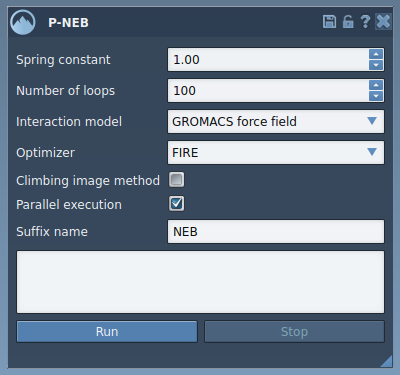
3. Adjust the Settings
Configure the P-NEB parameters. Depending on your system, typical settings are:
- Spring constant: Set to 1.00.
- Number of loops: Enter 100 iterations for sufficient optimization.
- Interaction model: Choose “Universal Force Field” (UFF).
- Optimizer: Select the “FIRE” algorithm for robust path optimization.
- Climbing image method: Uncheck initially; it can be revisited later.
- Parallel execution: Be sure to enable this for faster computation.
- Suffix name: Enter “NEB” to make the resulting path easier to identify.
4. Apply P-NEB to a Path
Select the path node in the Document view, ensure your parameters are set in the app, and click Run. The Universal Force Field (UFF) setup will prompt you to use existing bonds—accept this and proceed.
As the computation runs, you can monitor its progress in the interface and status bar. The optimized path will appear as a new node in the Document view upon completion:

Double-click the path to animate its trajectory and conduct further analysis using the Inspector. Additional options for the path can be accessed through the context menu.
Why Use P-NEB?
The P-NEB tool is a time-saver for systems where pinpointing transition mechanisms is essential. By automating optimizations and leveraging parallel execution, it streamlines the exploration of complex energy landscapes. Moreover, it seamlessly integrates with other tools and extensions like Ligand Path Finder for generating starting paths.
Learn more by visiting the full tutorial here.
Note: SAMSON and all SAMSON Extensions are free for non-commercial use. Visit SAMSON Connect to download the software and get started today.