



For molecular modelers and computational chemists, precise tracking of atom trajectories along defined paths is often crucial during reaction coordinate studies, free energy calculations, or ligand pathway analysis. Such workflows generate detailed movement data that can offer deep insights into molecular behavior. However, extracting and managing these trajectories can sometimes feel daunting. Enter the Export Along Paths extension in SAMSON—a tool designed to make this task seamless and user-friendly.
Why Does This Matter?
Let’s take an example: You have computed a ligand unbinding path, optimized it using advanced techniques like the parallel nudged elastic band (P-NEB) method, and now you want to analyze the free energy landscape. To do so, you need atomic coordinates at different pathway stages, but extracting these data efficiently can be challenging without the right tools. The Export Along Paths extension automates this process, simplifying what could otherwise be a manual and error-prone task.
One Workflow, Multiple Options
This SAMSON extension provides two main options to export atomic trajectories according to your specific needs:
1. Export All Atoms Along a Path
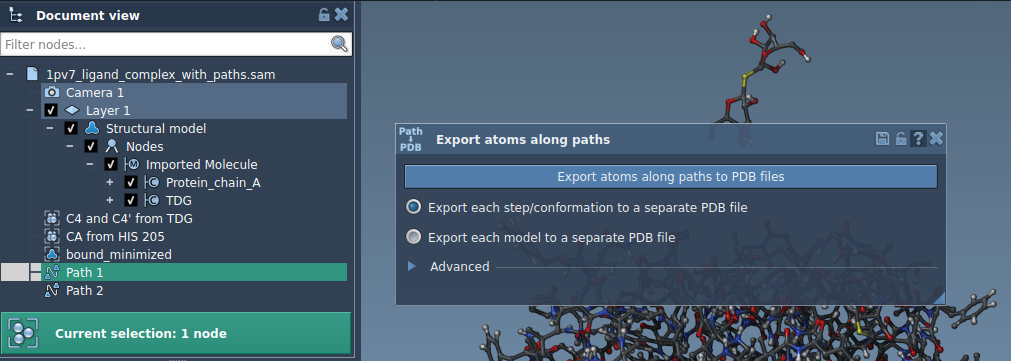
- Start by selecting paths in the Document view.
- Choose an export format—either a single PDB file for all frames or separate PDB files for each frame.
- Click Export atoms along paths to PDB files. You’ll then specify a destination folder and file name prefix.
This approach is particularly useful for capturing the full trajectory of a molecule throughout the pathway at once.
2. Export a Subset of Atoms
Need a more targeted extraction? For example, you might only want to track a ligand along its exit trajectory. The subset export feature makes this straightforward:
- Expand the Advanced panel within the app.
- Select the desired subset of atoms (e.g., the ligand of interest, such as
TDG) in the Document view. - Click Add to define this selection as a model for export.
This process creates a named set of atoms, which you can rename, modify, or even add more subsets to export multiple groups of atoms simultaneously.
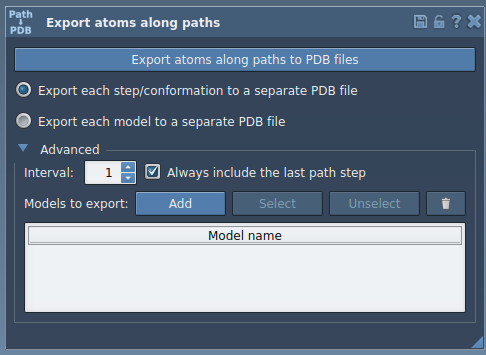
When ready, specify your export preferences, select paths, and click Export atoms along paths to PDB files. This flexibility makes it easy to customize data output for specific use cases like targeted free energy calculations.
Use Cases for Molecular Modeling
The Export Along Paths feature is a versatile tool for various molecular modeling scenarios, such as:
- Generating reaction coordinate files for free energy profiling.
- Exporting ligand entry/exit trajectories for enhanced sampling simulations.
- Tracking specific atomic subsets like ligands, active sites, or protein backbones across binding/unbinding pathways.
- Visualizing intermediate states to better understand structural transformations.
Getting Started
To begin using the Export Along Paths extension, ensure it’s installed via SAMSON Connect. Refer to the original documentation for a step-by-step guide on setup and usage: Export atom trajectories along paths.
SAMSON and all SAMSON Extensions are free for non-commercial use. Get SAMSON today at SAMSON Connect.