



For molecular modelers tackling complex molecular designs, managing and registering monomers is often a challenging bottleneck. But what if you could streamline this step with a versatile and intuitive solution? In this blog post, we explore the powerful capabilities of the Polymer Builder extension in SAMSON for registering custom monomers efficiently and accurately. Whether you are designing synthetic polymers or molecular scaffolds, this feature helps you save time while maintaining precision.
What Is Monomer Registration?
Monomer registration allows modelers to define building blocks (monomers) that form the foundation of polymers they wish to construct. With Polymer Builder, you can define these monomers, assign connection points, and use them repeatedly in custom sequences. Each registered monomer becomes a reusable unit, simplifying complex workflows.
How to Register Monomers
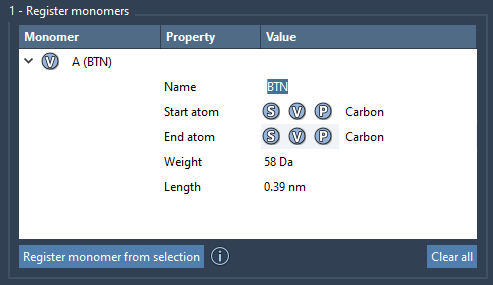
To start, select a molecule (the monomer unit) from your Document view or Viewport in SAMSON. Once selected, click Register monomer from selection. The tool will automatically detect connection points by identifying start and end atoms on opposite ends of the monomer, ensuring chemical logic is preserved.
If you wish to override the default choices for connection atoms, you can:
- S: Set a specific atom from your current selection.
- P: Pick an atom from a list of available atoms in the structure.
- V: Highlight and visualize the structure or selected atoms for a clearer understanding of the configuration.
Each monomer is labeled with a unique identifier like A, B, or C, which allows easy reference in your subsequent sequence designs.
Flexibility and Customization
Polymer Builder additionally supports real-time modification of registered monomers. You can expand existing monomers or even update their start and end atoms directly within the intuitive interface. The tool also provides details such as molecular weight (in Daltons) and the distance between the start and end atoms for every monomer, helping you stay informed about key structural parameters.
For quick clearing of unwanted entries, right-click a monomer in the table and choose Delete monomer. If you want to start afresh, use Clear all to remove all registered monomers in one click.
Best Practices and Additional Notes
The flexibility of Polymer Builder doesn’t stop at monomer registration. For example, if your monomer contains a single residue or structural group, its name will be automatically derived from it. If you create more complex monomer configurations requiring separate structural groups, you can assign custom names during registration. Adjustments to hydrogens and connectivity occur automatically, but improper edits will result in deregistration of the affected monomer, ensuring accuracy.
When designing polymers or assembling sequences, having consistently registered monomers is essential for smooth workflow. This capability alone can save you hours of work and eliminate the frustration of manual setup on other platforms.
Take the Next Step
Whether you are crafting biopolymers, customizing drug-polymer conjugates, or building molecular scaffolds, Polymer Builder’s monomer registration can become one of the most reliable steps in your toolkit. Its ease of use and configurability make it a must-have for any molecular design workflow.
To explore this feature in depth and learn how to assemble polymers or sequences, visit the complete documentation: Polymer Builder Documentation.
Note: SAMSON and all SAMSON Extensions are free for non-commercial use. Get started today by downloading SAMSON at https://www.samson-connect.net.