



Geometry optimization is a crucial step in molecular modeling. It helps ensure stable and physically realistic molecular structures, setting the stage for reliable simulations and accurate molecular design workflows. However, optimizing molecular geometries can be a time-consuming challenge, especially when working with large or complex systems.
One solution to this common pain point is the FIRE Minimizer (Fast Inertial Relaxation Engine) from SAMSON, a powerful tool designed to tackle even large-scale molecular motions efficiently. In this blog post, we’ll explore how this minimizer can simplify your geometry optimization process and highlight valuable tips for its settings and use.
Why Choose the FIRE Minimizer?
Traditional geometry optimization methods, such as the steepest descent algorithm, often struggle with convergence when molecular motions are collective or when potential energy changes are minor. The FIRE algorithm, on the other hand, is faster and more adaptable. Here’s what makes it stand out:
- Speed: The FIRE algorithm is significantly faster for large-scale motions compared to steepest descent.
- Compatibility: Works with any SAMSON interaction model, making it versatile for various simulation needs.
- Simplicity: It’s ideal for pre-simulation cleanup and structural relaxation, saving you time and effort before diving into simulations.
Getting Started: Key Steps
To use the FIRE Minimizer for your molecule setup, follow these steps:
1. Load Your Molecular System
SAMSON supports various file formats, such as PDB and MOL2. To understand more about loading molecules, refer to the Loading Molecules Guide.
2. Add a Simulator
- Navigate to Edit > Add Simulator.
- Choose an interaction model.
- Select the FIRE state updater from the list. This step allows you to integrate the FIRE Minimizer directly into your simulation process.
For further clarity, visit the Simulators Overview.
Fine-Tuning Settings
Customization is essential, and the FIRE Minimizer allows you to adjust settings like:
| Setting | What It Does |
|---|---|
| Step size | Defines the initial integration step for the minimization process. |
| Steps | Specifies how often the geometry updates are presented visually in the viewport, striking a balance between speed and visualization clarity. |
| Fixed | Lets you maintain a constant step size for consistent minimization (optional). |
Want to reset the molecular history manually while minimizing? Simply hit the Reset button to refresh the FIRE history.
Visual Comparisons: FIRE vs. Steepest Descent
The FIRE Minimizer’s efficiency becomes especially apparent when compared to the steepest descent algorithm. For example, the following visualizations showcase their differences:

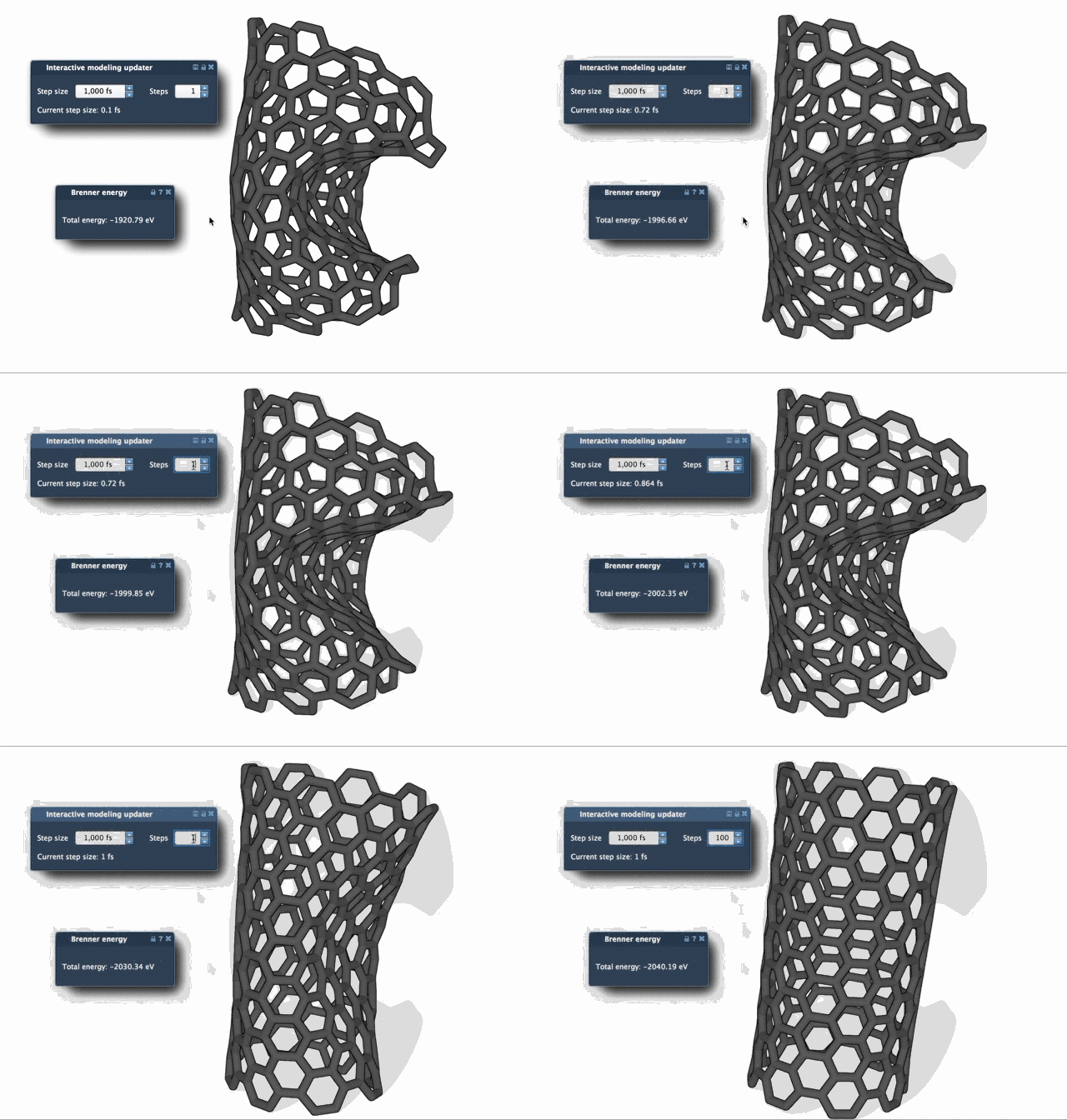
In many cases, the FIRE algorithm will converge faster, particularly when handling subtle energy changes that involve large-scale structural movements.
Seamless Integration into Your Workflow
The FIRE Minimizer is a versatile tool implemented as a SAMSON state updater. This means it can be incorporated into virtually any extension or app within SAMSON. For example, it works seamlessly with tools like the Molecular Restrainer extension, which utilizes FIRE for restrained energy minimization of NMR-derived structures.
Final Thoughts
Whether you’re preparing molecular systems for simulation or optimizing structures for design workflows, the SPEED and ADAPTABILITY of the FIRE Minimizer can save both time and effort. To learn more, visit the official documentation at this link.
SAMSON and all SAMSON Extensions are free for non-commercial use. You can download SAMSON at SAMSON Connect.