



For molecular modelers engaged in understanding reaction-coordinate dynamics, generating accurate Potential of Mean Force (PMF) profiles is a critical yet often challenging part of umbrella sampling workflows. Fortunately, SAMSON’s GROMACS Wizard provides a structured and user-friendly approach for PMF analysis using the Weighted Histogram Analysis Method (WHAM). If generating PMF profiles has ever seemed cumbersome to you, here is an efficient workflow that can simplify it.
Start With the Right Setup
Before diving into the analysis, it’s essential to ensure your inputs are well-prepped for seamless computation. Here’s what you need:
- Complete an umbrella sampling workflow (a prerequisite).
- Organize your input folder to contain properly numbered subfolders, each corresponding to the same molecular system and reaction-coordinate definition.
Ensuring these prerequisites are met will save you time and prevent potential errors during the PMF computation process.
Using the WHAM Analysis Tool in GROMACS Wizard
The process begins in the WHAM Analysis tab of the GROMACS Wizard. The interface is designed to automatically load much of the required information from your project, including reaction-coordinate data, temperature, and time range.
- Choose the project path or utilize the auto-fill (
 ) option if your previous step was an umbrella sampling simulation.
 - Verify that the input folder is correctly organized. Each subfolder should be numbered and represent simulations under identical reaction-coordinate conditions.
- Select the reaction coordinate from the provided list.
- If needed, fine-tune settings such as custom coordinate bounds, time ranges, or energy units.
- Click Compute to run the analysis.
Once initiated, GROMACS Wizard processes your data to generate two essential plots:
- The PMF profile, which paints a detailed picture of the energy landscape.
- A histogram indicating how well the reaction-coordinate space is covered. This can highlight regions requiring additional sampling.
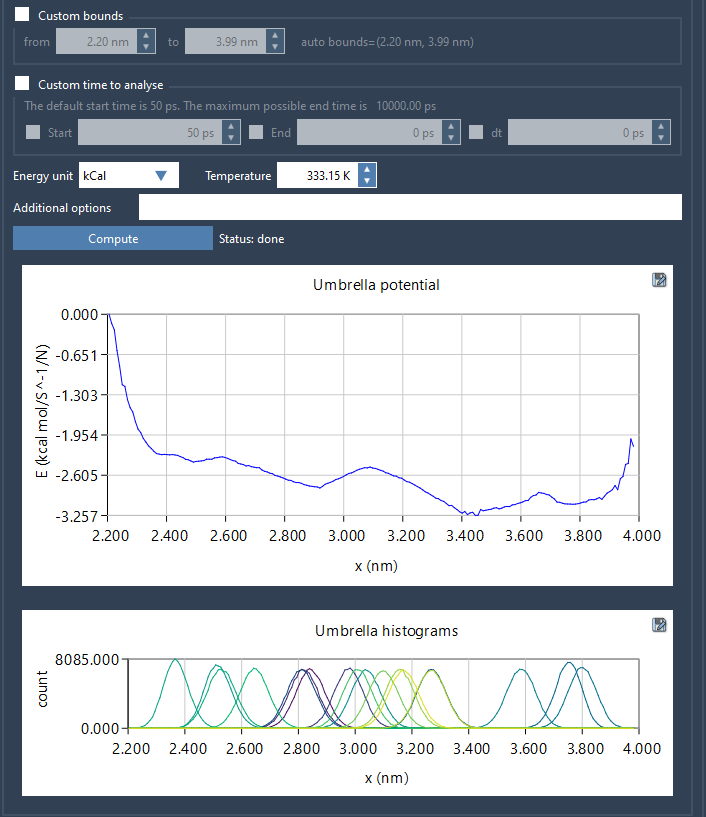
Depending on the size of your trajectory data, the computation might take a few seconds to several minutes.
Interpreting the Results
One of the major benefits of GROMACS Wizard is its intuitive result visualization. The histogram helps identify under-sampled regions in your reaction-coordinate space, directing you toward potential areas for further simulation. Meanwhile, the PMF profile provides the essential insights for thermodynamic and kinetic analyses of your molecular system.
All results, including plots and computed data, are automatically saved in the project’s wham_results subfolder, ensuring that your work is accessible for later review. Additionally, if you decide to switch between reaction coordinates, the tool efficiently reuses pre-computed data, saving time and computational resources.
Conclusion
By leveraging the WHAM Analysis tool within GROMACS Wizard, generating PMF profiles is no longer a tedious task. This streamlined process ensures you spend less time troubleshooting and more time analyzing meaningful results.
To dive deeper into this workflow, visit the complete GROMACS Wizard PMF Analysis documentation.
SAMSON and all SAMSON Extensions are free for non-commercial use. You can get SAMSON at https://www.samson-connect.net.