



For molecular modelers, designing custom polymers often starts with crafting unique monomer units. Whether you’re building complex biomolecules or synthetic chains, having control over individual monomer registration can greatly ease the process. SAMSON’s Polymer Builder simplifies this crucial task, offering intuitive tools to register monomers efficiently.
Why Registering Monomers Matters
When working on a complex polymer project, modelers often deal with highly specific molecular fragments. Registering these fragments as monomers not only lets you reuse them with ease but also allows for precision in polymer assembly. This feature is particularly useful for research into drug-polymer conjugates, molecular scaffolds, and advanced materials.
SAMSON’s approach to registering monomers is practical and user-friendly. Here’s a closer look at how it works.
Step-by-Step Guide to Registering Monomers
- Selection: Use the selection tools to isolate a desired molecule (the monomer unit) in the Document view or Viewport within SAMSON.
- Registration: Click on Register monomer from selection. The Polymer Builder automatically identifies start and end atoms at opposite ends of the fragment, setting up connection points for later polymer assembly.
- Customization: If the automatically selected start or end atoms need adjustment, you can refine them using:
- S: Set the atom from the current selection (first, select a single atom).
- P: Pick an atom from a list of all structure atoms.
- V: Highlight specific atoms or structures for visual clarity.
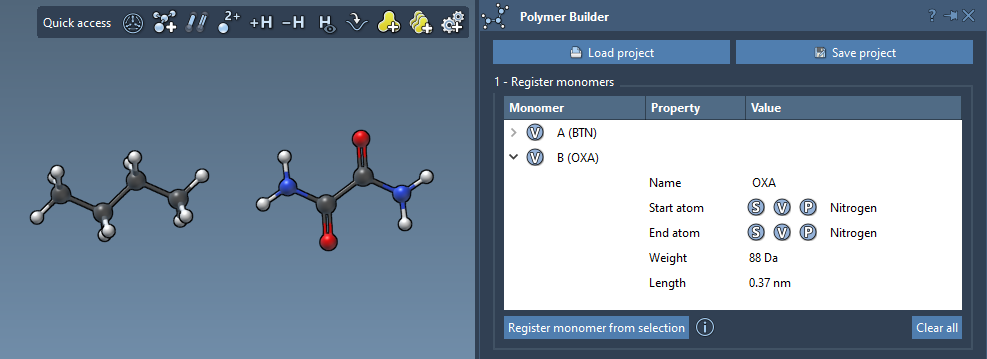
Each registered monomer is automatically assigned a unique identifier (like A, B, C), and the registration table displays details such as molecular weight (in Daltons) and distance between start and end atoms. These metrics are crucial for assembling precise polymer structures.
Making Adjustments
Need to refine already registered monomers? Simply use the editable registration table. You can:
- Edit entries to tweak their setup or expand existing monomer entries.
- Remove monomers via a right-click and Delete monomer option in the context menu, or clear the entire table with Clear all.
Note:
If you modify the structure of a registered monomer in SAMSON (e.g., by adding or removing atoms), the monomer will automatically be deregistered, ensuring the integrity of your design.
Insights in Action
For visual learners, SAMSON provides illustrative tables and convenient features to monitor your work. Registered monomer tables display molecular parameters, ensuring modelers always have a clear picture of their design progress. Additionally, by registering accurately defined monomers, you set the foundation for efficient polymer sequence assembly.
Want to Learn More?
To deepen your understanding of monomer registration and other advanced workflows with Polymer Builder, visit the official documentation page.
Note: SAMSON and all SAMSON Extensions are free for non-commercial use. Get SAMSON at https://www.samson-connect.net.