



One of the challenges in molecular modeling and materials design is creating complex, custom polymers with repeating sequence patterns. Whether you’re constructing synthetic polymers for material property predictions or drug-polymer conjugates, manually assembling these structures can be tedious and error-prone. Fortunately, SAMSON’s Polymer Builder offers a solution through its sequence registration feature, enabling you to define and utilize repeating patterns of monomers effortlessly.
Why Sequence Registration Matters
When building polymers, researchers often need to work with specific, repeating patterns of monomers. Without a tool to manage these sequences, you risk spending valuable time assembling polymers manually or running into structural inconsistencies. Sequence registration in SAMSON Polymer Builder allows you to:
- Define custom patterns of monomers once, and reuse them with ease.
- Control bond types between monomers (single, double, triple).
- Estimate molecular weights and lengths of sequences before polymerization.
- Streamline workflows for creating complex architectures like block copolymers and molecular brushes.
How to Work with Sequences in Polymer Builder
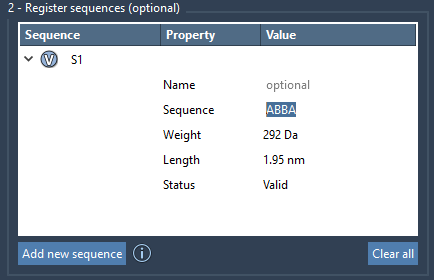
To register a new sequence in SAMSON polymer builder:
- Click Add new sequence in the sequence registration table.
- Enter a sequence using IDs of the monomers that you have already registered. For instance, if you’ve defined monomers
AandB, you can inputABBAor any other custom combination.
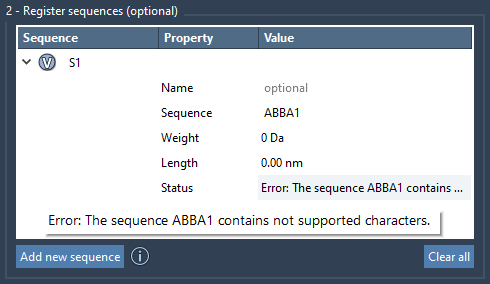
The table automatically validates your input, so if there are any issues such as incorrect monomer IDs, the Status column will highlight the error. When the sequence is valid, it’s marked as Valid. Each sequence is assigned a unique identifier (e.g., S1, S2) for easy reference in future operations, such as polymer generation.
Bond Type Customization
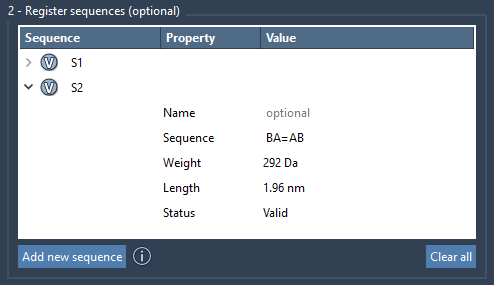
You can go a step further by specifying bond types between monomers in a sequence. By default, monomers are connected using single bonds. However:
- Use
=to define a double bond between two monomers (e.g.,A=B). - Use
#to define a triple bond (e.g.,A#B).
These options grant you precise control, essential for modeling specific chemical and material properties.
Practical Benefits
Defining sequences not only enhances accuracy but also accelerates your workflow. Once registered, sequences can be combined or repeated in complex expressions during polymer generation. For example, you can input something like:
2*S1 + 3*S2 + AB=B
to create highly customized polymers. Predicted molecular weight, bond type distribution, and the final polymer length are calculated automatically, reducing guesswork and iteration time.
Conclusion
Sequence registration in SAMSON Polymer Builder is a game-changer for anyone working on custom polymer design. It simplifies the process, minimizes errors, and gives you flexibility to focus on your research goals. By leveraging this functionality, you can quickly prototype polymers for simulation, material development, or any other specialized application.
For a detailed step-by-step guide, head over to the Polymer Builder documentation page.
Note: SAMSON and all SAMSON Extensions are free for non-commercial use. Start your molecular design journey by downloading SAMSON from SAMSON Connect.