



Modeling smooth and realistic transitions between protein structures is a critical step in molecular modeling workflows, particularly when aiming to understand conformational changes or set up complex simulations. This is where the ARAP (As-Rigid-As-Possible) Interpolation in SAMSON can simplify your workflow, saving you significant time and effort. In this post, we’ll guide you through a self-contained approach to generate continuous structural transitions between protein conformations, offering a practical solution to an important challenge in molecular design.
Why ARAP Interpolation?
Simulating or analyzing conformational changes often requires intermediate structures between two distinct protein states. Creating these transitions manually can not only be tedious but also prone to inaccuracies. ARAP Interpolation automates this process, producing biologically realistic pathways between two protein conformations in seconds. Additionally, it allows alignment, visualization, and export options that cater to diverse molecular modeling needs. This can be particularly useful for workflows involving free energy simulations, conformational analyses, or even dimensional reduction of structural ensembles.
How Does It Work?
To generate a transition path, the ARAP Interpolation extension requires two well-prepared protein conformations. Here’s a simplified guide to get started:
- Prepare both structures by removing non-connected entities like water, ligands, and ions, ensuring a clean protein backbone.
- Create conformations representing your “start” and “goal” states. These are the endpoints for ARAP’s interpolation algorithm.
- Define how ARAP should match atoms (e.g., excluding hydrogens or using alpha-carbons) and construct connectivity edges through bonds or residue segments.
Once set up, the application computes a smooth transition path in seconds, reflecting the defined parameters.
Key Features of ARAP in SAMSON
- Quick Computation: Generate intermediate conformations almost instantly.
- Visual Pathlines: Scrub through pathways using the included slider tool to inspect transitions interactively.
- Edge Construction: Tailor connectivity using logical rules, such as linking alpha-carbons over missing residues for better continuity.
- Export Options: Save the resulting path in PDB format for simulations or export trajectories for further analyses.
A Practical Example
Imagine comparing open and closed states of the SARS-CoV-2 spike protein to understand its conformational dynamics. With ARAP, you can generate an interpolated motion path between the two states, setting the stage for umbrella sampling simulations or pathway optimization. This not only saves you time but ensures a biologically meaningful representation of transitional states.
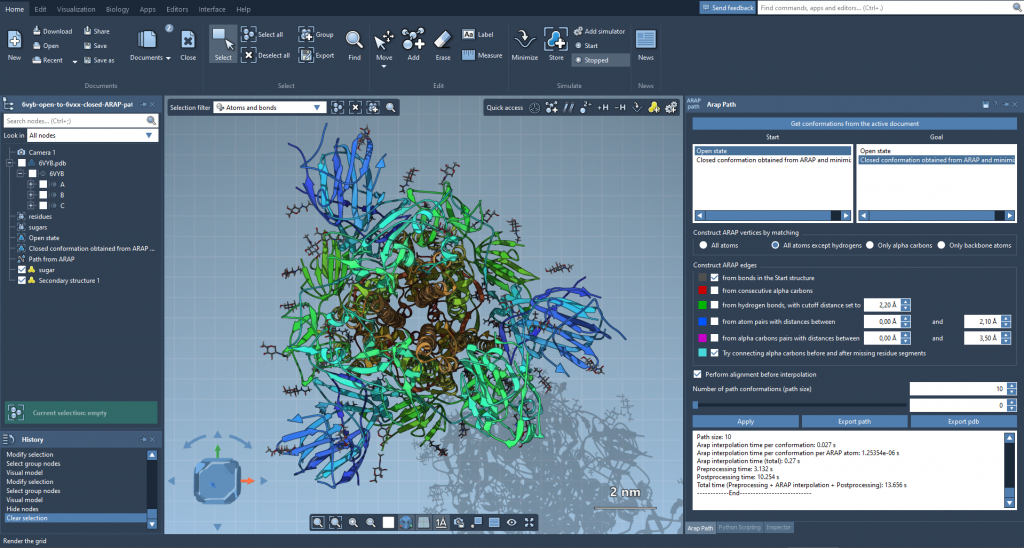
Here’s how such a pathway could look. ARAP’s advanced handling of biological geometry ensures realistic transitions aligned with protein structures’ physical properties.
Analyze and Share Results
Once your transition path is calculated, you can:
- Explore motion between conformations using the slider tool.
- Visualize the detailed connectivity modeled by ARAP edges, including custom edge construction logic.
- Export the path for integration into workflows involving umbrella sampling, steered MD, or P-NEB refinement.
Such versatility makes ARAP an essential tool for molecular modelers aiming to balance speed, accuracy, and insight.
Wrapping Up
To learn more about leveraging ARAP Interpolation for your molecular modeling projects, visit the full documentation page. This guide will walk you through every step, from setup to advanced configurations.
Note: SAMSON and all SAMSON Extensions are free for non-commercial use. You can download SAMSON at https://www.samson-connect.net.