



Handling complex molecular selections is a routine — and often tedious — task for molecular modelers. Whether you’re toggling between ligands, protein domains, cofactors, or solvent molecules, it’s easy to lose precious time reselecting the same groups over and over. That’s where Quick Groups in SAMSON step in to save the day.
Quick Groups offer a fast and temporary way to save selections such as atoms, residues, or molecules. These groups are ideal for:
- Switching focus between different structural elements during analysis
- Preparing systems for simulations
- Visualizing different components independently
- Educational walkthroughs and demonstrations
They live in the lower section of the Document view and can be selected or reassigned using keyboard shortcuts 1 through 0. For instance, pressing 1 will instantly reselect what you stored in Quick Group 1. Pressing 1 twice in a row will even zoom into that selection, streamlining molecular navigation with minimal effort.
How to Set Up Quick Groups
Creating Quick Groups in SAMSON is simple:
- Select a region you’re working on (e.g., a ligand or set of residues)
- Assign it:
- Using your mouse: Hover over a Quick Group slot and press Shift + click.
- Using your keyboard: Press Shift + a number (e.g., Shift + 2).
You can store up to 10 Quick Groups. These assignments are temporary and can be redefined at any moment — perfect for trial-and-error workflows or focused tasks.
Real-World Example
Imagine analyzing a protein-ligand complex:
- You assign the ligand to Quick Group 1
- The binding site residues to Quick Group 2
- Nearby water molecules to Quick Group 3
Switching between these regions becomes as fast as pressing 1, 2, or 3. Need to zoom in? Just double-press the same key (e.g., 2 + 2) to zoom into your second selection.
This feature is a small but meaningful addition for those who spend long hours analyzing, visualizing, and preparing molecular systems. It reduces friction in repetitive tasks and encourages exploration of large systems without “selection fatigue.”
Visual Aid
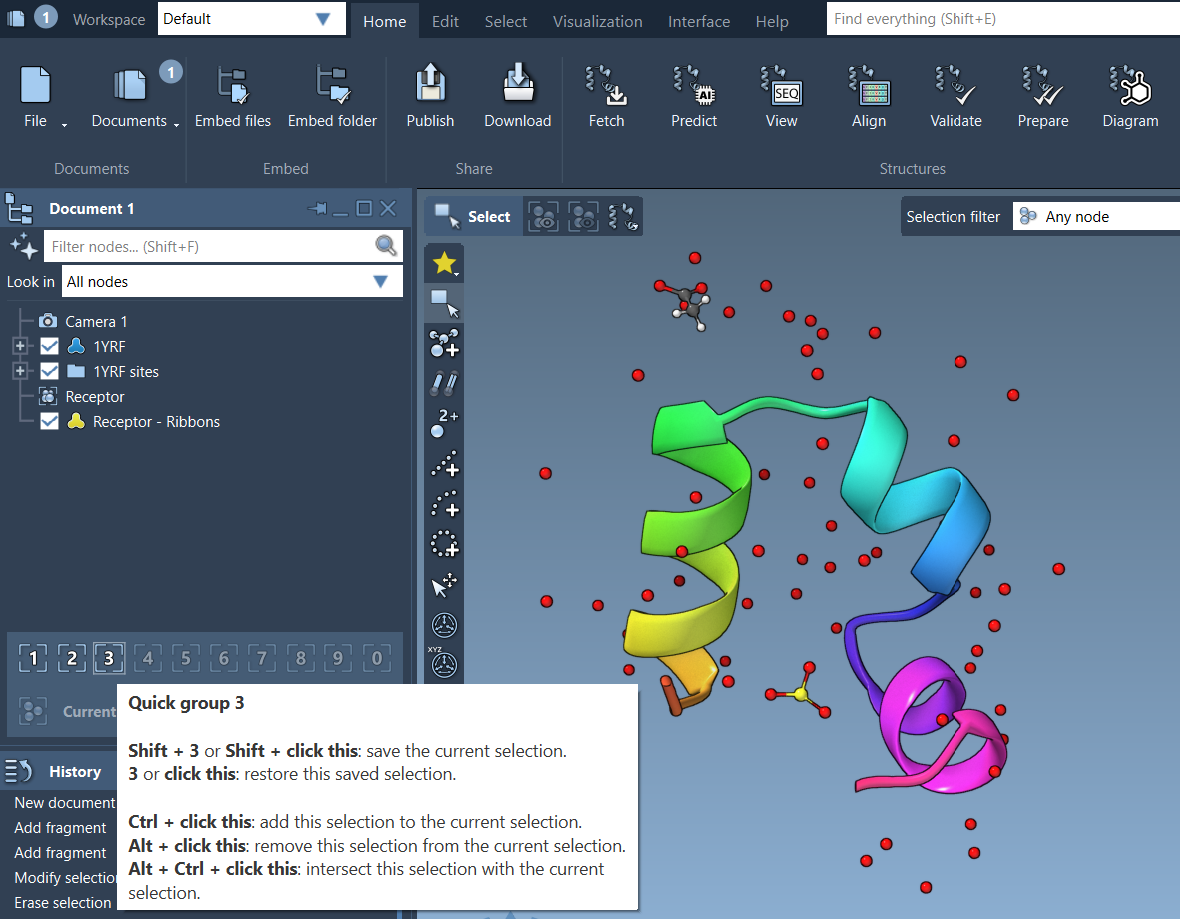
Learn more about Quick Groups and other SAMSON selection tools in the original documentation here: https://documentation.samson-connect.net/users/latest/selecting/
SAMSON and all SAMSON Extensions are free for non-commercial use. You can get SAMSON at https://www.samson-connect.net.