



In a molecular model with many atoms and nested structural groups, selecting a useful neighborhood by clicking can become tedious—and a distance search can return more than you intended. The key is to describe both what kind of node you want and where it is. SAMSON’s Node Specification Language (NSL) lets you combine those conditions in one expression.
For example, suppose you want atoms near a named residue, but not the atoms that belong to that residue itself. A distance-only search can include the target group or even higher-level nodes in the document hierarchy. Add an atom-type condition and explicitly exclude the target:
node.type atom within 5A of "GLN 2" out of "GLN 2"
This reads as: find atom nodes within 5 angstroms of the node named “GLN 2,” then remove nodes that are part of “GLN 2.” In compact form, the same query is n.t a w 5A of "GLN 2" out of "GLN 2". The full form can be easier to understand while you are building a query; the short form is handy once you know the syntax.

Build the query in two steps
1. Set the result type. The prefix node.type atom limits results to atoms. Without that restriction, NSL can match different kinds of nodes, including groups and other document elements. This matters especially when using operators such as not, within, or beyond: a broad condition can match a parent node because something inside it meets the condition. If you need atoms, say so explicitly.
2. Add the spatial condition—and check what it includes. within 5A of finds nodes within five angstroms of the named target. The distance can also be written in other supported length units, such as 0.5nm. The target itself may satisfy a “within” test, so out of "GLN 2" removes nodes belonging to it. This is useful when you want the surrounding atoms rather than the target’s own atoms.
For a different structure, replace "GLN 2" with the name of the node you want to use as the reference. Quotes are important for names containing spaces. A quoted string without wildcards matches a full name exactly; patterns such as "ALA*" use glob matching to find names beginning with ALA.
Run it where it fits your workflow
Use Select > Find when you want a search-driven selection. In the search box, press Tab for context-sensitive completion. For instance, start typing an opening quote and part of a node name to browse matching names in the active document. This can help avoid guessing how a structure or residue is named.
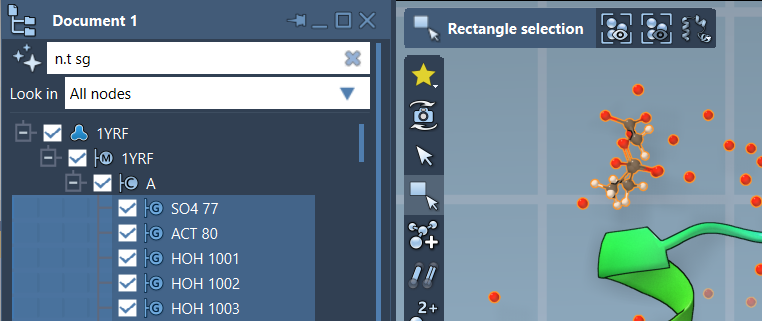
If you prefer to inspect the document hierarchy as you work, enter an expression in the Document view’s filter box. The filter narrows the displayed nodes; press Enter to select the matching results. For example, n.t sg filters for structural groups. The same NSL idea works in both places, but the interface suits a different task: Find for making a selection, Document view for filtering while looking through the hierarchy.
A quick check before you trust the result
- Ask whether you want atoms, residues, or another node type. Add a type condition such as
n.t awhen the result must contain atoms. - Check whether the reference group itself should be included. If not, use an exclusion such as
out of "GLN 2". - Use quotes for names, especially names containing spaces, and use Tab completion to confirm the name in your document.
- Try the expression in the Document view when you want to inspect which hierarchy nodes match before selecting.
This pattern turns a vague task—“show me the atoms around this part”—into a query you can read, adjust, and reuse: define the result type, set a distance, and explicitly handle the reference group. For more on NSL syntax and operators, see the Node Specification Language documentation.
Note: SAMSON and all SAMSON Extensions are free for non-commercial use. Get SAMSON.