



A protein–ligand structure can look ready for simulation and still fail at a less visible step: the ligand in the structure must agree with the ligand described by its topology. Atom names, hydrogens, residue naming, and force-field assumptions all matter. If these pieces do not line up, preparing the system can become a frustrating search for a mismatch.
This workflow is for non-covalently linked protein–ligand complexes. Covalent complexes need additional treatment for the linking bond, so the steps below are not sufficient for those systems.
Start with the force field, not the file format
If the ligand is not already a standard residue in the force field you plan to use, it needs parameters. Choose a parametrization tool or server that matches that force field: for example, Antechamber for AMBER, ATB for GROMOS96 54A7, CGenFF for CHARMM, or LigParGen for OPLS-AA. Check the chosen service’s accepted input formats before exporting the ligand.
This choice is worth making early. A ligand topology generated for one force field is not automatically interchangeable with a different force field. Some services may also supply a custom force field that must be added to GROMACS Wizard.
Prepare the ligand before sending it away
Many parametrization tools require the ligand to have its hydrogens properly set. In SAMSON, hydrogens can be added using Edit > Add hydrogens. For ligands in the Chemical Component Dictionary (CCD), SAMSON can use the hydrogen names described there. For other ligands, hydrogens are added based on valences, so check that aromatic rings and charges are already specified. If a non-standard ligand file contains this information—for example, a .mol2 file—use it when adding hydrogens.
If the ligand is embedded in a protein complex, select it in the Document view and use Home > File > Save selection as… to make a separate file in a format accepted by the parametrization workflow. If the service needs a different format, SAMSON can load and save files to convert them.
Compare the returned structure with the original
After parametrization, keep the include topology file (.itp) and, if provided, the updated structure file. Compare the updated ligand with the ligand in your complex: did atom names change, were hydrogens added, or were other structural details modified? This check helps you decide whether the original complex can be used as-is or whether the ligand needs to be updated.
If the ligand structure has not changed, you can keep the existing complex. If it has changed, place the updated ligand at the old ligand’s position and then remove the old ligand. If you are adding a ligand to a protein for the first time, it can be positioned using SAMSON’s move tools, docked with AutoDock Vina Extended, or appended to the protein structure file. When appending, ensure the structures do not overlap and use separate chains or consecutive sequence numbering.
Before moving on, verify the ligand name. The ligand name in the structure file must match the name used in the topology data. This small consistency check can prevent a confusing setup problem later.
Give GROMACS Wizard the topology it needs
Open GROMACS Wizard from Home > Apps > Biology > GROMACS Wizard, select the protein–ligand system in the Document view, and use Set system in the Prepare tab.

In the Choose model section, click Edit next to include topology files (itp) and browse to the ligand’s .itp file. If the parametrization service provides a custom force field that is not available by default, download it and add it with the force-field Add button. The added force field is stored by GROMACS Wizard for future use.
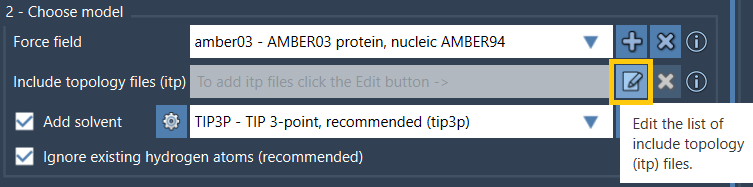
Then complete the remaining preparation choices—such as solvent model, periodic box, and ions—following the general preparation workflow, and click Prepare. Review any warnings and use the Output button to inspect the log if you need to check what happened. The prepared system is saved in the results folder; loading it into SAMSON is optional, but can help you inspect the result before proceeding to energy minimization and equilibration.
A practical handoff checklist: the ligand has suitable hydrogens; the parametrization matches the intended force field; the returned topology and ligand structure are consistent; the ligand name matches in structure and topology; and any required custom force field has been added.
For the full tutorial and links to the subsequent simulation steps, see GROMACS Wizard — Protein-ligand systems.
Note: SAMSON and all SAMSON Extensions are free for non-commercial use. Get SAMSON.