



Designing custom polymers often starts with building blocks: monomers. But if you’ve ever spent hours manually assembling repeat units just to test a new polymer idea, you’re not alone. Many molecular modelers face the tedious process of building polymers atom by atom or fragment by fragment—especially when their research involves unconventional monomer units or dynamic polymer architectures like drug-polymer conjugates, electronic polymers, or copolymers.
The Polymer Builder extension in SAMSON provides a workflow that simplifies this process with a feature-rich approach to registering monomers. By allowing you to define, label, and modify monomer units directly in the UI, this tool offers flexibility and precision—without the time sink.
Registering a New Monomer: One-click Simplicity
To get started:
- Select a molecular structure within SAMSON’s Document view or Viewport.
- Click “Register monomer from selection” in Polymer Builder.
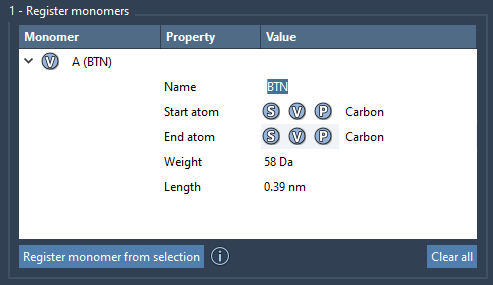
SAMSON automatically identifies start and end atoms—used as connection points. You can override these manually using:
- S: Set the selected atom as start/end point.
- P: Pick from a list of atoms.
- V: Visually verify the selected atoms.
Each registered monomer is given a unique single-letter code (like A, B, etc.), making it easy to reference them later when constructing polymer sequences.
Fine Control and Real-Time Feedback
Every monomer entry includes key structural data:
- Molecular weight (in Daltons)
- Distance between start and end atoms
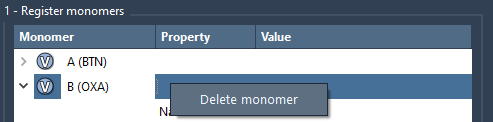
Need to delete a monomer? Just right-click it and select “Delete monomer”. You can also clear the entire table to start fresh.
Why Register Individual Monomers?
Once registered, monomers can be reused across multiple sequences and projects. This makes it easy to:
- Switch between different polymer architectures by changing sequence definitions
- Ensure consistency in structure and atom connectivity
- Rapidly prototype ideas for novel polymers and copolymer arrangements
Additionally, SAMSON helps ensure that added or deleted atoms automatically mark monomers as changed—so you always know whether a unit is up-to-date.
Note
If any atom in a registered monomer is modified, SAMSON deregisters it automatically, so your sequence remains structurally valid.
With these tools at your disposal, you can go from tiny fragments to structured repeat units in under a minute—then focus on what’s really important: building, simulating, and testing polymer behavior.
Want to dive deeper into the full Polymer Builder workflow, including sequence registration and polymer generation? Learn more in the original documentation here.
SAMSON and all SAMSON Extensions are free for non-commercial use. You can get SAMSON at https://www.samson-connect.net.