



When working on molecular simulations, especially in preparation for dynamics or quantum calculations, geometry optimization is a common early step. But depending on the size and complexity of the system, traditional minimization algorithms like steepest descent can be painfully slow — particularly when molecules require large-scale structural adjustments to reach an energy minimum.
This is where the FIRE Minimizer (Fast Inertial Relaxation Engine) in SAMSON can save time and improve stability. It’s designed to efficiently optimize molecular geometries, especially when energy gradients are low but structural changes are still significant — a common and frustrating bottleneck in many modeling workflows.
What Makes FIRE Different?
Unlike steepest descent, which takes very cautious steps and can stall during shallow energy changes, FIRE uses momentum-based tactics to progress more decisively through flat potential energy regions. This allows it to relax molecular structures with fewer steps and reach realistic conformations faster.
In fact, FIRE is especially effective when dealing with collective motions or pre-simulation ‘cleanups’ — such as when you download a PDB file that looks generally correct but still contains unreasonable bond lengths, clashes, or distortion.
Visual Comparison: FIRE vs. Steepest Descent
The difference in performance is best illustrated visually. Below are two animations showing the structural relaxation of a molecular system — on the left using FIRE, and on the right using steepest descent:

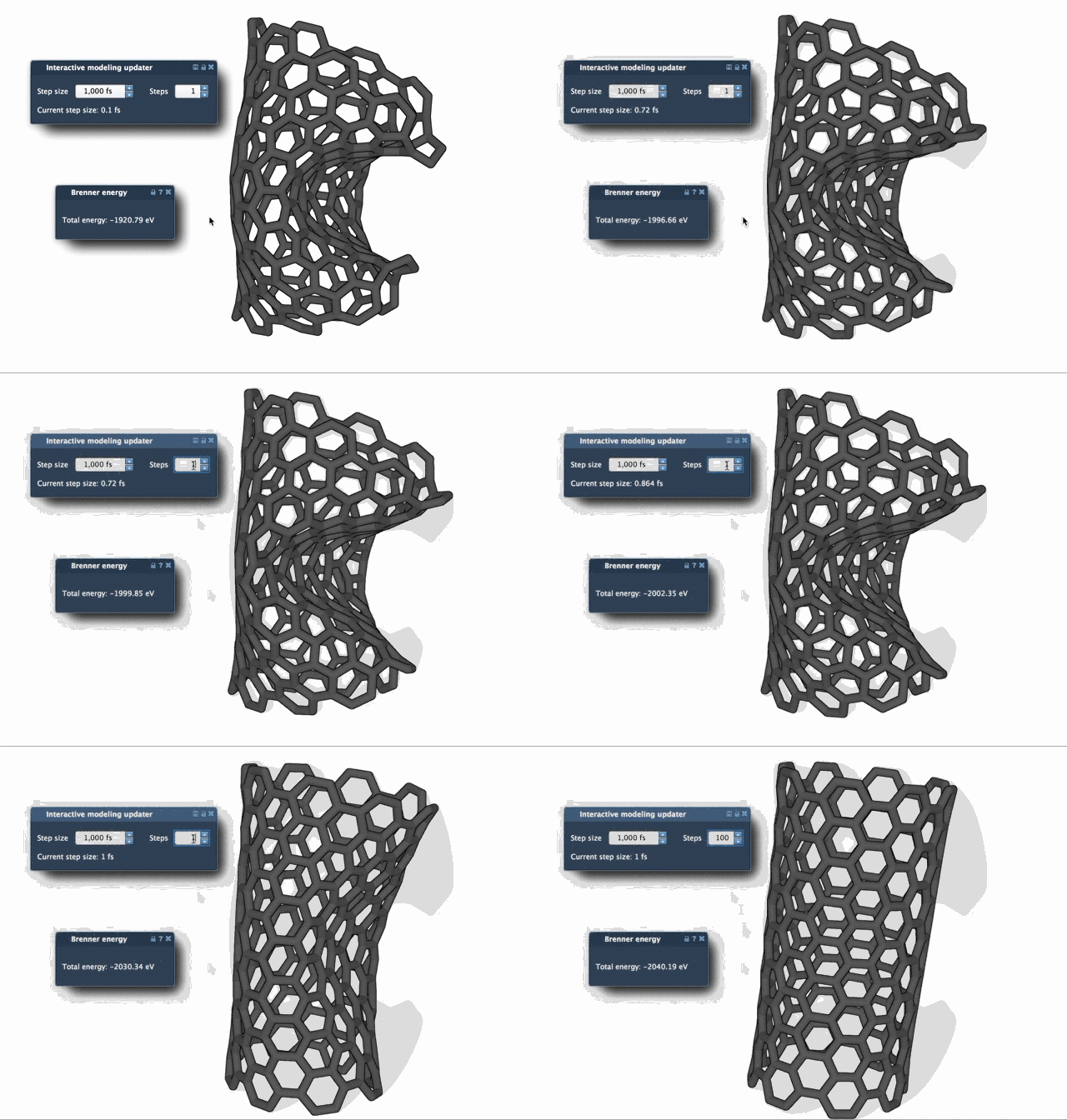
Notice how FIRE quickly brings the structure to a stable conformation with large, smooth motions, while steepest descent progresses with smaller incremental changes. If you’re working with large biomolecular systems or structures derived from experimental data (like NMR), these time savings can add up quickly.
How To Use It in SAMSON
You can start using the FIRE Minimizer in SAMSON in just a few steps:
- Log into SAMSON Connect.
- Go to the FIRE Minimizer Extension page and click Add.
- Restart SAMSON to activate the Extension.
Then you can integrate FIRE into any simulation workflow by selecting it as a State Updater in your simulator. There’s no need to change your interaction model or simulation engine — just plug it in where it fits your pipeline.
To see the clearest progress during relaxation (especially for larger systems), consider increasing the Steps parameter, which controls how often the viewport updates. This results in fewer, but more noticeable, updates that make the geometry evolution easier to observe.
Good to Know
FIRE isn’t just a standalone tool — it’s also used inside other SAMSON Extensions, such as the Molecular Restrainer for energy minimization of NMR-derived structures. Because it’s embedded into the simulation infrastructure of SAMSON, it easily integrates with your modeling workflow.
So, if you’ve ever waited too long for your structure to relax—or if you’re looking for a more stable and efficient alternative—FIRE might be the better choice for your next project.
You can learn more here.
SAMSON and all SAMSON Extensions are free for non-commercial use. You can get SAMSON at www.samson-connect.net.