



When preparing molecules for a simulation or cleaning up a structure after import, every molecular modeler eventually runs into the challenge of geometry optimization. Some methods are effective but slow, especially when dealing with systems undergoing large-scale collective motions. That’s where the FIRE Minimizer comes in.
The Fast Inertial Relaxation Engine (FIRE) method, available as a SAMSON extension, provides an efficient way to relax molecular structures. Unlike traditional minimization algorithms like steepest descent, FIRE converges more quickly in many practical situations, offering a smoother modeling workflow.
Why Geometry Optimization Is a Bottleneck
When working with molecular structures from PDB files or generated via modeling tools, you often start with atoms slightly out of place. Before running simulations or calculating properties, it’s important to minimize the potential energy of the system. Poor initial geometries can lead to noisy results or outright simulation crashes.
However, traditional methods like steepest descent can be painfully slow in optimizing such structures—especially when the overall shape is evolving significantly while local forces remain small.
FIRE in a Nutshell
FIRE combines aspects of molecular dynamics and gradient descent, updating velocities and positions based on both directional gradients and inertia. This hybrid strategy allows the system to “relax” faster, reaching a stable state more efficiently.
Comparing FIRE and Steepest Descent
Take a look at how FIRE and steepest descent perform side-by-side:

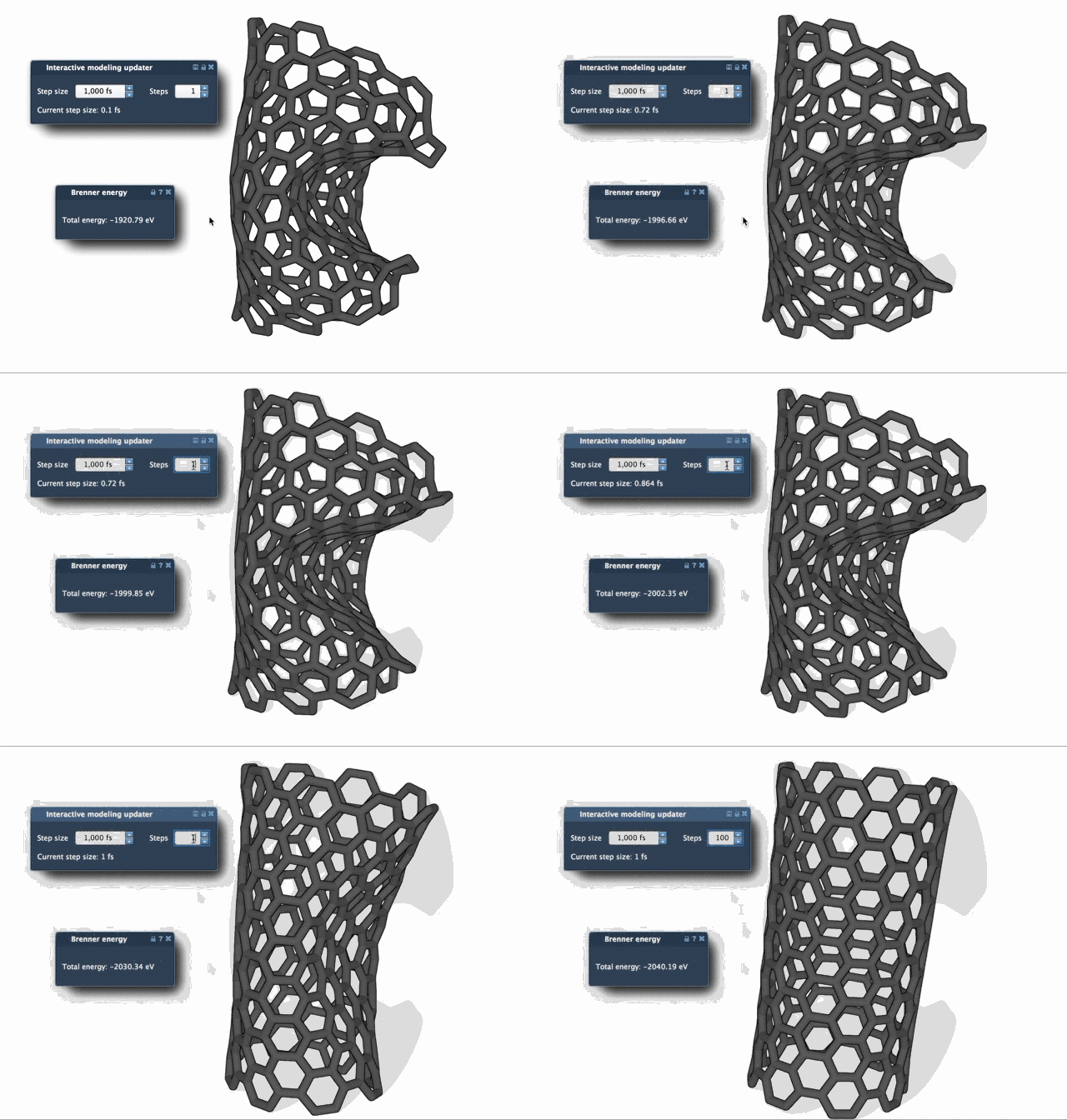
You can clearly observe how FIRE achieves a stable conformation in fewer visual update steps, while steepest descent requires more smaller steps, resulting in slower visual and energetic convergence.
Getting Started in SAMSON
You can add the FIRE Minimizer to your toolbox in three quick steps:
- Log into SAMSON Connect.
- Go to the FIRE Minimizer Extension and click Add.
- Restart SAMSON, and you’re ready to optimize.
Tips for Effective Use
Once installed, you can access the FIRE method via the SAMSON simulator framework. Just go to Edit > Add Simulator, choose your interaction model (e.g., force field), and select FIRE under State Updaters.
Want to visualize your optimization better? Adjust the Steps parameter in FIRE’s settings to update the viewport less frequently but display more noticeable changes between frames. This is particularly useful for presentations or reviewing progress over time.
Integrated Across Workflows
Because the FIRE Minimizer is implemented as a State Updater in SAMSON, it integrates seamlessly with other extensions, such as the Molecular Restrainer. This makes it especially useful for refining NMR-derived structures or preparing systems for dynamic simulations.
Whether you’re building a small molecule or simulating a protein complex, incorporating FIRE can streamline your preprocessing pipeline—and that means more reliable results delivered faster.
To learn more, visit the official documentation: Ready, Set, FIRE: The FIRE Minimizer Tutorial.
SAMSON and all SAMSON Extensions are free for non-commercial use. You can get SAMSON at https://www.samson-connect.net.