



In the world of molecular modeling, analyzing motion is crucial for understanding dynamical trajectories. One common challenge lies in identifying when and where molecules or groups of molecules exhibit bursts of activity or experience stillness. This is where SAMSON’s Average Velocity analysis within the Path Analyzer becomes immensely helpful.
What Does It Do?
The Average Velocity tool provides the mean velocity magnitude of a selected group as it traverses a defined path. By tracking this value over time, you can easily spot dynamic regions in motion or quiet areas in your molecular system. This is particularly useful for trajectories containing meaningful dynamical data, as it allows you to quickly identify trends or anomalies within the system.
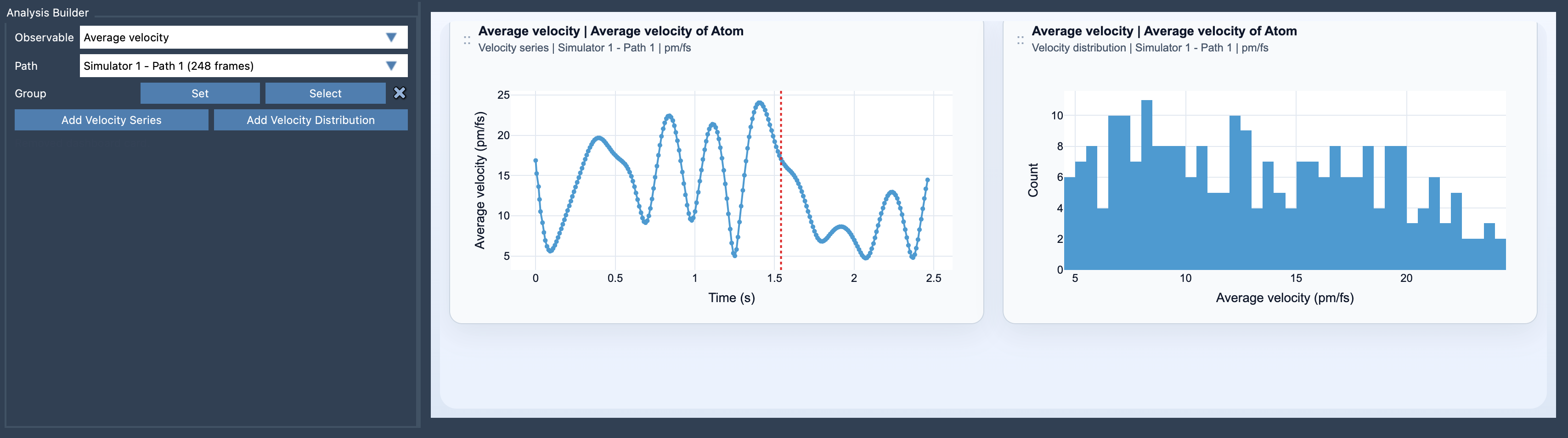
An example of the Average Velocity analysis visualization is shown below:
How to Add and Interpret the Plot
Getting started with the Average Velocity tool is straightforward:
- Open the Path Analyzer.
- Select Average velocity under Observable.
- Choose the desired path to analyze.
- Define the group of atoms you want to focus on.
- Add either a Velocity Series (for tracking the velocity over the entire path) or a Velocity Distribution (to inspect the distribution of sampled values).
The application provides two visualizations: Velocity series, which plots the mean velocity magnitude over the path, and Velocity distribution, which shows a histogram of velocity data for sampling insights.
Why Is Average Velocity So Useful?
This analysis is especially relevant when evaluating molecular simulations in search of dynamic insights. Are there bursts indicating substantial conformational changes? Are there quiet periods suggesting stabilization or equilibrium? The Average Velocity tool allows researchers to answer such questions quickly and with precision.
To deepen your understanding, you can also compare the results of Average Velocity analysis with Average Force analysis. By doing this, you can investigate how driving forces relate to resulting motion, gaining more insights into the mechanisms at play.
Customizable Options for Greater Flexibility
SAMSON’s settings ensure that you can tailor units of Average Velocity as per your needs. Choose from options like Auto, pm/fs, A/ps, or m/s, even after data creation. This refinement ensures that you can work in the most convenient scales for your research.
Ready to use this tool and better understand the dynamics in your molecular simulations? Learn more about SAMSON’s Average Velocity documentation and start exploring dynamical trajectories more effectively.
Note: SAMSON and all SAMSON Extensions are free for non-commercial use. You can get SAMSON here.