



As a molecular modeler, one persistent challenge is efficiently constructing complex polymers from basic units while seamlessly maintaining molecular structure accuracy. The Polymer Builder Extension in SAMSON is a solution to this pain point, allowing users to streamline the creation and customization of polymers. In this blog post, we focus on one of its essential features: how to register monomers.
What Is Monomer Registration and Why Does It Matter?
Monomer registration in Polymer Builder allows you to define the fundamental building blocks that make up your custom polymers. Whether you are working with synthetic materials, biopolymers, or unusual scaffolds for advanced molecular design, registering monomers efficiently ensures that your subsequent steps, such as sequence creation or polymer generation, proceed smoothly.
Step-by-Step Guide to Register Monomers
Here is how you can register monomers effectively in Polymer Builder:
- Select a molecule in the Document view or in the Viewport of SAMSON. This molecule will act as your monomer unit.
- Click Register monomer from selection. The system will automatically detect “start” and “end” atoms at opposite ends of the selected fragment to define its connection points.
- Not satisfied with the automatically selected atoms? Use these helpful override options:
- S: Set atom from your current selection (first, select a single atom).
- P: Pick an atom from a list of atoms within the structure.
- V: Visualize structure or highlight specific atoms for clarity.
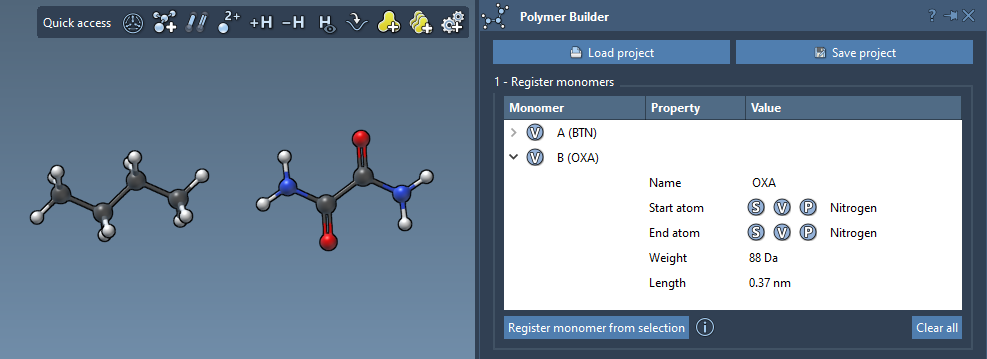
- Each successfully registered monomer is given a unique identifier, such as
A,B,C, to keep track easily. A table below will also display useful properties like molecular weight (in Daltons) and the distance between start and end atoms for each monomer.
Tips for Managing Saved Monomers
Once monomers are registered, you can modify them in Polymer Builder:
- Right-click on a monomer entry and choose Delete monomer to remove it from the table entirely.
- If your structure has been updated (e.g., an atom added or removed post-registration), the monomer will automatically be deregistered to maintain consistency.
- Use the Clear all option to reset the table if you’d like to register a completely new set of monomers.
Here’s an example of what the interface looks like while registering monomers:
Taking It Further: The Importance of Registered Monomers
Mastering the monomer registration step is crucial as it paves the way for creating sequences of monomers and ultimately generating complex polymers. Registered monomers are perfectly integrated into the subsequent design steps in SAMSON, making the entire polymer-building process smooth and efficient. Additionally, the detailed feedback and validation tools ensure accuracy at every step.
To dive further into the complete capabilities of Polymer Builder and explore other features like sequence registration or full polymer generation, visit the original documentation page at https://documentation.samson-connect.net/tutorials/polymer-builder/polymer-builder/.
Note: SAMSON and all SAMSON Extensions are free for non-commercial use. You can get SAMSON today at https://www.samson-connect.net.