



When working on molecular designs, reaching a stable and realistic molecular structure is often a critical step. This core task, known as geometry optimization, ensures that the molecular system resides in an energy minimum, which is essential for simulations and further analysis. Yet, any molecular modeler will agree: slow optimization algorithms can significantly bottleneck the workflow, especially with large systems. This is where the FIRE Minimizer comes into play.
Why Consider the FIRE Minimizer?
The FIRE Minimizer stands out for its efficiency in handling complex molecular motions. Unlike traditional methods like steepest descent, it’s especially useful for collective motions within large molecular systems. Let’s break this down.
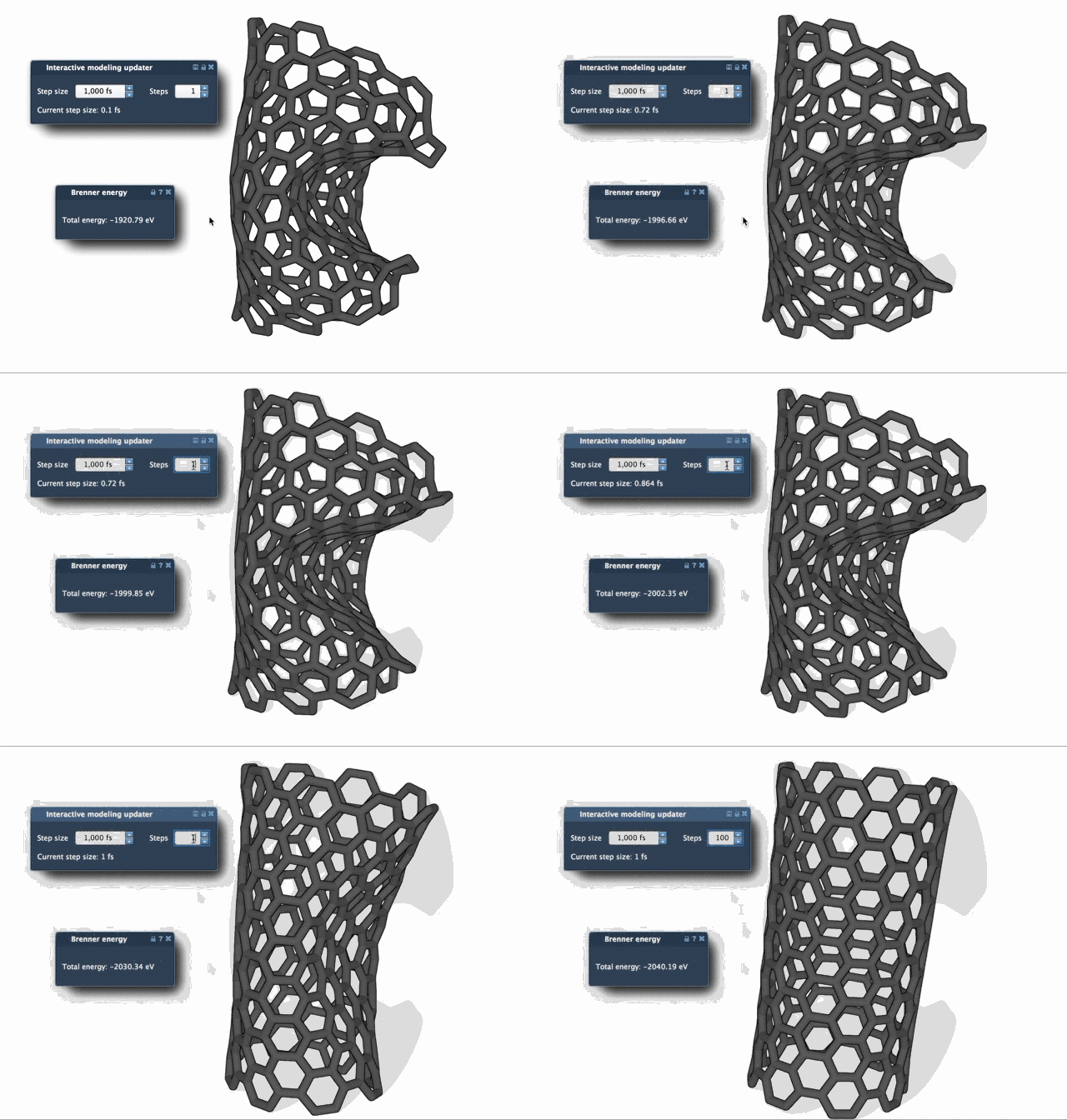
- Speed: The algorithm outperforms steepest descent methods, particularly when potential energy changes are subtle but structural adjustments are significant. This is crucial during pre-simulation cleanup or structural relaxation workflows.
- Versatility: The FIRE Minimizer integrates with any SAMSON interaction model, making it versatile across diverse molecular modeling scenarios.
To make the benefits more tangible, here’s a visual comparison of FIRE and steepest descent convergence processes:

Key Settings for Customization
To optimize its use, the FIRE algorithm includes several adjustable settings:
| Setting | Description |
|---|---|
| Step size | Defines the initial integration step for minimization. This determines how quickly the system converges to a minimum. |
| Steps | Specifies how many FIRE steps occur between viewport updates. Increasing this provides less frequent, but more noticeable updates. |
| Fixed | Allows you to enforce a constant step size. This setting is optional but provides additional control over the minimization process. |
By adjusting these options, users can fine-tune how the algorithm runs, making it ideal for different types of molecular systems and personal preferences in interface updates.
Tips for an Optimized Workflow
For best results, consider these simple recommendations:
- Pre-clean simulations: Use the FIRE Minimizer for energy minimization of structures before running simulations to correct geometries and avoid unnecessary noise.
- Need a visual aid? Increase the Steps parameter so changes to the molecular geometry appear more clearly during updates.
- Reset history: If you manipulate atoms manually during the minimization process, ensure a consistent computation by pressing the Reset button to clear the FIRE history.
Integrating FIRE with SAMSON Workflows
FIRE is designed to work seamlessly as a SAMSON State Updater. This means it can handle geometry optimization tasks in any SAMSON extension or app that requires this functionality. For example, it’s employed in the Molecular Restrainer Extension to refine NMR-derived structures.
Learn More
The FIRE Minimizer provides molecular modelers with a fast, reliable tool for streamlining geometry optimization. To explore all its features and see how they could fit into your workflow, check out the full documentation: documentation.samson-connect.net/tutorials/fire/ready-set-fire/.
SAMSON and all SAMSON Extensions are free for non-commercial use. If you don’t have SAMSON yet, you can get it at samson-connect.net.