



For molecular modelers, symmetry is more than just an aesthetic feature—it can significantly streamline workflows, improve accuracy, and reduce computational costs. Whether you’re building coarse-grained models or preparing simulations, having the ability to detect and visualize symmetry axes becomes invaluable. This blog offers a deep dive into how the Symmetry Detection extension in SAMSON helps you uncover and use symmetry in biological assemblies.
Why Is Symmetry Detection Important?
Understanding symmetry within protein complexes, viral capsids, or other large molecular assemblies addresses several practical challenges. Here are some scenarios where symmetry detection can make a real difference:
- Identify functional interfaces: Symmetry repeats often hint at biologically significant interfaces.
- Validate models or experimental structures: By confirming expected symmetry elements, you can ensure the structural integrity of your assemblies.
- Optimize simulations: Analyzing just the unique asymmetric unit instead of the whole structure can save time and computational resources.
- Drive molecular designs: Symmetry-based insights can guide development of symmetric nanomaterials or make mutagenesis more efficient.
How Does SAMSON Simplify Symmetry Detection?
Using the Symmetry Detection extension is straightforward, allowing both seasoned researchers and newcomers to integrate symmetry insights into their workflows. Here’s how you can get started:
- Install the Symmetry Detection extension from the SAMSON store if you haven’t already.
- Load or fetch a biological assembly, such as a protein complex, in SAMSON. You can directly import complex PDB assemblies (e.g., PDB codes like
3NQ4or1CHP). - Access Home > Apps > Biology > Symmetry Detection and hit the Compute symmetry button.
Supported Symmetry Types
One of the strengths of the Symmetry Detection extension is that it supports multiple symmetry categories, including:
| Category | Supported Systems |
|---|---|
| Cyclic (Cn) | Any order (e.g., C2, C3…) |
| Dihedral (Dn) | Any order (e.g., D2, D3…) |
| Cubic | Tetrahedral, Octahedral, Icosahedral |
Keep in mind that SAMSON will often detect more than one plausible symmetry group for larger assemblies, giving you additional analysis flexibility.
Quick Case Study: Icosahedral Capsid (3NQ4)
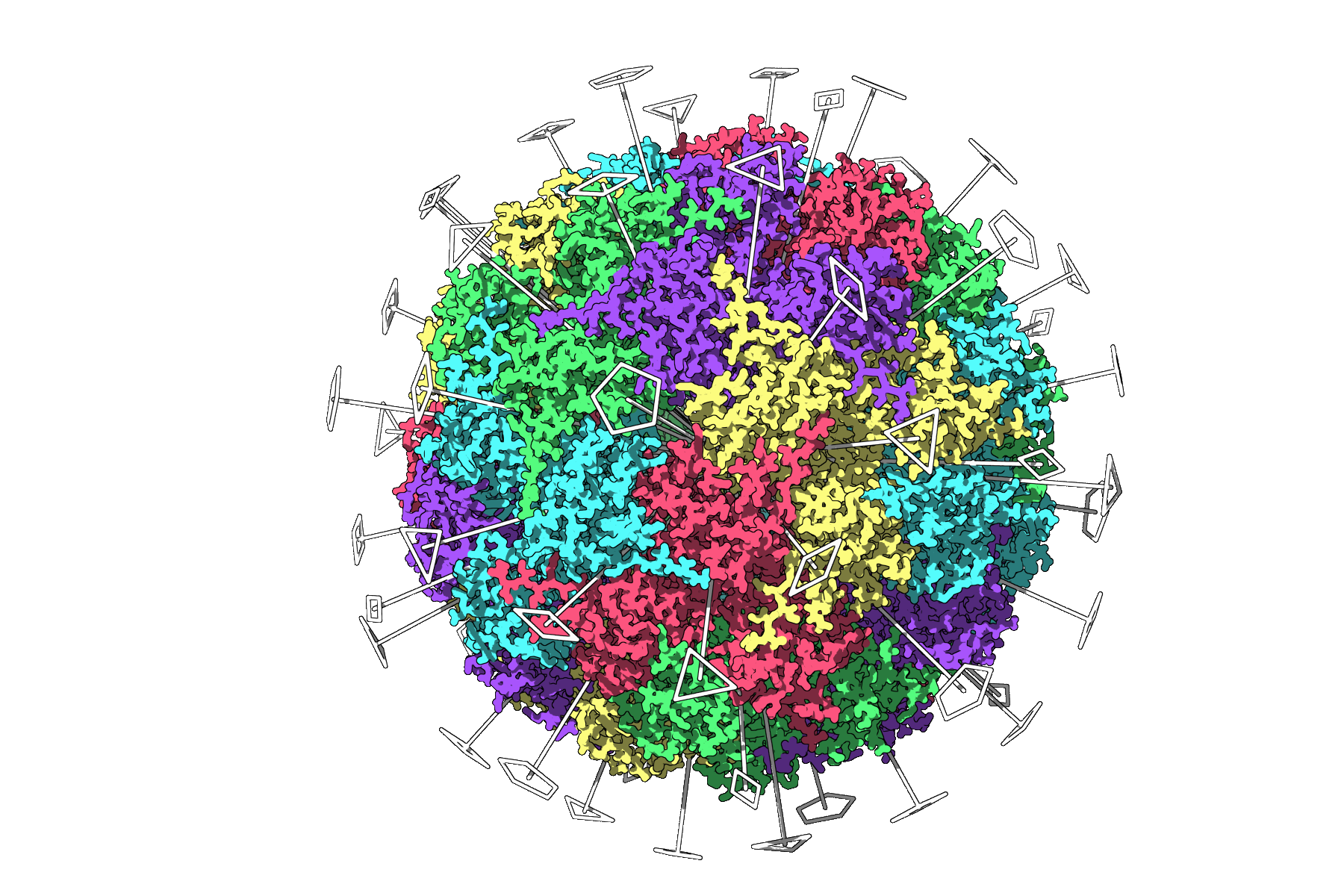
The Symmetry Detection extension excels in identifying intricate symmetry patterns, such as those in the 3NQ4 capsid, which features icosahedral symmetry. Every 2-, 3-, and 5-fold axis is visually represented, enabling you to explore relationships and focus on unique asymmetric units. This high-level visualization simplifies tasks like preparing simulations for heavy calculations.
Next Steps for Molecular Modelers
Once symmetry is detected, you can use the insights for tasks such as:
- Exporting the asymmetric unit for simulation.
- Designing symmetric molecular mutations or drug-binding ligands.
- Applying the workflow to nanoparticles or other complex systems.
Ready to dive deeper into symmetry detection workflows and examples? Visit the official documentation for more comprehensive guidance.
Note: SAMSON and all SAMSON Extensions are free for non-commercial use. Download SAMSON at samson-connect.net.