



Molecular modeling often involves identifying which parts of a molecular structure exhibit the most flexibility over time. This can provide insights into the dynamic behavior of molecules and their interactions. For instance, determining flexible regions in proteins is crucial when studying ligand binding or conformational changes. Addressing this pain point, SAMSON’s Path Analyzer offers an invaluable tool: RMSF (Root Mean Square Fluctuation) analysis. In this post, we will explore how to use RMSF profiles to gain critical information about molecular flexibility, helping modelers make data-informed decisions.
What is RMSF Analysis?
The Root Mean Square Fluctuation (RMSF) analysis calculates the fluctuation profile of selected molecular features based on their movement in a simulation. By aligning all simulation frames to a designated Fit set, this tool eliminates overall motion and quantifies the flexibility of individual atoms, residues, or larger molecular segments. The result is a precise identification of which parts of the model are highly dynamic and which remain stable.
How to Generate RMSF Profiles
To generate an RMSF profile in SAMSON, follow these steps:
- Open the Path Analyzer in SAMSON.
- Select RMSF from the Observable menu.
- Choose your desired Path.
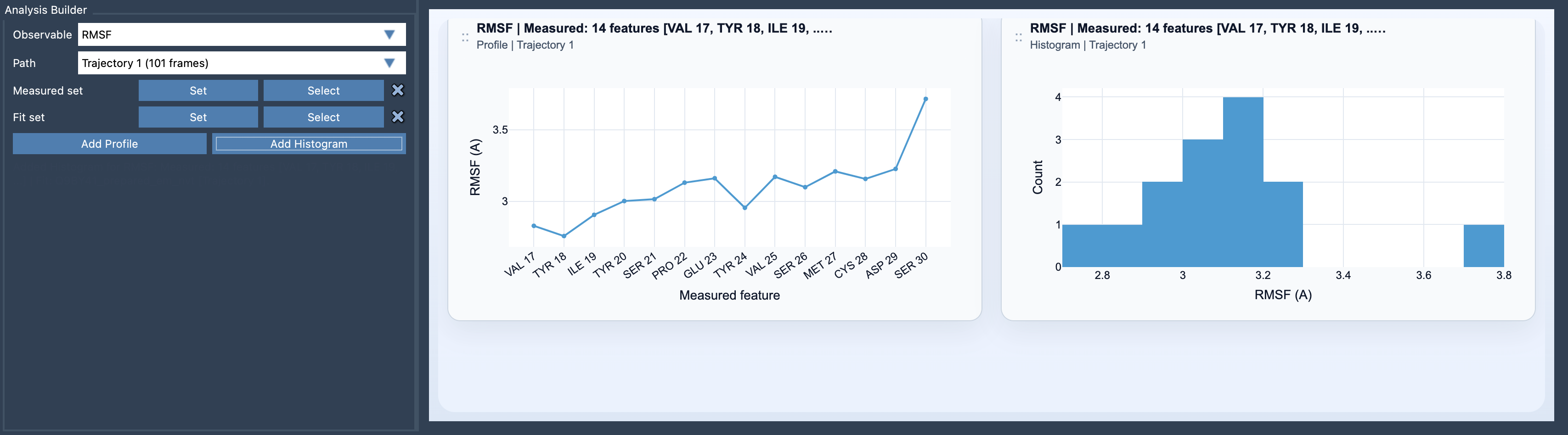
- Define the Measured set, which contains the features you want to evaluate, and the Fit set, which ensures that overall motion is removed before computing the fluctuations.
- Click Add Profile to view the fluctuations per measured feature or Add Histogram to analyze the distribution of fluctuation amplitudes.
Delving into RMSF Results
When interpreting RMSF profiles, there are two primary visualizations available:
- Profile: A detailed visualization of the RMSF values for each selected feature. For example, you can see the fluctuation intensity for individual atoms or entire residues.
- Histogram: A statistical representation of the fluctuation amplitudes, enabling you to inspect how fluctuations are distributed.
These visualizations allow users to quickly identify the regions of a molecule that exhibit significant movement, making it easier to focus on areas critical to biological or chemical function.
Tips for Effective RMSF Analysis
To get the most out of your RMSF analysis:
- For residue-level flexibility, choose residues or groups like secondary structures as the measured features.
- For atom-level precision, select specific atoms directly.
- Define a robust and stable Fit set; this ensures the fluctuations captured are intrinsic rather than caused by global molecular motions.
Double-clicking a profile point in SAMSON allows you to instantly select the corresponding feature, further streamlining your analysis workflow.
Why Use RMSF in Your Simulations?
An accurate RMSF analysis aids in understanding molecular dynamics at a deeper level, whether the focus is on detecting flexible loops within a protein, analyzing the dynamics of DNA regions, or assessing the movement of small molecule structures. It’s the perfect complement to other stability and motion analyses, providing insight into regions requiring further investigation or optimization in molecular designs.
To learn more, visit the official Path Analyzer RMSF documentation.
SAMSON and all SAMSON Extensions are free for non-commercial use. You can download SAMSON at https://www.samson-connect.net.