



A large protein assembly can be difficult to reason about one chain at a time. Repeated subunits may suggest symmetry, but visual repetition alone does not tell you which symmetry group fits the structure, where its axes lie, or whether you have loaded the biological assembly rather than a smaller component. Getting those details clear can help you choose what to inspect or model next.
SAMSON’s Symmetry Detection extension finds and visualizes symmetry axes in protein complexes, viral capsids, and other biological assemblies. The results give you a practical way to examine candidate symmetry groups in the context of the structure, rather than relying only on an impression from the viewport.
Start with the right structure
Before computing symmetry, open the biological assembly or multimeric complex you want to analyze and add the Symmetry Detection extension. If you fetch a structure or use an importer, check whether an option is available to import the biological assembly. This matters because the symmetry you want to investigate may involve multiple copies that are not present in a single-chain or incomplete model.
For a quick test, the tutorial suggests structures including 3NQ4, 1CHP, and 1B4B. In SAMSON, open Home > Apps > Biology > Symmetry Detection, then click Compute symmetry. Review the proposed groups and select one to explore its axes.
Read candidates as evidence, not just labels
The extension supports cyclic groups such as C2 and C3, dihedral groups such as D2 and D3, and cubic symmetry types: tetrahedral, octahedral, and icosahedral. It may return more than one plausible group for a large assembly. That is a reason to compare the candidates, not to assume that the first result is automatically the only useful interpretation.
Use the RMSD values as part of that comparison: the tutorial recommends preferring higher-order groups with small RMSD values. It does not prescribe a universal cutoff, so consider the score alongside what you know about the assembly and the symmetry you expect. If you already know a likely group—for example, D3 for 1B4B—you can choose the symmetry group and order manually from the drop-down lists and inspect that result.
For icosahedral capsid 3NQ4, the extension displays the 2-, 3-, and 5-fold axes. Seeing these axes together can help you understand the assembly’s organization and identify a unique asymmetric unit before planning a more focused workflow.
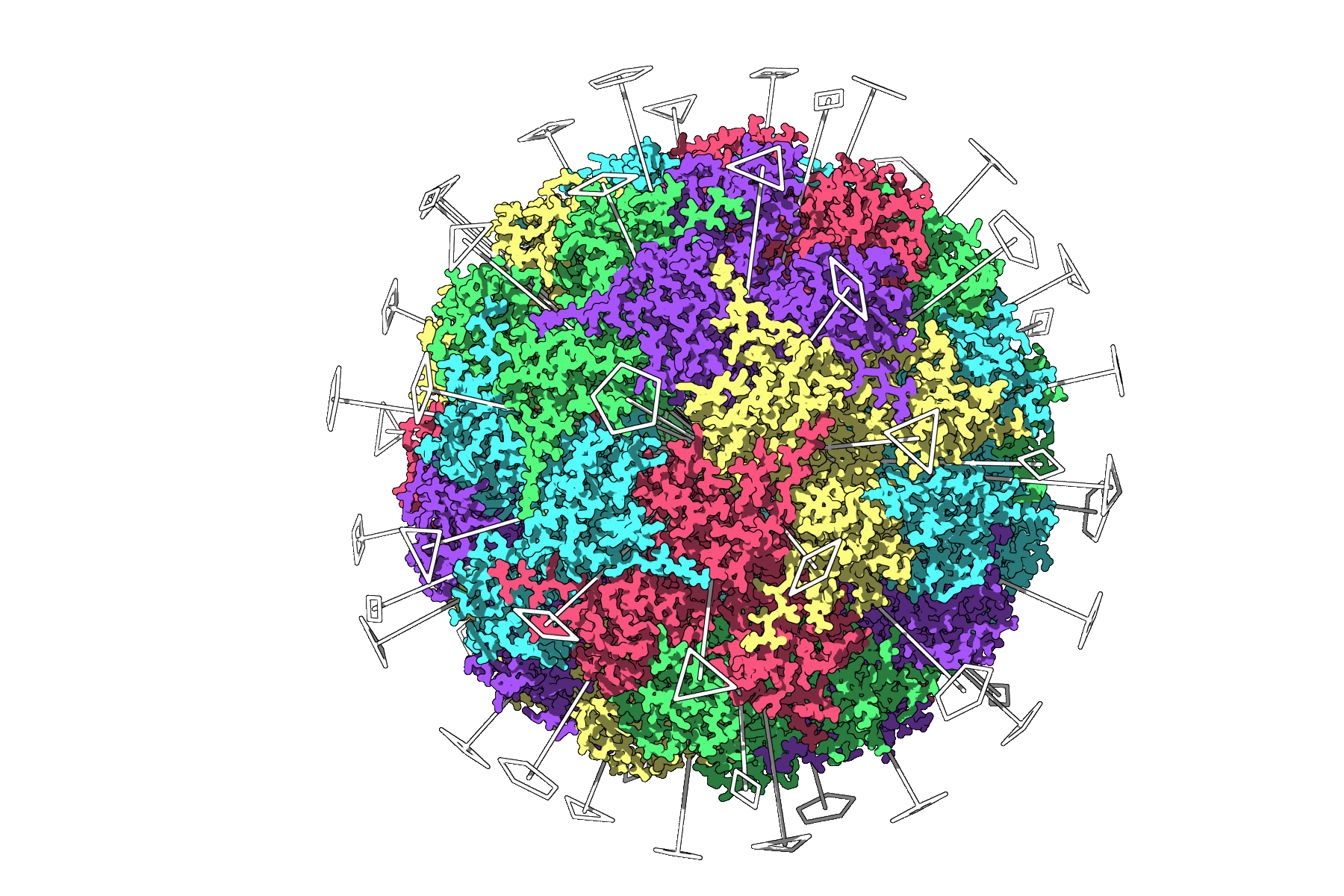
Use the axes to inspect the assembly
A group can contain several axes, each with its own RMSD score. Expand a group to see the axes. A single click highlights an axis in the viewport; a double-click aligns the camera so you look straight down it. This makes it easier to connect the group listed in the app to the actual arrangement of subunits in your model.
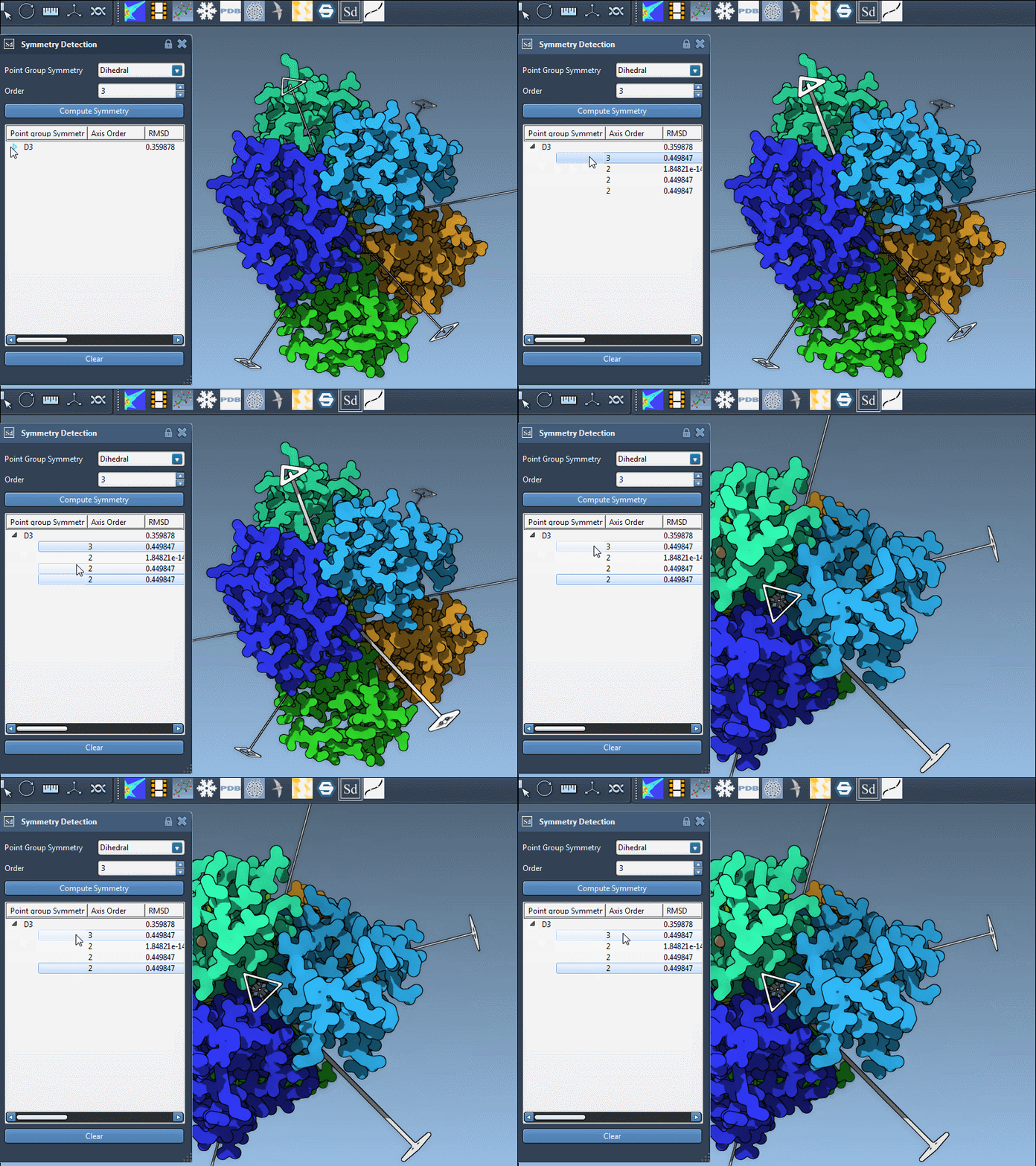
For a more readable view, combine the axes with Ribbons or Surface visual models, and consider coloring chains differently to make repeated units easier to distinguish. These are visualization aids: they help you inspect the structure, while the detected group and its RMSD provide information to evaluate.
Why this check can save effort
Knowing the symmetry can help you identify interfaces that repeat across copies, check whether a structure has the symmetry you expected, and decide whether a symmetry-aware modeling workflow is appropriate. It can also inform the choice to focus on an asymmetric unit when preparing a simulation, though the right modeling and simulation setup depends on your specific system and goals.
The useful habit is simple: load the intended assembly, compute candidate symmetries, compare group order and RMSD, then inspect the axes in the viewport before deciding what to do next. For the full workflow and additional examples, see the Symmetry Detection tutorial.
Note: SAMSON and all SAMSON Extensions are free for non-commercial use. Get SAMSON.