



A protein structure can look convincing in a 3D viewer and still contain backbone conformations worth a closer look. This is a familiar modeling pain: local geometry is difficult to judge by eye, especially when you are preparing a structure for refinement, simulation, or further molecular design.
A Ramachandran plot offers a focused way to inspect that geometry. It maps each residue’s backbone dihedral angles, φ (phi) and ψ (psi), against regions that are energetically favored or unfavorable. Instead of scanning the entire structure, you can see which residues fall into which regions and select them directly from the plot.
Use the plot as a diagnostic, not a verdict
In SAMSON, open a protein structure and launch the Ramachandran plot app from Home > Apps > Biology > Ramachandran plot. Click Update to generate the plot. In the displayed plot, yellow indicates energetically favorable regions, while white indicates unfavorable conformations.
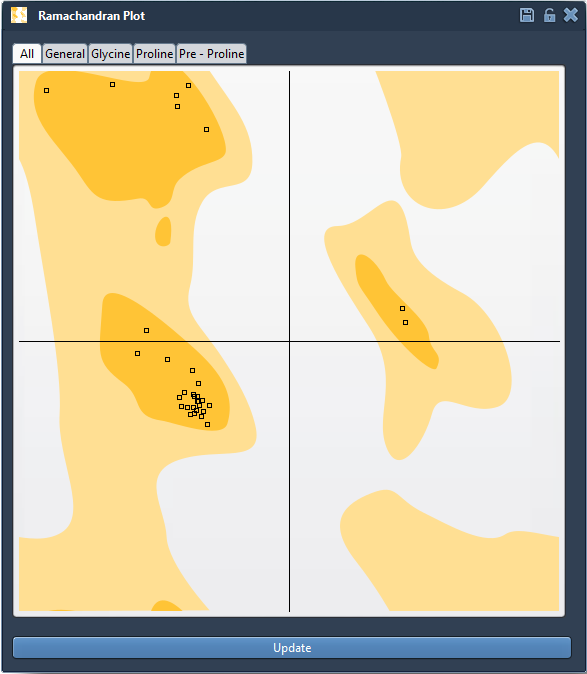
Use the category tabs to inspect all residues or focus on General, Glycine, Proline, or Pre-proline residues. These categories help you examine residues in the context of their type rather than treating every point as interchangeable. A point in an unfavorable area is a prompt to investigate, not by itself proof that the whole protein model is wrong. The plot is one useful view of backbone geometry; it does not replace broader structure preparation and validation.
Turn an outlier into an actionable selection
Click a point to select its residue in the 3D viewport. The status bar reports its φ and ψ values, connecting the plotted position to the corresponding part of the structure. This makes the plot more than a summary: it can help you move from “something looks unusual” to “this is the residue I want to inspect.”
For a practical review, first update the plot and scan for residues in unfavorable regions. Then select a point of interest, inspect the selected residue in the viewport, and consider whether a local adjustment is appropriate for your modeling task. This keeps the review targeted and helps avoid changing parts of the structure that do not need attention.
Make controlled edits and watch both views
When you decide to adjust a conformation, you can drag a point on the plot. The φ and ψ angles change in real time, and the 3D structure updates as you work. This paired view is useful because it lets you see both the angular change and its effect on the protein model. If you are not satisfied with an edit, use Ctrl+Z on Windows or Linux, or Cmd+Z on macOS, to undo.
You can also use SAMSON’s Twister editor to twist the protein in 3D space while observing the plot update. This provides another way to explore backbone changes when you prefer to manipulate the structure in the viewport. Whichever method you use, make adjustments deliberately and recheck the plot afterward.
Combine local inspection with broader motion
Backbone checking can also follow a larger structural change. The tutorial’s bonus exercise reloads PDB structure 1YRF, computes the first 10 nonlinear normal modes, sets the scaling factor to 1, and shifts the first mode fully left. The Ramachandran plot can then be used to inspect and tweak conformations so residues fall in favored regions. The useful idea is to examine local backbone geometry after applying a global motion, rather than assuming a large-scale change leaves every residue in a suitable conformation.
For your own workflow, a simple sequence is: load the protein, update the plot, inspect residue categories, select points that need attention, make careful edits, and review the result again. This can help you detect strained residues before simulation, focus refinement on outliers, and examine flexibility around active or binding sites. It is a practical geometry check—not a substitute for the rest of your validation process.
For setup instructions and the complete walkthrough, see the Interactive Ramachandran Plot tutorial.
Note: SAMSON and all SAMSON Extensions are free for non-commercial use. Get SAMSON.