



A molecular trajectory can contain thousands of atoms and many frames. When you need to know whether a selected region is moving steadily, becoming unusually quiet, or showing bursts of motion, inspecting the animation alone can make the pattern hard to judge. An average-velocity plot gives you a compact way to follow motion along a path—and a few details about what it averages help you interpret it correctly.
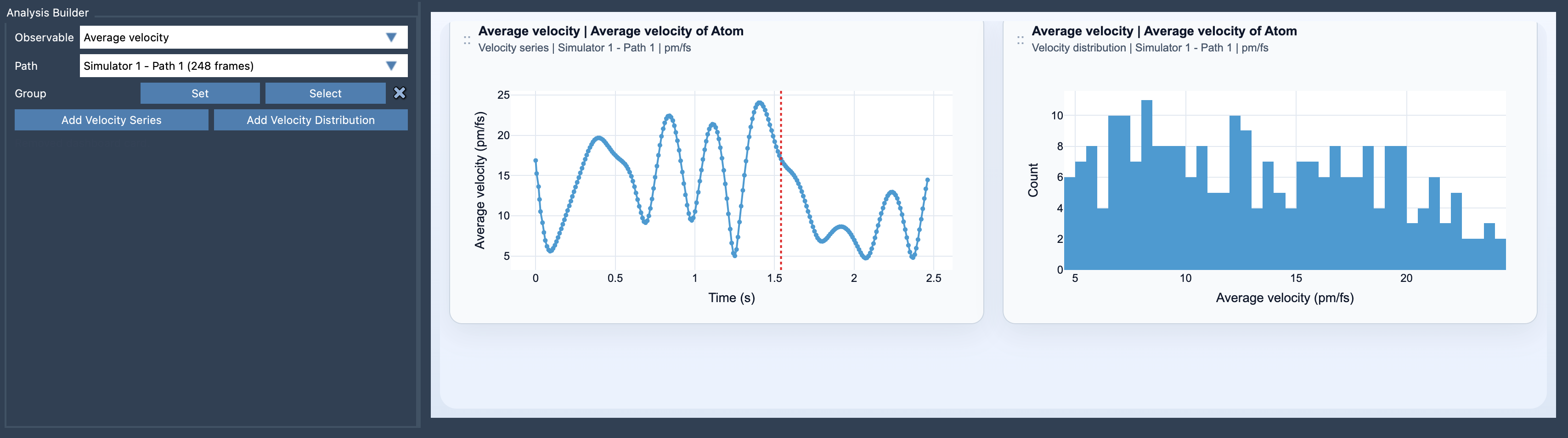
What the average tells you
For each frame, Path Analyzer calculates the mean magnitude of the velocities of the atoms in your selected group. In simplified notation:
mean speed(t) = (1 / number of selected atoms) × sum of each atom’s speed at time t
This is an average of magnitudes, not an average of velocity vectors. That distinction matters: atoms moving in opposite directions still contribute their speeds to the result rather than cancelling each other out. The series is therefore useful for tracking how much motion is present in the group, but it does not tell you the group’s net direction of travel.
Use the plot to find where to look
A velocity series makes changes along the path easier to spot. A rise can flag a region where the selected atoms are moving faster on average; a dip can point to a relatively quiet region. These are useful clues for deciding which part of a trajectory deserves closer inspection. The plot does not, by itself, explain why the motion changed, so treat a peak or dip as a prompt to investigate rather than a diagnosis.
The selected group also affects what you see. A single average can conceal differences between atoms: a small number of fast-moving atoms may influence the group’s value, while distinct behaviours within the group are compressed into one number. If that could matter for your question, consider which atoms belong in the selection and inspect the velocity distribution as a complementary view. The distribution lets you examine sampled values rather than only following the group’s mean.
A practical setup
- Open Path Analyzer and choose Average velocity as the observable.
- Select a path that provides velocity data for the atoms you want to analyze.
- Define an atom-containing group. A selection without atoms, or a path without velocity data for those atoms, will not meet the input requirements.
- Choose Add Velocity Series to follow the mean over the path, or Add Velocity Distribution to inspect the sampled distribution.
After creating the card, you can switch its units between Auto, pm/fs, A/ps, and m/s. When comparing results, check that the displayed units are consistent; a unit change alters how the values are expressed, not the underlying trajectory.
Put motion in context
Average velocity is most informative when the path contains meaningful dynamical information. It summarizes speed, not force or cause. If you want to explore how driving forces relate to the observed motion, compare it with the Average force analysis. Together, the views can help frame a question about where motion changes and whether force patterns are also worth examining—without treating correlation as an explanation.
For the full procedure and details, see the Average Velocity documentation.
Note: SAMSON and all SAMSON Extensions are free for non-commercial use. Get SAMSON.