



A molecular trajectory can contain many frames, and choosing one frame as the reference may hide the relationships you care about. Two distant parts of a path might adopt similar conformations, while neighboring frames may differ during a transition. A single-reference RMSD view answers “how different is each frame from this one?” Pairwise RMSD offers a broader view: it compares every frame with every other frame.
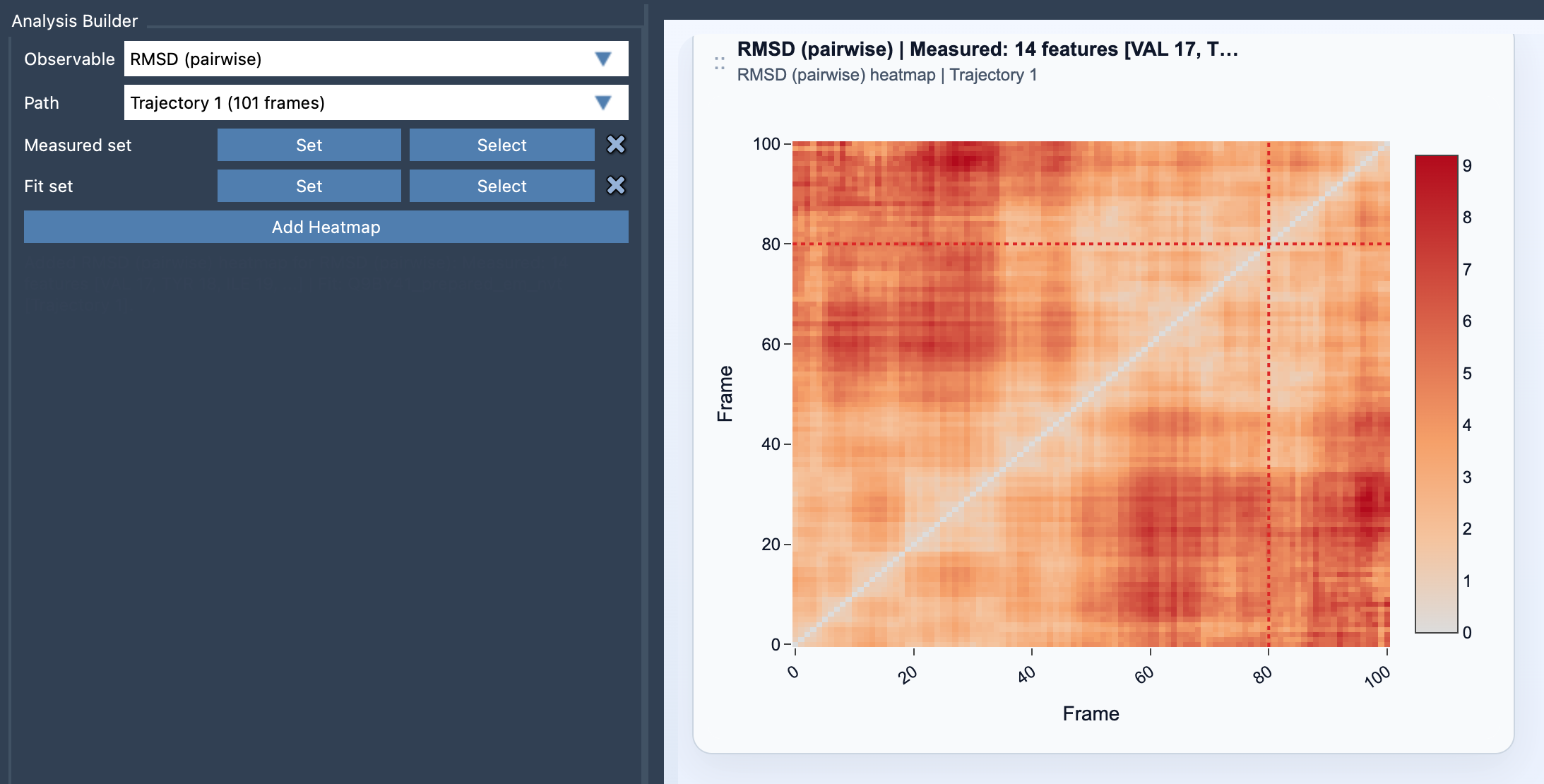
In SAMSON’s Path Analyzer, the result is a square heatmap. Each cell represents the RMSD between a pair of frames. Instead of scanning a list of values, you can look for visual patterns across the full path: regions where many frames are similar, or areas where the structural differences change.
What the heatmap can help you see
Look first for blocks of relatively low RMSD. A block means that the frames represented in that region of the matrix are structurally similar to one another, according to the measured atoms and the chosen alignment. Such a pattern can point to a recurring conformation or a phase of the path in which the structure remains similar.
Then look for changes between blocks. A region of higher RMSD between two otherwise internally similar groups may suggest that the groups represent distinct conformational states. The heatmap is not, by itself, a description of the motion or its cause; it is a way to locate relationships that may be worth examining in the trajectory.
Because the comparison is pairwise, repeated states do not need to be next to one another in the path to appear related. That is useful when a trajectory revisits a conformation after passing through other structures. It also helps when there is no obvious single frame that serves as a meaningful reference for every part of the path.
Set up the comparison thoughtfully
- Open Path Analyzer and choose RMSD (pairwise) as the observable.
- Choose the path you want to inspect.
- Define both a Measured set and a Fit set. Each selection must contain atoms.
- Click Add Heatmap to display the pairwise comparisons.
The fit set and measured set answer different questions. The fit set determines how each frame pair is aligned before comparison. The measured set is the atoms whose positional differences contribute to the RMSD. For example, if you want to compare a selected region after aligning on another part of the structure, the fit and measured selections let you specify those roles separately. Keep the selections consistent with the structural question you are asking: changing either set can change what the heatmap means.
Reading the comparison
For frames i and j, the RMSD is calculated from the differences between corresponding measured-atom positions after the fit set has been aligned. The value summarizes the average positional difference across the measured atoms. The resulting matrix is symmetric: comparing frame i with frame j gives the same RMSD as comparing j with i.
Use the heatmap as a map for further inspection, not as a complete explanation. A low-RMSD block tells you that a group of frames is similar under your selected alignment and measurement choices; it does not establish why those conformations occur. To explore a particular comparison in the path, click its cell. Path Analyzer moves the path to the later of the two selected frames, helping you connect a heatmap pattern back to the structures.
For another perspective, compare the pattern with an energy landscape or a custom scatter plot. These views can complement the pairwise structural comparison, while keeping in mind that each plot represents the path in a different way.
For setup details and the equation, see the RMSD (pairwise) documentation.
Note: SAMSON and all SAMSON Extensions are free for non-commercial use. Get SAMSON.