



A molecular trajectory can produce a long list of measurements: distances, energies, RMSD, radius of gyration, solvent-accessible surface area, and more. Looking at each measurement on its own may show that it changes, but not whether it changes alongside another property. That gap makes it hard to spot coordinated behavior—or to identify which frames are worth examining more closely.
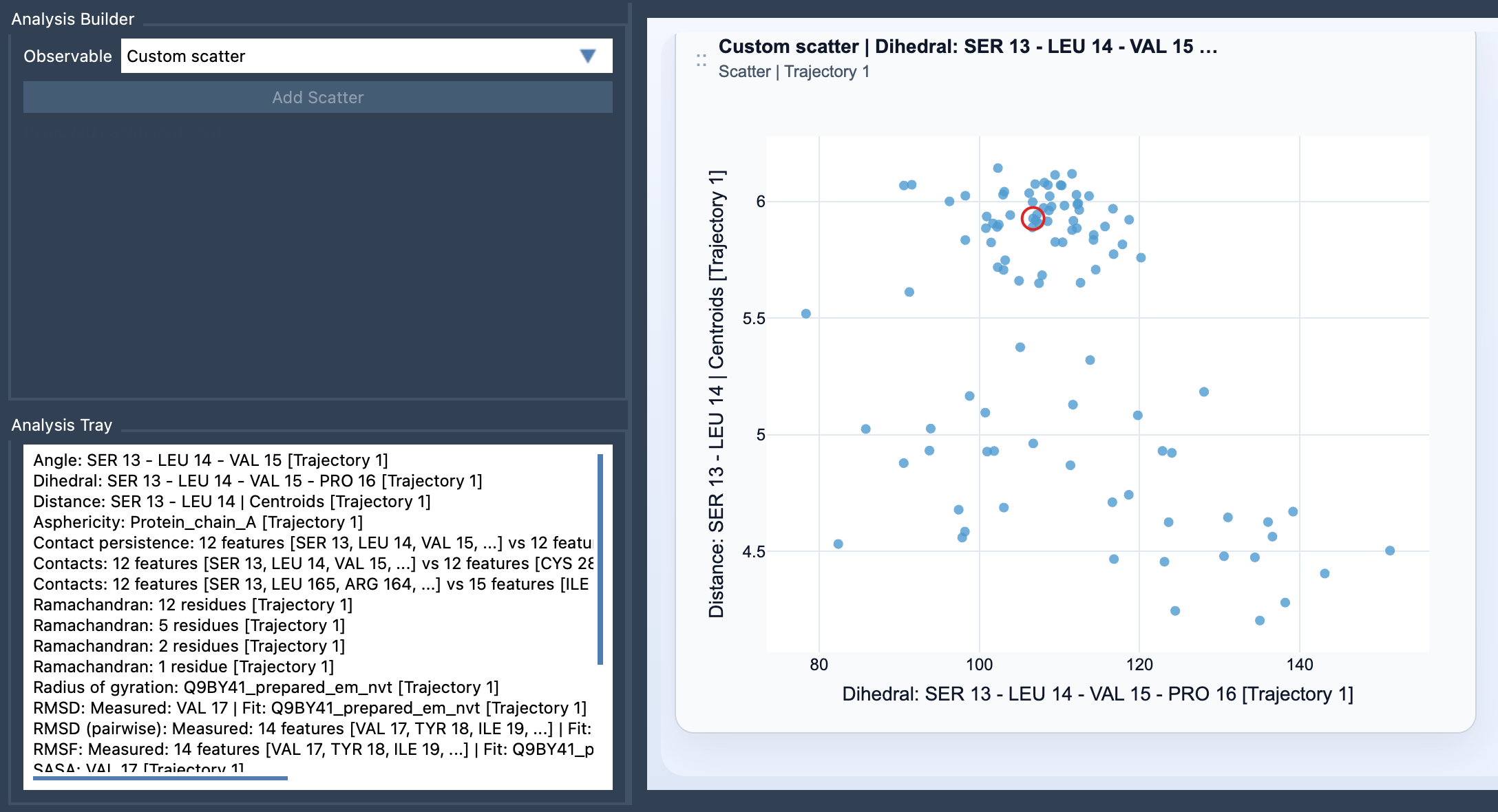
A Custom scatter plot in SAMSON’s Path Analyzer puts two saved scalar analyses into the same view. Each point represents one sampled pair of scalar values. Instead of scanning two separate traces, you can explore how the observables relate across the samples.
Start with a question, not just two measurements
The most useful scatter plots begin with a specific question about the system. For example:
- Distance vs Energy: Do sampled structures with a particular distance also tend to have different energy values?
- RMSD vs Radius of gyration: Do changes in structural deviation appear alongside changes in overall size or compactness?
- SASA vs Distance: Does solvent-accessible surface area vary with the distance you are tracking?
These pairings are starting points for inspection, not proof that one observable causes another. A scatter plot helps you see whether the values appear to vary together, whether points form visible groups, or whether the relationship looks more complicated than a single trend.
Build the plot from saved scalar analyses
Custom Scatter is a derived analysis. It uses saved scalar analyses in the Analysis Tray, rather than direct atom selections. To create one:
- Open the Path Analyzer.
- Create or reuse two scalar analyses and make sure they are saved in the Analysis Tray.
- Choose Custom scatter under Observable.
- Select exactly two saved scalar analyses in the tray.
- Click Add Scatter.
Both inputs need to be scalar analyses. If the plot cannot be created, first check that the tray contains exactly two selected analyses and that both are scalar.
Read the pattern, then investigate the frames
Each point corresponds to a sampled pair of values. A compact band, a broad cloud, or several visible clusters can suggest different patterns worth investigating. Treat these shapes as prompts for questions: Are there groups of samples with similar values? Do the observables seem to move together over part of the data? Are there points that merit a closer look? The plot is a visual comparison; interpretation still depends on the scientific context and on how the source analyses were produced.
There is also a useful connection between the plot and the trajectory. When both source analyses come from the same path and remain frame-linked, the scatter plot can stay connected to the current frame. When the two analyses are frame-linked, clicking a point can move the path to its corresponding frame. That makes a visible point a practical starting place for inspecting the molecular structure behind a pair of values, rather than an observation that stays detached from the path.
Use the scatter plot as an exploratory step
A custom scatter plot is often a good first view when you have two observables in mind and want to see how their sampled values relate. If you want to examine the distribution of points in more detail, the documentation also suggests moving on to a 2D density map or an Energy landscape. Starting with the scatter plot helps you decide whether that next view would answer a useful question.
For the full instructions and details, see the Custom Scatter documentation.
Note: SAMSON and all SAMSON Extensions are free for non-commercial use. Get SAMSON.