



A pair of protein structures can show you two conformations, but not what happens between them. That gap matters when you want to inspect a motion, prepare a starting path for a simulation, or compare intermediate shapes. Simply switching between endpoint structures can hide the structural changes you care about.
SAMSON’s ARAP (As-Rigid-As-Possible) Interpolator can generate a sequence of intermediate conformations between two protein structures. The workflow below uses two conformations of diphtheria toxin as an example. It also highlights a few choices that help make the result useful rather than just visually smooth.
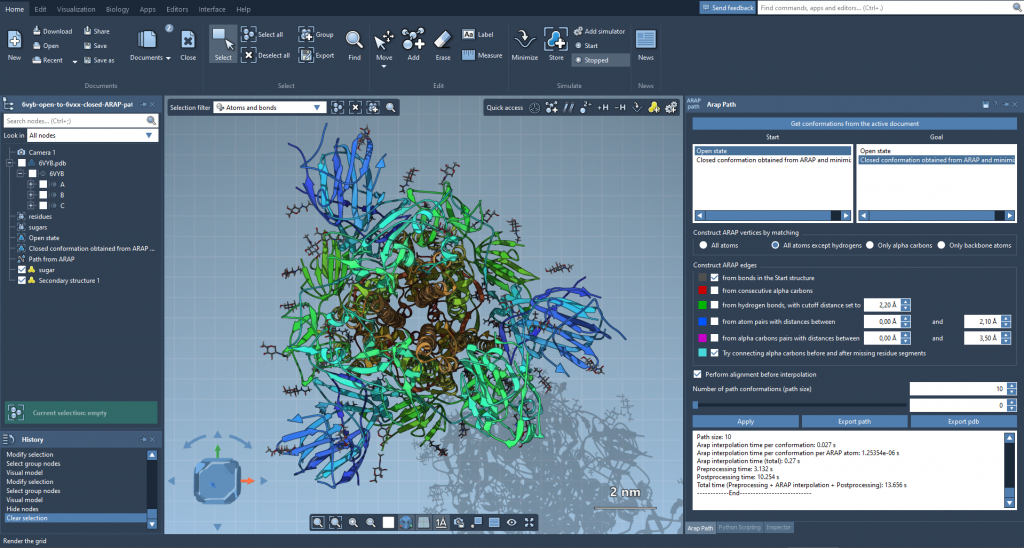
ARAP interpolation can generate intermediate conformations between open and closed protein states.
Start with comparable, clean structures
For the example, fetch PDB structures 1DDT and 1MDT in SAMSON using Home > Fetch. The goal is to interpolate between chain A in each structure. In the Document view, remove chain B from 1MDT so the structures contain the intended chain for this comparison.
Next, run Home > Prepare on both structures. This removes alternate locations, water, ligands, and ions. Cleaning is more than housekeeping: non-connected components can prevent the interpolation from running. If SAMSON reports that the structure does not make one connected component, check for these extra components and prepare the structures again.
Create a conformation for each cleaned structure with Edit > Conformation. Name them clearly, such as 1DDT A and 1MDT A. These named conformations will be the start and goal for the interpolation.
Choose what should be matched and connected
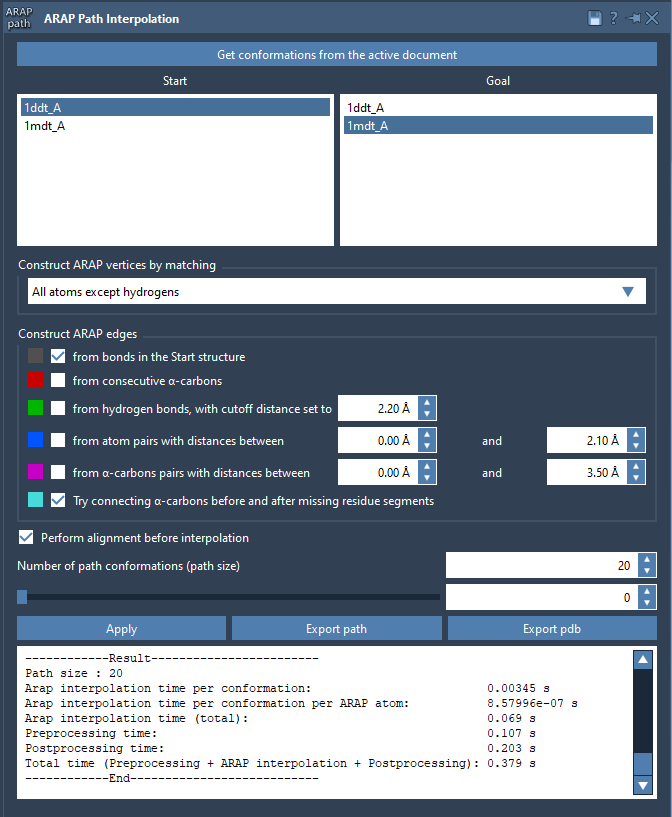
Open Home > Apps > Biology > ARAP Path Interpolation, get the conformations from the active document, and select 1DDT A as Start and 1MDT A as Goal.
For matching, the tutorial uses All except hydrogens. This matches non-hydrogen atoms between the conformations and uses the matched atoms in the start conformation as ARAP vertices. Other available choices include all atoms, α-carbons only, or backbone atoms. The useful question is: which atoms should define correspondence for the comparison you want to make?
For edge construction, enable from bonds in the Start structure and Try connecting α-carbons before and after missing residue segments. The first follows covalent bonds in the starting structure. The second adds connections across missing-residue segments, helping define continuity where residues are absent. These settings describe how the structure’s local connectivity informs the interpolation; they are not simply visual styling options.
Align, then generate a manageable path
Enable Perform alignment before interpolation so the start conformation is aligned with the goal before the path is calculated. Set Number of path conformations to 20. This count includes both endpoints, giving you intermediate conformations as well as the original start and goal. Click Run to compute the path.
Inspect the result before using it
Use the app’s slider to move through the conformations and look for changes that are easy to miss when viewing only the endpoints. The generated ARAP edges are also available as a visual model in the Document view; toggle their visibility to inspect how the chosen connectivity contributes to the path.
Interpolation gives you a geometric sequence to examine or export, but a smooth-looking path should not automatically be treated as a validated physical mechanism. If the path is intended for a simulation workflow, use it as a starting point and apply the appropriate analysis or refinement. The documentation suggests possible next steps including umbrella sampling with the GROMACS Wizard, steered molecular dynamics, or P-NEB refinement.
You can export the path as a path object in the current SAMSON document or export it to PDB, including sequential PDB files for the individual conformations. For setup details and related guidance, see the original ARAP interpolation tutorial.
Note: SAMSON and all SAMSON Extensions are free for non-commercial use. Get SAMSON.