



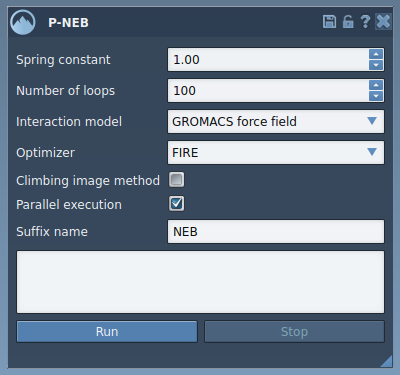
When modeling molecular transitions between two states, such as during protein-ligand interactions, researchers often rely on the Nudged Elastic Band (NEB) method to compute minimum energy paths. In SAMSON, the integrative molecular design platform, users have two main options to apply Parallel NEB (P-NEB): directly to a trajectory path, or to a set of discrete conformations. While both workflows lead to results, their computational efficiency can vary dramatically.
One common frustration among modelers is that working with conformations often feels slower. But why is that?
Paths vs. Conformations: What’s the Difference?
In SAMSON, a Path is a node that stores a full trajectory of selected atoms—essentially a continuous transition. A Conformation, on the other hand, is a snapshot of atomic positions at a specific moment. You might have ten conformations between start and end states, but they don’t inherently link together unless converted into a path.
When NEB is applied to a path, the method efficiently leverages the existing framework of sequential steps, reducing overhead in processing. Conformations need additional interpolation and setup at runtime, making the optimization slower even if the data content is similar.
Tip
In SAMSON, you can merge conformations into a path quickly. Just select the conformations in the Document view, then click Conformation > Create path from conformations. This new path is immediately usable with the P-NEB app.
Speed Matters: Prefer Paths When Possible
Applying NEB to a path instead of conformations isn’t just a suggestion—it significantly reduces computation time when dealing with similar configurations. For example, transitioning a ligand between two nearby positions using P-NEB on a conformational set could take minutes, while the same optimization on a path might complete in seconds.
Moreover, paths allow for animation, easier inspection, and smoother editing. You can double-click a path in the document view to animate it, visualize energy barriers, and validate transition plausibility before deeper analysis.
Conclusion
If you’re optimizing transition paths in SAMSON using NEB, structure your data as a path whenever possible. It not only streamlines the setup but pays off with faster computations. This small adjustment can make a big difference during iterative modeling tasks.
Interested in the full workflow? Read the full documentation for examples and a detailed step-by-step guide to using the P-NEB app.
SAMSON and all SAMSON Extensions are free for non-commercial use. You can download SAMSON at https://www.samson-connect.net.