



Geometry optimization is at the heart of molecular modeling, aiding scientists in achieving stable, accurate molecular structures for reliable simulations and designs. But it’s not uncommon for researchers to encounter slow convergence or inefficiencies when handling large-scale molecular systems with traditional algorithms like steepest descent. If this resonates with you, it’s time to explore the FIRE Minimizer, a tool specifically designed to tackle these challenges head-on.
What is the FIRE Minimizer?
The FIRE (Fast Inertial Relaxation Engine) Minimizer is an efficient algorithm integrated into the SAMSON molecular design platform. It’s particularly effective for large-scale molecular motions, where minor energy changes correspond to significant geometric shifts. This makes the FIRE Minimizer an ideal solution for pre-simulation geometry cleanups, structural relaxation, and setups that demand high precision in a short amount of time.
Why Choose FIRE Over Steepest Descent?
The steepest descent algorithm, while standard, is not optimal for every optimization task. When geometric changes are extensive but energy variations are small, steepest descent tends to converge slowly. In contrast, the FIRE Minimizer is designed to handle such cases efficiently, saving computational time without sacrificing reliability. To illustrate, here’s a visual comparison of the two approaches:

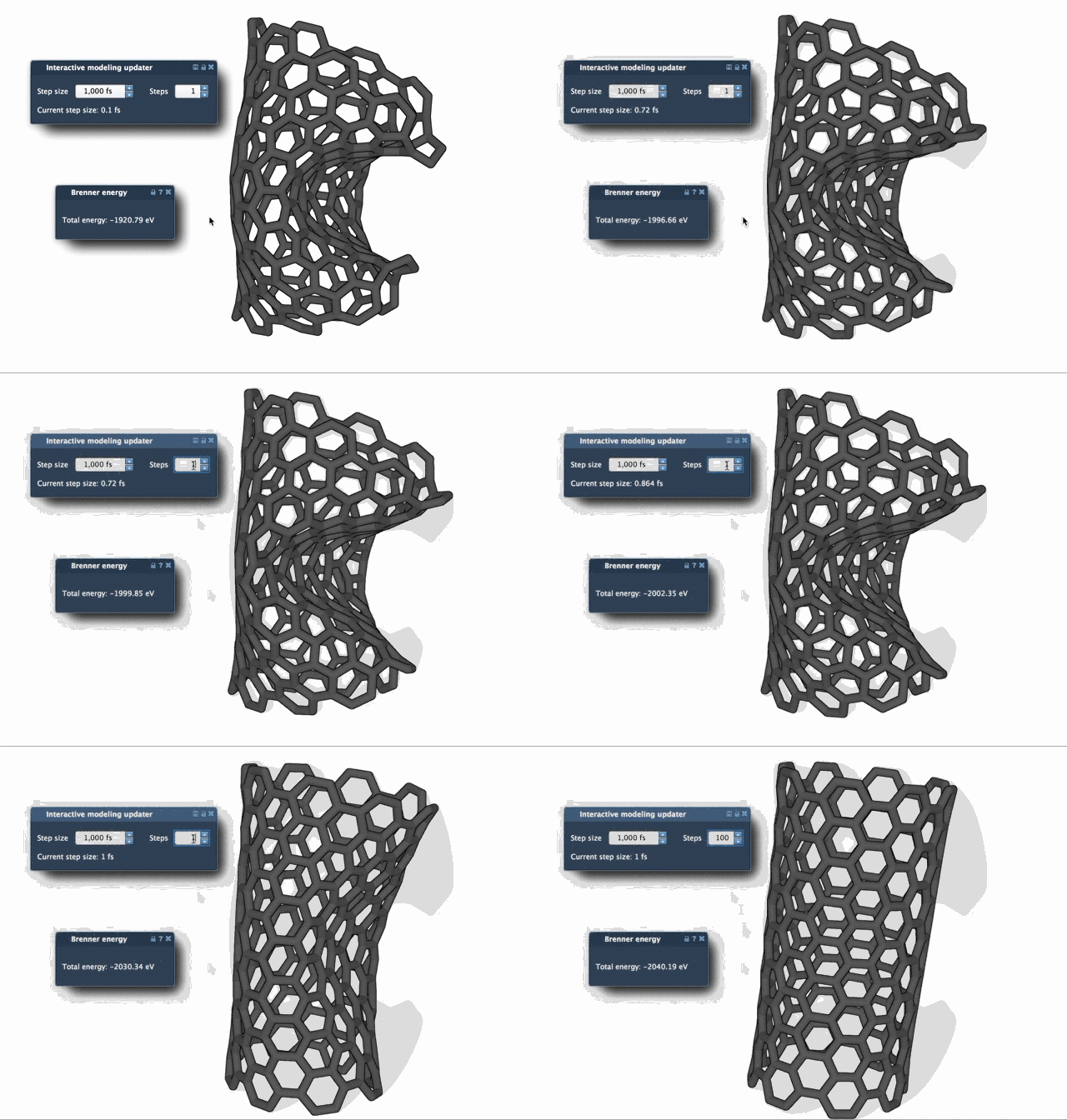
As the images demonstrate, the FIRE algorithm achieves faster and smoother relaxation. These benefits are particularly valuable when tuning geometries for complex simulations or workflows involving large molecules.
How to Get Started with the FIRE Minimizer
If you’re ready to integrate the FIRE Minimizer into your workflow, setup is straightforward:
- Login to SAMSON Connect.
- Navigate to the FIRE Minimizer Extension page and click Add.
- Restart SAMSON, and your extension will be ready to use.
Optimizing Your Settings
To further streamline your optimization process, the FIRE Minimizer includes adjustable settings:
| Setting | Description |
|---|---|
| Step size | Determines the initial integration step size for minimization. |
| Steps | Sets the number of FIRE iterations between screen updates for smoother visualization. |
| Fixed | Locks the step size to remain constant, should fine control be required (optional). |
If you’ve manipulated atoms during the minimization and wish to clear the previous history, simply press Reset to start fresh.
Seamless Integration in Your Workflow
The FIRE Minimizer doesn’t work in isolation—it is a SAMSON State Updater. This means you can integrate it easily with other tools or extensions designed to enhance your molecular design process. For example, the Molecular Restrainer Extension effectively employs FIRE Minimizer for optimizing NMR-derived structures, making it one of the versatile components of the SAMSON ecosystem.
Curious to dive deeper? Check out the full FIRE Minimizer tutorial for a step-by-step guide, helpful tips, and all you need to get started.
SAMSON and all SAMSON Extensions are free for non-commercial use. Download SAMSON today at samson-connect.net.