



When modeling molecules, selecting specific atoms, residues, or groups based on their relationships or properties can make or break your workflow. Whether you’re preparing a system for simulation or analyzing structural features, having to sift through thousands of atoms manually is time-consuming and error-prone.
This is where the Node Specification Language (NSL) in SAMSON becomes useful. In this post, we’ll focus on how logical and topology operators allow you to define precise, powerful queries to select molecular structures based on how they are related spatially or hierarchically.
Why this matters
Say you’re interested in selecting all residues that don’t contain cysteine. Or maybe you want to find hydrogens bonded to oxygen atoms. Perhaps you need to work only with residues that are near a ligand but not part of it. These are common needs—yet they require more—than just basic attribute filtering.
Logical Operators
NSL supports standard logical operations like and, or, not, and xor, which you can use to combine multiple search criteria.
Examples:
n.t r and not r.t CYS: Selects all residue nodes that are not cysteines.a.sn <= 20 or a.sn >=40: Selects atoms with serial numbers either below 20 or above 40.sg.id 1000:1040 and sg.nat < 4: Selects structural groups with IDs in a range and fewer than 4 atoms.
Note: Using not alone can return unexpected results. For example, not r.t CYS also returns things that aren’t residues (like folders). To restrict the result to residues only, include n.t r.
Topology Operators
Topology operators help define relationships based on structure or connectivity, such as whether something is part of, linked to, or contains other nodes.
Available operators include:
in/out ofhaving(orh)linking(orl)
Examples:
n.t a in r.t CYS: Atoms that are part of cysteine residues.node.type sideChain having Sorn.t sc h S: Side chains that contain at least one sulfur atom.H linking OorH l O: Hydrogens that are bonded to oxygens (useful for identifying polar hydrogens).
Another powerful trick is using combinations:
n.t a within 5A of "GLN 2" out of "GLN 2": Select atoms within 5 angstroms of GLN 2, excluding atoms that are part of GLN 2.
Boosting Your Selection Workflow
With practice, these logical and topology operations will let you write compact, expressive selection queries that adapt to your model’s complexity. Instead of scrolling or clicking through menus, your workflow becomes just one command away from the structure you need to isolate.
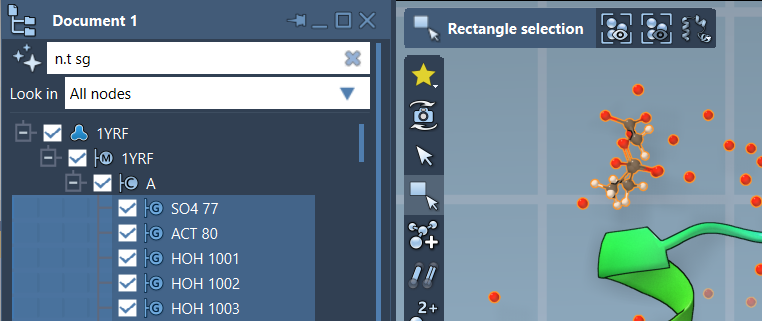
Most importantly, you can use these expressions in both the Find command and in the Document View’s filter field. Just hit Tab for autocompletion, or even better—ask the built-in AI Assistant to help generate the NSL expression for your current structure.
To learn more, visit the Node Specification Language documentation.
SAMSON and all SAMSON Extensions are free for non-commercial use. You can download SAMSON at https://www.samson-connect.net.