



As a molecular modeler, have you ever found yourself struggling with disconnected tools for visualizing molecular interactions? Or perhaps you’ve wished for seamless integration between 2D and 3D molecular designs? The Interaction Designer in the SAMSON platform offers a streamlined solution for both visualizing and designing molecules in a unified environment.
The Interaction Designer allows users to create and manipulate 2D interaction diagrams, such as ligand-protein interactions, while maintaining synchronization with a 3D viewport. This coupled view enables a comprehensive exploration and design process. Whether you’re modeling hydrogen bonds, van der Waals forces, or halogen bonds, the Interaction Designer makes it intuitive to not only detect but also edit these interactions in real time.
Key Functions: Visualizing and Editing 2D Interaction Diagrams
With a simple command, Home > Diagram, you can automatically generate interaction diagrams based on the current selection—or the entire document if nothing is highlighted. These diagrams vividly depict various molecular interactions, such as hydrogen bonds, clashes, van der Waals forces, and more.
The true strength of the Interaction Designer lies in its tight integration between 2D and 3D visualizations. You can:
- Show binding pockets for protein-ligand interactions.
- Visualize solvent accessibility for ligand atoms.
- Select and zoom on any atoms or structures interactively.
Users can also edit the diagrams to customize them to their insight needs:
- Rearrange labels and interaction symbols for an aesthetic or logical layout.
- Color-code interactions by double-clicking their legend entries.
- Hide or display specific interactions in the diagram.
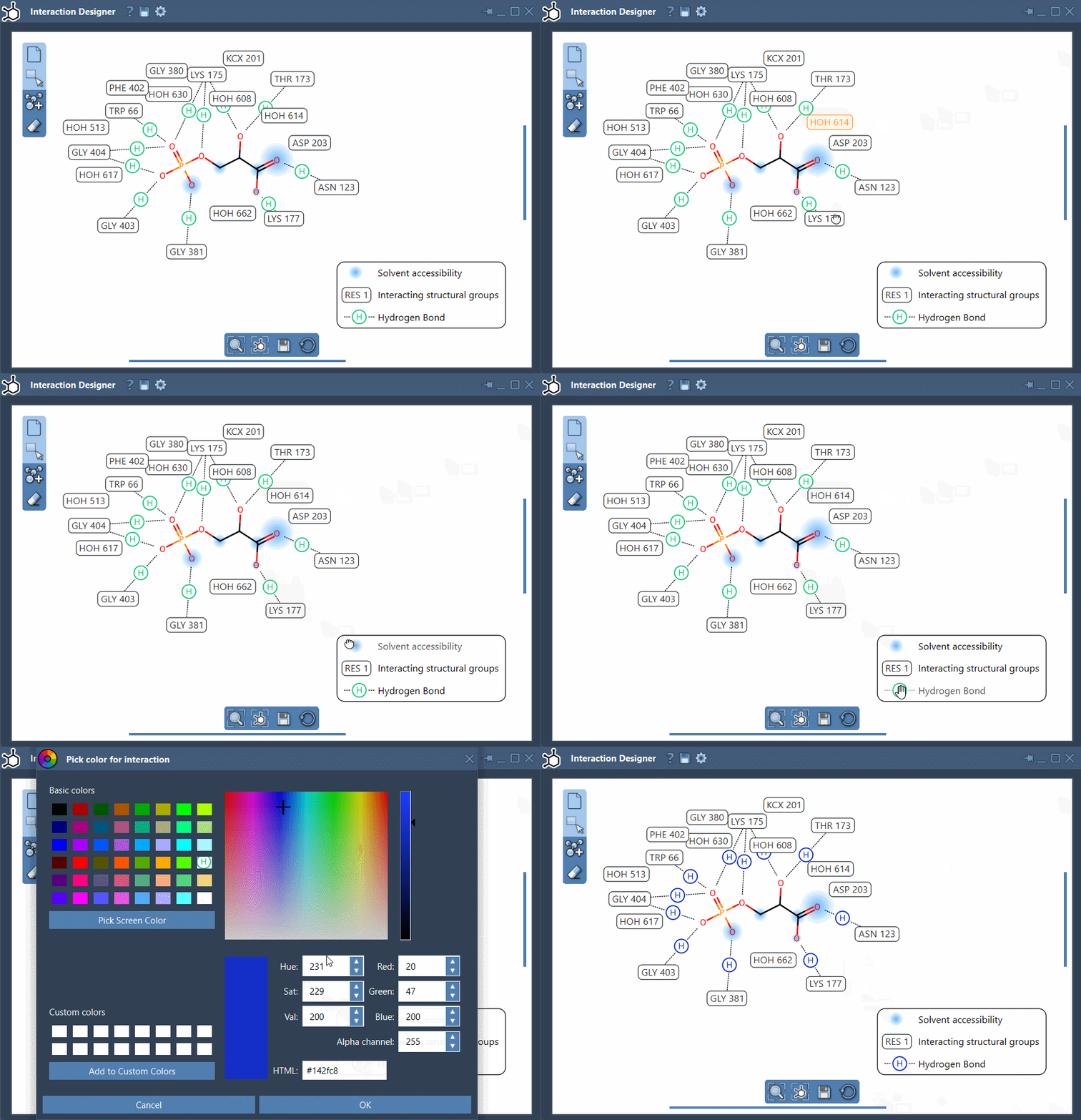
These features make it easier to identify key interactions in complex systems, vital for tasks like drug discovery or protein-ligand binding studies.
Building New Molecules in 2D
The Interaction Designer doesn’t just stop at interaction visualization. It offers a robust toolset for 2D molecular design. Whether you’re starting from scratch or editing an existing structure, the designer ensures your changes sync dynamically with the 3D viewport.
Here’s how you can start building:
- Add Atoms: In the left panel, click on “Add” (
 ) and begin placing atoms in the workspace. By default, a carbon atom is assigned, but you can switch elements through the Periodic Table or the Asset Browser.
 - Add Fragments: The Asset Browser also allows you to incorporate pre-designed molecular fragments. Moreover, you can change the pivot atom of any fragment for ultimate flexibility.
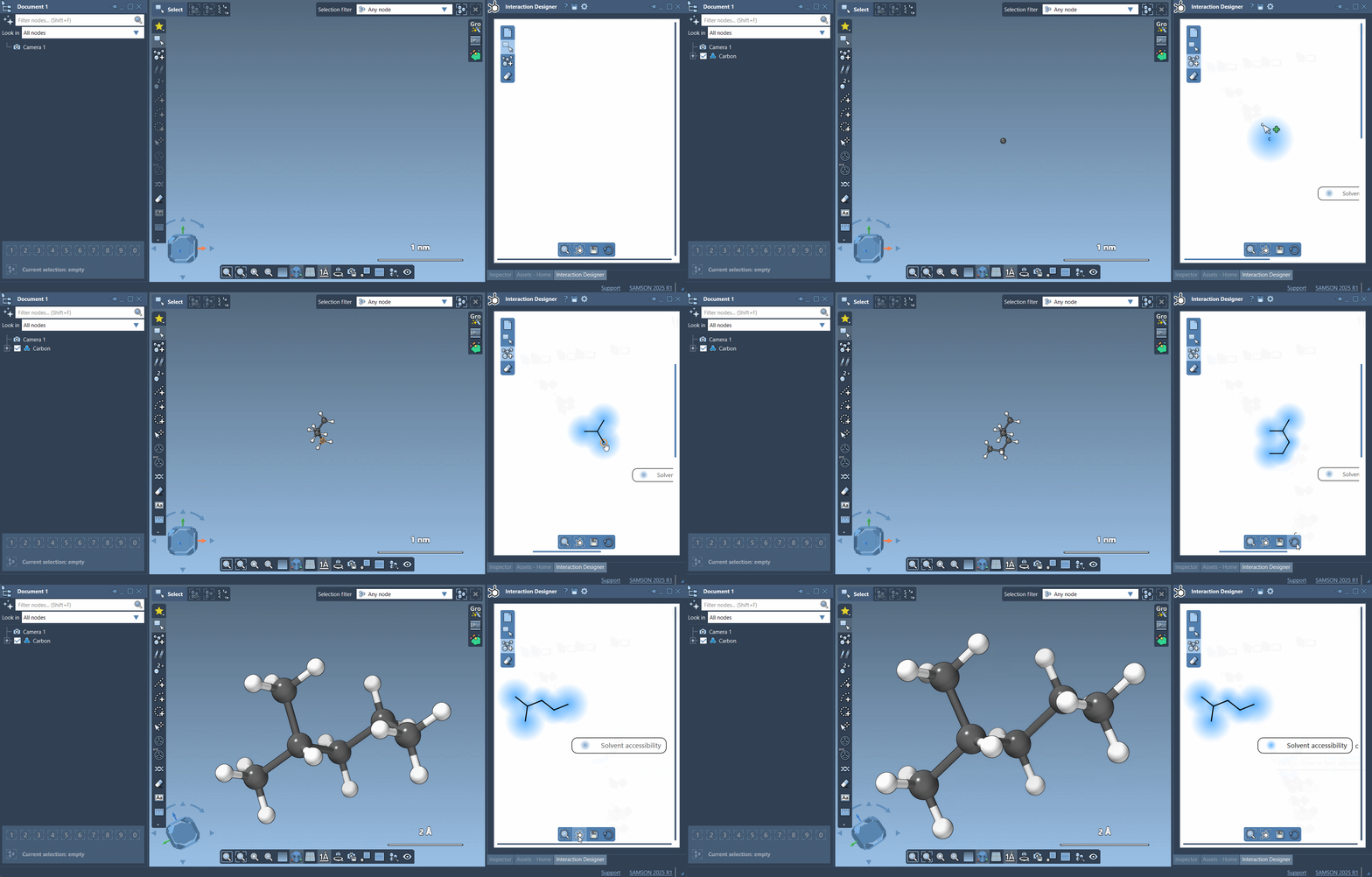
For example, if you’re working with organic chemistry frameworks, you can easily add functional groups, modify atom types, or erase unwanted components. Just click on “Erase” ( ) to remove specific atoms from your structure.
The Interaction Designer simplifies molecule creation while offering complete control over atom placement, types, and interactions, enhancing workflows for structure-based design projects.
Exporting Interaction Diagrams
When you’re ready to share your results, the Interaction Designer provides options to export interaction diagrams and molecule sketches in various formats—including PNG, JPEG, BMP, and SVG. Simply click “Save” ( ) in the bottom panel, and choose the format that best fits your project’s needs.
This feature is particularly useful for preparing publications, sharing project insights with your team, or documenting discoveries for future reference.
Conclusion
The Interaction Designer in SAMSON addresses a critical gap for molecular modelers by integrating powerful 2D and 3D design tools into one platform. Its visualization capabilities accelerate understanding of molecular interactions, while its design tools simplify creating new molecules. All of this is intuitive and deeply customizable for your specific workflow.
To learn more, visit the original documentation page: https://documentation.samson-connect.net/users/latest/interaction-designer/
*Note: SAMSON and all SAMSON Extensions are free for non-commercial use. You can get SAMSON at https://www.samson-connect.net.