



One of the recurring challenges in molecular modeling is achieving stable and realistic molecular structures. Without proper optimization, simulations or workflows might yield inaccurate results, leading to wasted time and resources. Geometry optimization, aiming to find the energy minima of molecular structures, plays a vital role in solving this problem. This is where the Fast Inertial Relaxation Engine (FIRE) Minimizer, available as a SAMSON Extension, stands out as an effective solution for molecular design tasks.
Why Optimize with FIRE?
The FIRE Minimizer is an advanced algorithm specifically designed for efficiency during large-scale molecular motions. It is particularly useful for scenarios where other methods, such as steepest descent, might struggle due to slower convergence. Key advantages include:
- Faster convergence compared to steepest descent algorithms, especially during collective motions.
- Compatibility with any SAMSON interaction model, making it flexible for various molecular systems.
- Utility in pre-simulation cleanup and structural relaxation, where accurate geometries are essential.
By fine-tuning molecular geometries efficiently with FIRE, you can ensure realistic setups for computational experiments or simulations. The FIRE Minimizer not only saves time but also paves the way for better reproducibility in molecular studies.
How to Use the FIRE Minimizer
Setting up and using the FIRE Minimizer in SAMSON is straightforward. Here’s an overview:
1. Load Your Molecular System
Start by loading your molecular system into SAMSON. SAMSON supports various formats such as PDB and MOL2. For more details, check out the Loading Molecules Guide.
2. Add a Simulator
Next, set up your simulation environment by following these steps:
- Head to Edit > Add Simulator in SAMSON.
- Select the interaction model appropriate for your molecular system.
- In the State Updaters list, choose FIRE as the selected algorithm for geometry optimization.
You’re now ready to perform geometry optimization with all the computational tools available in SAMSON.
3. Fine-Tune Settings
The FIRE Minimizer Extension offers options to fine-tune how the algorithm behaves:
| Setting | Description |
|---|---|
| Step size | Initial integration step size for the minimization process. |
| Steps | The number of FIRE steps between updates displayed on the viewport. |
| Fixed | An optional setting to lock the step size during the process. |
Additionally, if you manipulate atoms manually during optimization, resetting the history by pressing the Reset button ensures smoother minimization from then on.
Efficiency: FIRE vs. Steepest Descent
If you’re accustomed to using steepest descent for geometry optimization, the differences with FIRE are immediately noticeable. FIRE excels, particularly in cases where potential energy changes are minimal, but geometry evolves significantly. Here’s a direct visual comparison:

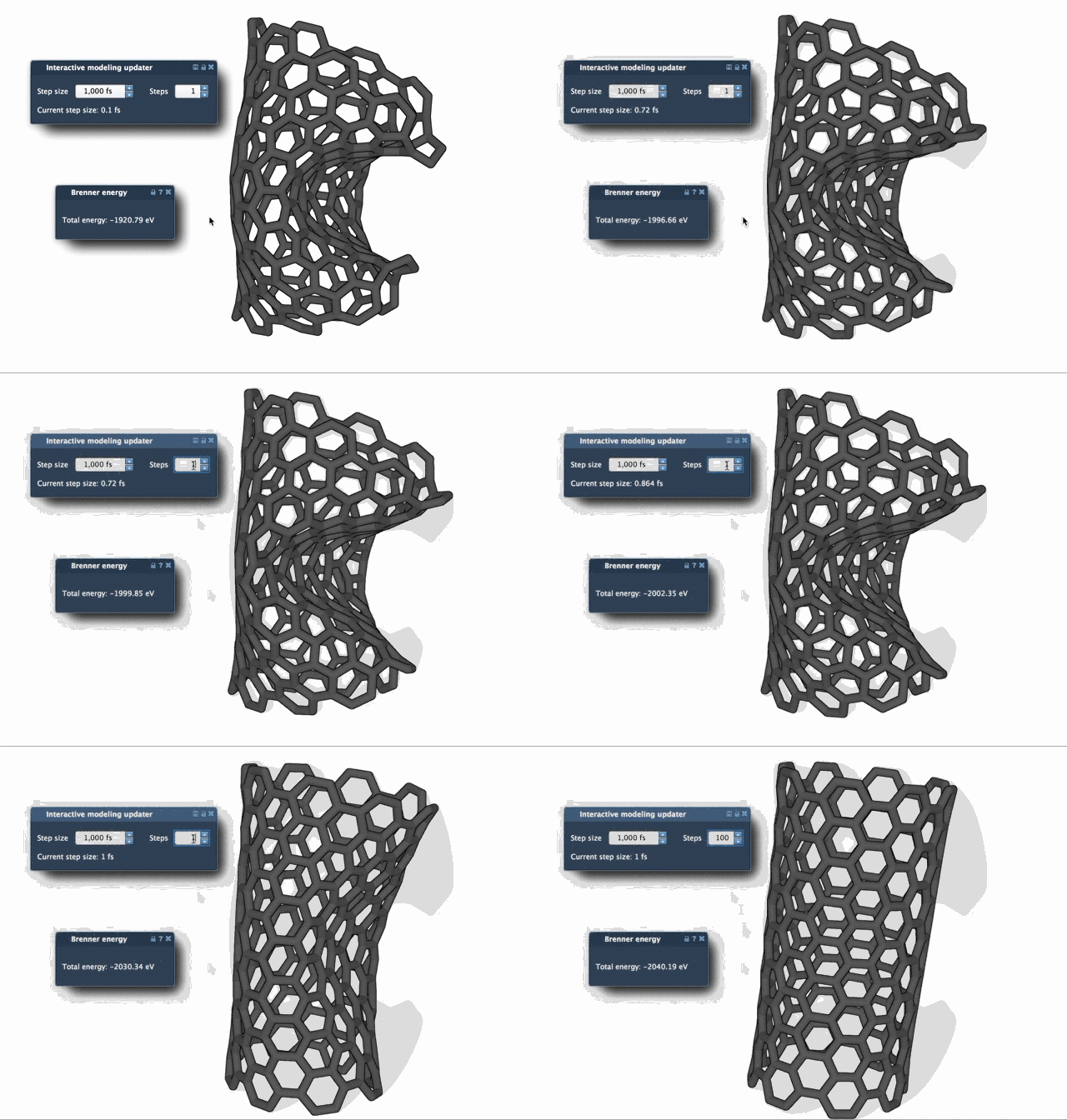
The enhanced speed of FIRE minimizes computational overhead while maintaining precision—a vital feature for large, complex structures.
Integrating into SAMSON Workflows
The FIRE Minimizer integrates seamlessly with other SAMSON apps and extensions. For instance, it is utilized in the Molecular Restrainer extension to optimize NMR-derived structures. Whatever your workflow, FIRE can accelerate geometry optimization tasks and enhance your results.
Learn More
To dive deeper into the FIRE Minimizer and its applications, check out the official documentation at https://documentation.samson-connect.net/tutorials/fire/ready-set-fire/.
Note: SAMSON and all SAMSON Extensions are free for non-commercial use. You can download SAMSON at https://www.samson-connect.net.