



For molecular modelers and researchers working on custom polymer design, one of the biggest challenges is handling sequences effectively when building large, complex structures. Whether you’re optimizing for specific material properties, creating biopolymers, or simulating new synthetic chains, accurately registering and stitching monomers together is crucial. Fortunately, the Polymer Builder in SAMSON offers powerful tools for this process, including the ability to register and manage monomer sequences. Let’s explore how this can streamline your workflow and prevent common bottlenecks.
Why Register Monomer Sequences?
When designing polymers, not all structures are simple linear chains. Many involve repeating patterns, cross-linking, or specific sequences of monomers that define their properties. Registering sequences brings two key advantages:
- It ensures consistency by directly linking sequences to registered monomers.
- It allows you to easily reuse or modify those sequences as needed.
By leveraging pre-defined sequences, you can avoid errors, save time, and focus on the result you’re building towards.
How Does it Work?
Follow these steps to register monomer sequences in SAMSON’s Polymer Builder:
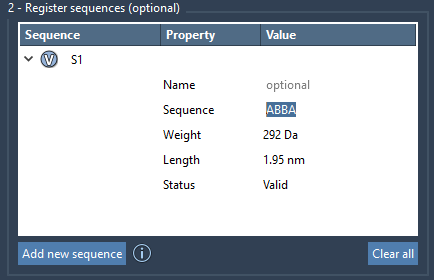
- Step 1: In the Polymer Builder interface, click on Add new sequence.
- Step 2: Input your sequence by combining registered monomer IDs. For instance, if you’ve registered monomers
AandB, you can create a sequence likeABBA.
Once added, the tool provides instant feedback about the sequence’s validity. Errors, if any, are highlighted in the Status property, making it easy to catch typos or inconsistencies.
Each sequence gets an automatic identifier (S1, S2, etc.) for easy reference. You’ll also see vital details such as molecular weight and length for every sequence, helping you predict the physical properties of the resulting polymer.
Tweak Structural and Bond Preferences
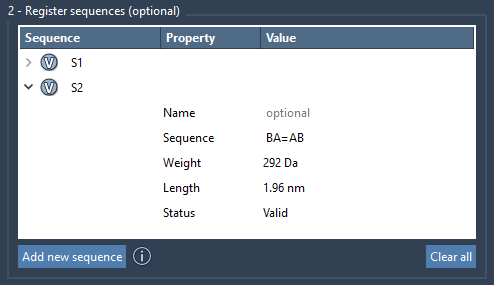
SAMSON allows you to specify detailed connections between monomers in a sequence:
- By default, a single bond is used between monomers.
- Use
=to indicate double bonds. - Use
#for triple bonds.
For example:
A=Bestablishes a double bond betweenAandB.AB#BAcreates a triple bond betweenABandBA.
This flexibility makes the Polymer Builder remarkably versatile, catering to use cases from basic chain design to advanced custom molecular scaffolds.
Guidelines for Efficient Sequence Management
When working with sequences, keep these tips in mind:
- Name groups: If desired, assign a Name to the sequence for easier organization in the polymer’s structural hierarchy. For example, generated polymers can group sequences under named structural entities.
- Exception handling: The “Status” property immediately shows if a sequence has any errors, making troubleshooting much simpler.
- Quick reference: Use the V button to visually highlight monomers used in a sequence, ensuring consistency in your design process.
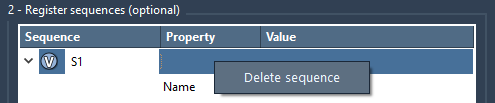
Modifications are simple too. You can directly edit sequence tables or delete specific sequences (via right-click > Delete sequence) without affecting the rest of your design. For complete reorganization, the Clear all option resets sequences entirely.
Streamline Your Polymer Design Process
Defining polymer sequences in SAMSON’s Polymer Builder puts you in control of your design, reducing complexity and enhancing flexibility. Whether you aim to model conjugated polymers for electronics, explore drug-polymer interactions, or test material properties, registered sequences form the foundation for efficient workflows. Learn more about SAMSON’s Polymer Builder tools and take the next step toward advancing your molecular modeling projects.
Note: SAMSON and all SAMSON Extensions are free for non-commercial use. You can get SAMSON for free at SAMSON Connect.