



In the field of molecular modeling, understanding and visualizing the interactions between atoms, residues, or molecules is an essential step. Whether you’re working on protein-ligand docking, observing chemical interactions, or refining your molecular structure designs, a clear and interactive diagram can make all the difference. But how do you efficiently convert complex 3D molecular structures into tidy and informative 2D interaction diagrams? Enter the Interaction Designer in SAMSON.
Why visualize molecular interactions in 2D?
While 3D modeling is pivotal in molecular design, 2D interaction diagrams help focus solely on the interaction characteristics, such as hydrogen bonds, ionic interactions, or aromatic contacts. These diagrams are indispensable for presentations, publications, and communication across interdisciplinary teams. Creating them manually can be tedious and prone to oversight; automated tools like the Interaction Designer remove that hassle by providing clear, synchronized representations.
How does the Interaction Designer simplify the process?
The Interaction Designer in SAMSON allows researchers to easily generate 2D interaction diagrams directly from their 3D molecular structures. With a few commands, you can visualize key molecular contacts, analyze binding pockets, and explore solvent accessibility of ligand atoms.
Steps to create interaction diagrams:
- Navigate to the Interaction Designer interface in SAMSON.
- Use the Home > Diagram command to automatically generate an interaction diagram based on your selection, or even the entire document if nothing is selected.
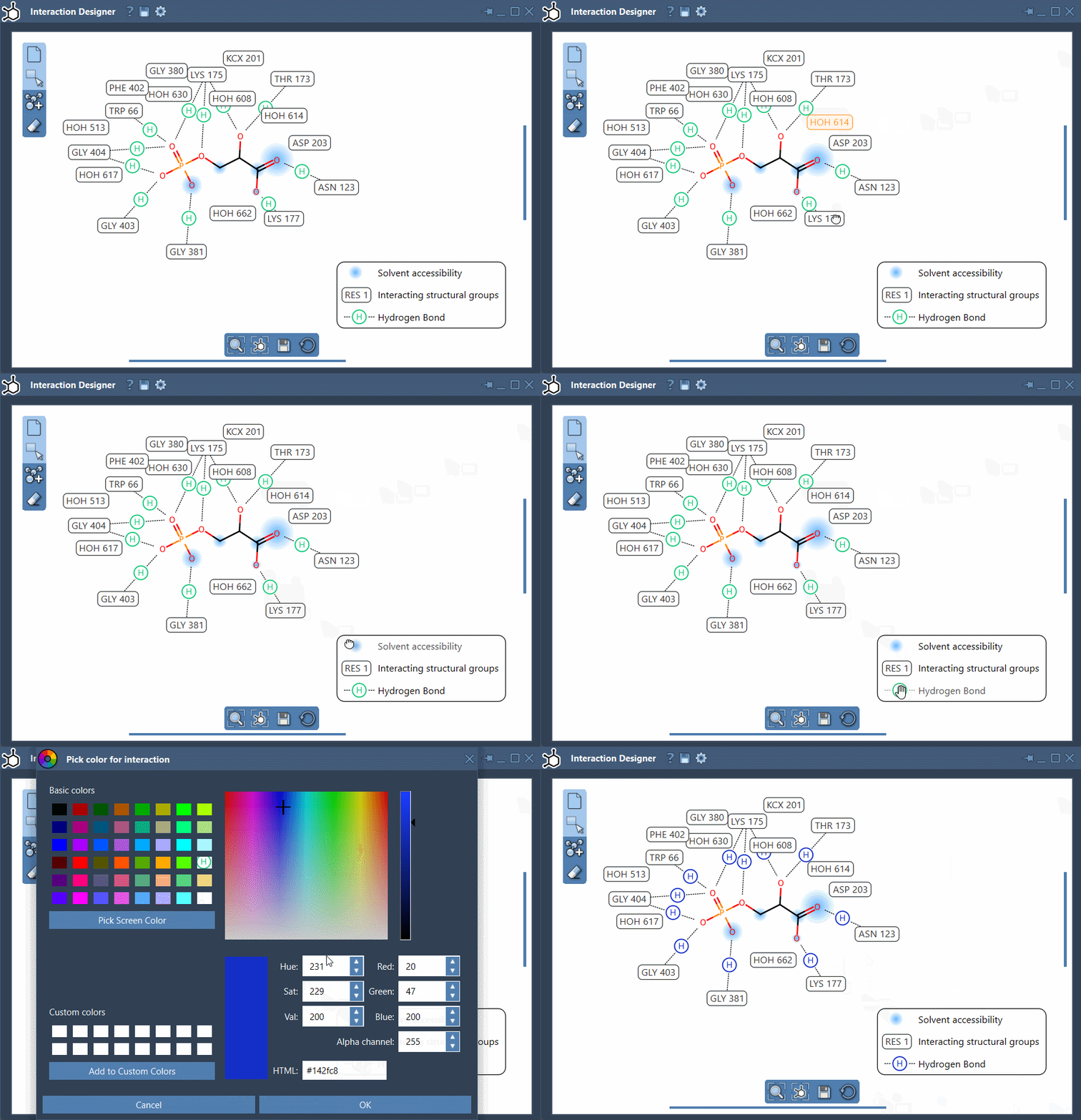
- Fine-tune the diagram as needed: rearrange labels, hide interactions, or modify their colors directly in the legend for enhanced clarity.
Features in focus
The Interaction Designer offers a number of useful capabilities to take your interaction diagrams to the next level:
- Real-time 2D and 3D synchronization: Any changes made to your 3D model reflect instantly in the 2D diagram and vice versa.
- Highlight binding details: Visualize the binding pocket, interacting residues, and even solvent accessibility around ligand atoms to get nuanced insights.
- Customization of interactions: Easily control the layout by moving labels and symbols. You can also toggle visibility of interactions to remove unnecessary information or change interaction colors to fit your preferences.
Pro tip:
Use the bottom menu of the Interaction Designer to align views, ensuring that your 2D diagram and 3D viewport remain consistent while navigating. Fine adjustments like zooming (Ctrl/Cmd + scroll) and panning (using mouse buttons) further enhance usability.
Showcasing supported interactions
The Interaction Designer provides detailed representations of various molecular interactions, including hydrogen bonds, ionic interactions, steric clashes, and more. Aromatic and π-system interactions are also visualized and categorized, adding depth to your analysis. Detailed criteria, such as distances, angles, and atom categories, ensure that detected interactions are geometrically accurate, though it’s important to keep in mind that it doesn’t estimate interaction energies or validate stabilization effects.
A seamless experience for publication-ready outputs
When it’s time to share your work, export your 2D interaction diagrams in widely-used formats such as PNG, JPG, SVG, or BMP. This ensures that your polished molecular insights are ready for presentation or documentation.
The Interaction Designer is a vital tool for molecular designers, offering an intuitive system to translate complex 3D structures into elegant 2D diagrams. It saves time, enhances clarity, and facilitates collaboration among scientific teams.
Learn more about creating interaction diagrams with the Interaction Designer on the official documentation page.
SAMSON and all SAMSON Extensions are free for non-commercial use. Download SAMSON today at https://www.samson-connect.net.