



One of the common challenges for molecular modelers is understanding the complex torsional motions in molecules. Whether you’re investigating backbone torsions, rotamers, or collective twisting motions, the ability to quantify dihedral angles along molecular paths is crucial. The Dihedral analysis in SAMSON’s Path Analyzer is a powerful tool designed to address exactly this need, providing you with detailed insights into torsional transitions and preferred conformations.
Why Track Dihedral Angles?
Molecular torsions are at the heart of many structural and energetic phenomena in molecular design. By evaluating dihedral angles—defined by four selected atom groups—you can uncover rotational transitions in molecules, analyze energy landscapes, and characterize conformational stability. This provides valuable information for fields like drug discovery, protein folding, and nanomaterials design.
Setting Up Dihedral Analysis
Using the Dihedral tool in SAMSON’s Path Analyzer is straightforward. Follow these steps to set up your analysis:
- Launch the Path Analyzer module in SAMSON.
- Select “Dihedral” under the Observable type.
- Choose the molecular path or trajectory you want to analyze.
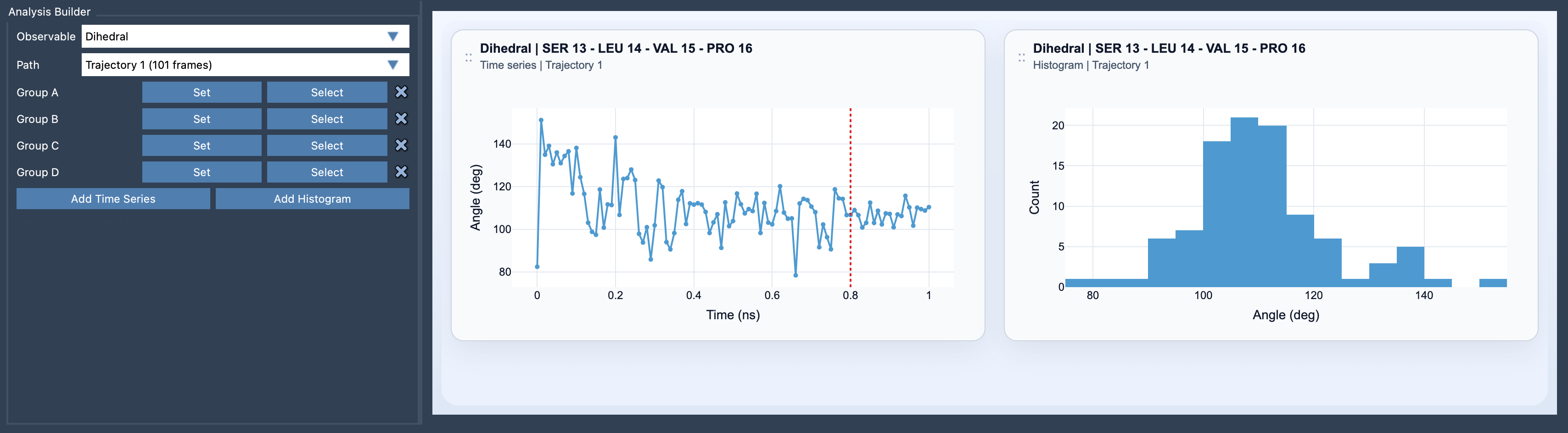
- Define four atom-containing groups: Group A, Group B, Group C, and Group D. The second and third groups will define the central bond or central geometric axis of the torsion.
- Click “Add Time Series” or “Add Histogram” depending on your analysis goal.
Visualizing Torsions: Time Series vs. Histogram
The Dihedral tool provides two visualization modes to serve different analytical needs:
- Time Series: Ideal for tracking torsional transitions along the molecular path or trajectory. This allows you to pinpoint exactly when and where conformational changes occur.
- Histogram: Excellent for identifying favored torsional states at a glance, helping you quickly spot metastable conformations in your molecular system.
How Does the Tool Work?
The Dihedral tool computes torsional angles by converting selected atom groups into representative positions. For single-atom groups, the atomic positions are used directly. For multi-atom groups, the center of mass is calculated as the representative position.
Once the representative positions are identified, the torsion is calculated using the plane normals formed by the atom groups, giving you the desired dihedral angle in degrees. This flexibility makes the tool suitable for analyzing a wide range of molecular systems, from small organic molecules to complex macromolecular assemblies.
Tips for Enhanced Analysis
To maximize the usefulness of your analysis, consider pairing the Dihedral observable with other tools in Path Analyzer:
- Use dihedral histograms to quickly identify metastable states in molecules, saving you time during your investigation stages.
- Combine dihedral analysis with RMSD or Energy observables to correlate torsional transitions with structural or energetic changes.
Conclusion
Mastering molecular torsions is easier with the Dihedral analysis tool in SAMSON’s Path Analyzer. Whether you’re investigating the dynamics of biomolecules or the stability of synthetic materials, this tool offers the insights you need to make informed decisions.
To dive deeper into this topic, explore SAMSON’s user documentation page on Dihedral analysis.
Note: SAMSON and all SAMSON Extensions are free for non-commercial use. Discover more and get started today at SAMSON Connect.