



Molecular modeling often involves grapple points like creating precise atomic structures, handling topology adjustments, and simulating realistic interactions. Imagine a tool that allows you to interactively adjust bonds, atom types, and molecular systems with ease—all guided by accurate force field simulations. Enter the Interactive Modeling Universal Force Field (IM-UFF) in SAMSON: an advanced extension that takes the Universal Force Field (UFF) to the next level by enabling seamless and interactive molecular editing.
Why IM-UFF is a Game-Changer
If you’ve ever struggled with reconciling static topological changes and dynamic simulations during model building, you’re not alone. Whether you need to create or break covalent bonds, modify their order, or refine atom typizations interactively—IM-UFF achieves this without disrupting your workflow. With this tool, your molecular structure dynamically adjusts itself in real-time so that it better represents the evolving atomic organization. This makes IM-UFF uniquely beneficial for tasks like quick prototyping of new structures or experimenting with reactive processes.
What Makes It Interactive?
The heart of IM-UFF lies in allowing molecules to adapt to physical manipulations performed by the user. For instance, as you move atoms around:
- Bonds automatically form or break based on atomic positions and forces.
- Bond orders adjust dynamically.
- Atoms are re-typed as their chemical environments change.
IM-UFF is designed to preserve molecular integrity during minor manipulations while updating the topology smoothly in response to significant changes. Whether you’re simulating bond stretching or approximating a reaction mechanism, this extension keeps things intuitive and scientifically accurate.
Quick Setup Walkthrough
Setting up IM-UFF in SAMSON is straightforward. Here’s how to start:
- First, load a molecular system in SAMSON.
- Add the IM-UFF extension by navigating to Edit > Simulate > Add simulator or using the shortcut
Ctrl + Shift + M(orCmd + Shift + Mon macOS). - Select “Interactive Modeling Universal Force Field” in the list of interaction models.
- Be sure to select the appropriate simulation state updater, for example, the FIRE minimizer, to ensure smooth simulations.
What sets IM-UFF apart from UFF is its lack of a dedicated setup window, as the extension focuses on interactivity. Once enabled, you’ll notice additional options, including:
- Static topology (UFF only): Toggle between “standard UFF” and fully interactive IM-UFF modes for different use cases.
- Keep vdW for manipulated: Customize whether manipulated atoms are excluded from van der Waals interactions to simplify complex operations like connecting distant atoms.
See IM-UFF in Action
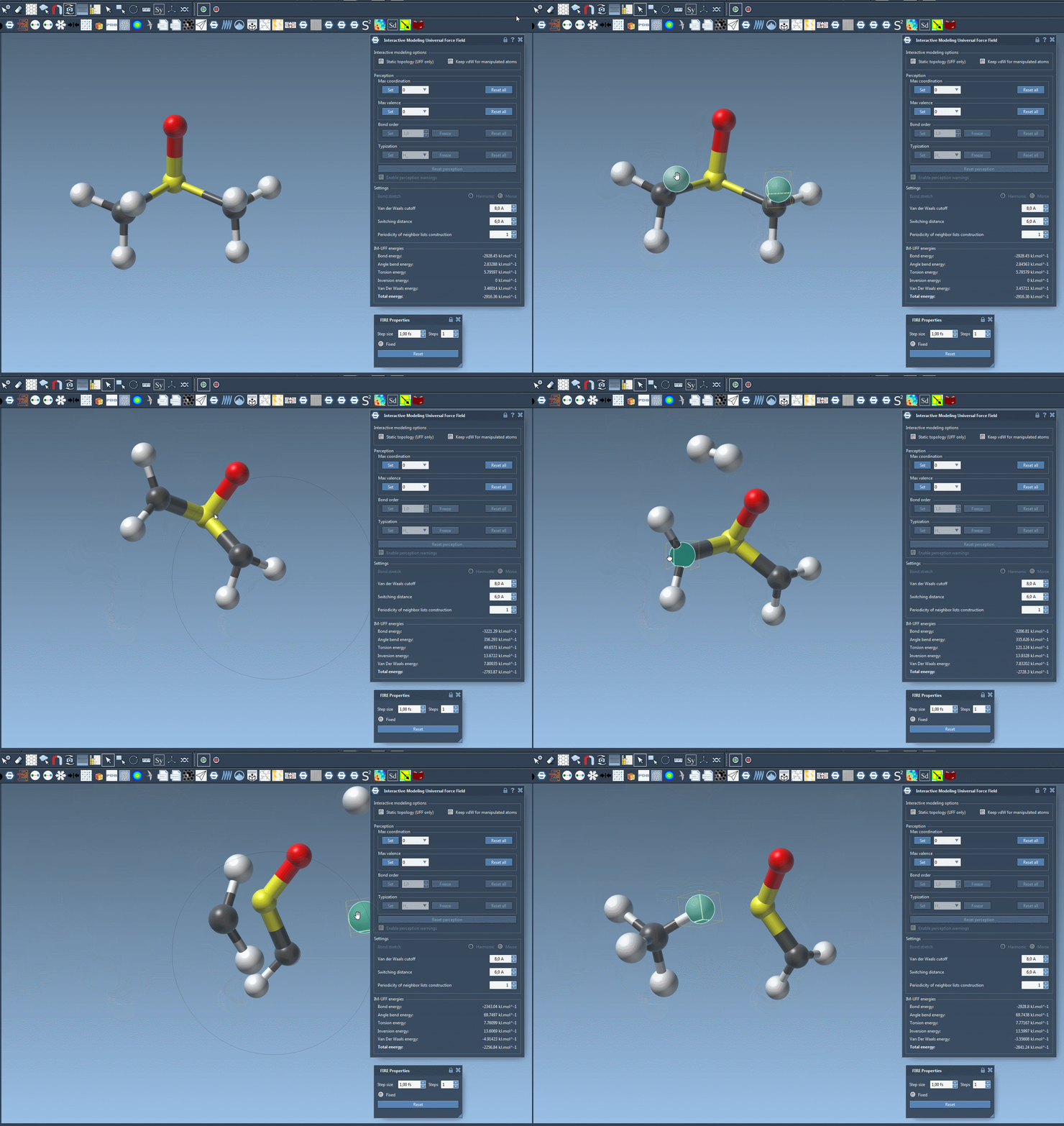
With IM-UFF, you can edit molecular systems interactively while observing real-time topology changes. For instance, displacing atoms slightly causes local structural adjustments without breaking bonds, while larger movements automatically trigger bond breaking or formation processes. Here’s an example image that demonstrates these smooth transitions:
Additional Customization Options
IM-UFF provides various parameters to fine-tune the interaction model for different tasks. You can:
- Adjust van der Waals cutoffs and switching distances.
- Control how often the neighbor list is updated for simulations.
For molecule-specific operations, IM-UFF allows you to change maximum coordination and valence, especially useful for handling dynamic typizations where bond orders continuously evolve. All these capabilities make IM-UFF a versatile tool for molecular modelers.
Conclusion
If you’re looking to perform dynamic, physically accurate molecular modeling without the constraints of static simulations, IM-UFF is worth exploring. Its interactive features simplify what would otherwise be tedious tasks, enabling faster, more intuitive workflows.
Discover more about IM-UFF and its functionalities by visiting the official documentation.
Note: SAMSON and all SAMSON Extensions are free for non-commercial use. You can download SAMSON from SAMSON Connect.