



A molecular structure can look crowded without telling you whether two groups consistently occupy the same local environment. A single distance measurement—or a quick visual inspection—may miss the broader pattern. The radial distribution function (RDF) helps answer a more useful question: across a molecular path, how are distances between two selected groups distributed?
In SAMSON’s Path Analyzer, an RDF is shown as a one-dimensional curve of density versus distance. You choose two atom-containing groups, and the analysis counts sampled pairs at different separations. That makes it useful for exploring local packing, solvation structure, and characteristic interaction distances without reducing the analysis to one arbitrarily chosen pair.
Why the shell matters
At a basic level, an RDF is built by counting how many sampled pairs fall within a thin distance shell around a radius r. The shell gets larger as the radius increases: in three dimensions, its volume is approximately 4πr2Δr, where Δr is the bin width. So a larger number of pairs at a greater distance does not automatically mean that distance is especially favored; there is simply more space in which pairs can be found.
When valid periodic unit-cell information is available, Path Analyzer can account for the expected ideal-gas occupancy of each shell and report a normalized g(r). This is the familiar form used to examine how pair density varies with separation relative to that reference. If periodic normalization is not possible, the app instead displays an RDF-style curve in arbitrary units. That curve can still show how counts vary with distance, but it should not be read as a properly normalized g(r).
Set up the question before the plot
Start by deciding what relationship you want to investigate. For example, Group A might represent a ligand and Group B selected atoms in a binding pocket; alternatively, the groups might represent a solute and solvent or two subsets of residues. The groups must contain atoms. Choosing chemically meaningful groups makes the curve easier to interpret than selecting broad, unrelated parts of a structure.
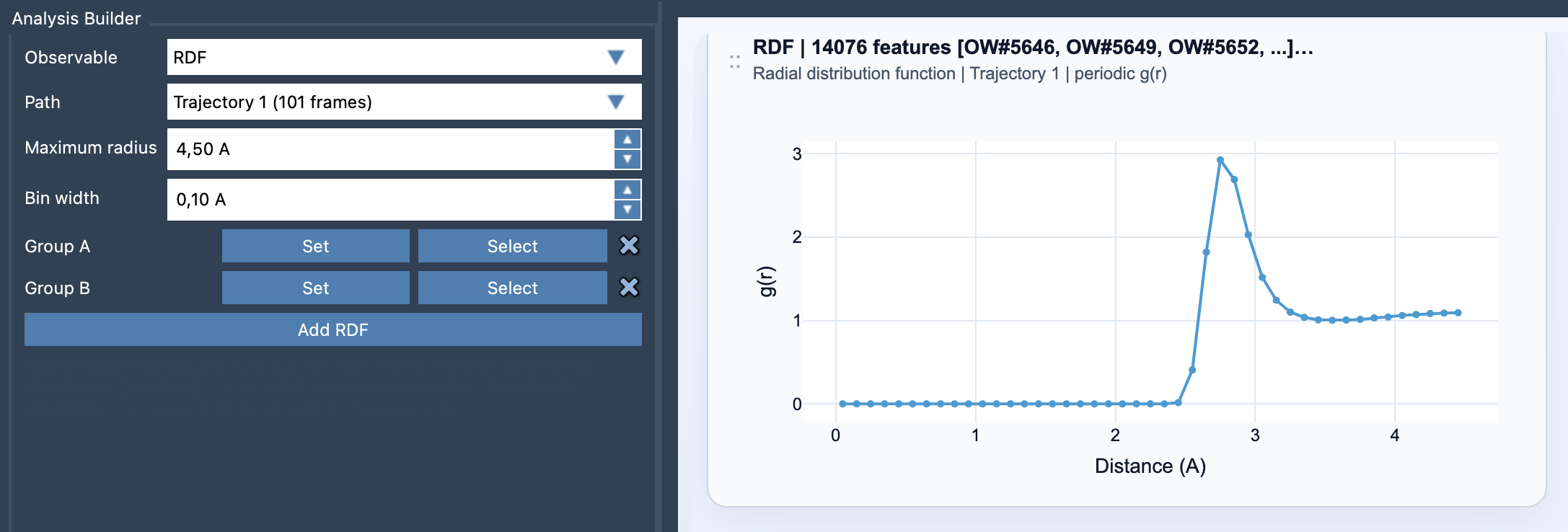
In Path Analyzer, choose RDF as the observable, select a path, define Group A and Group B, then set the maximum radius and bin width before clicking Add RDF. The maximum radius sets how far out the distribution is sampled. The bin width sets its radial resolution: smaller bins can distinguish finer changes, while bins that are too fine can make the curve noisy. A wider bin smooths the result but may blur nearby features. Choose a width that balances these two needs for the question and data at hand.
Read the curve with care
Look for distance ranges where the curve changes, and relate those features back to the groups you selected. A peak can indicate a distance range with a relatively strong representation in the sampled pair distribution, but the RDF alone does not identify a chemical cause or establish that an interaction is energetically favorable. Use it as a structural summary, then consider the molecular context and other evidence before drawing conclusions.
Also keep in mind what the plot summarizes: RDF cards are not linked to individual frames because they summarize the path globally. The result is therefore useful for understanding the overall distance distribution along that path, rather than locating a feature in one particular frame. If you need to investigate a specific configuration, inspect that structure separately.
The practical takeaway is simple: define the two groups carefully, choose a radius range that fits the question, and treat bin width as a resolution-versus-noise choice. Then check whether the curve is properly normalized before comparing its values or interpreting it as g(r).
For the full RDF reference, see the Path Analyzer RDF documentation.
Note: SAMSON and all SAMSON Extensions are free for non-commercial use. Get SAMSON.