



Building a polymer model often starts with a deceptively simple question: how do you turn a collection of molecular fragments into the exact chain you need? Manually copying units, choosing connection points, and keeping track of repeating patterns can become tedious—and a small mistake in the sequence can change the structure you generate.
SAMSON’s Polymer Builder offers a way to organize that work. You register molecular fragments as monomers, define reusable sequences, and then describe the polymer you want with a compact expression. The useful shift is to treat the task as two parts: first define reliable building blocks, then assemble them in a readable sequence.
Start with connection points, not the whole chain
Before building a long polymer, select a candidate monomer in the document or viewport and register it. Polymer Builder automatically proposes start and end atoms at opposite ends of the fragment. Those atoms determine how the monomer connects to its neighbors, so inspect the proposed connection points rather than treating registration as a purely administrative step.
If the automatic choice is not appropriate, you can set an atom from the current selection or pick one from the structure’s atom list. The tool also provides a way to highlight the structure or atoms. This is especially useful when a fragment has several plausible attachment sites: confirming the endpoints early helps avoid discovering a connection-point problem only after generating a longer chain.
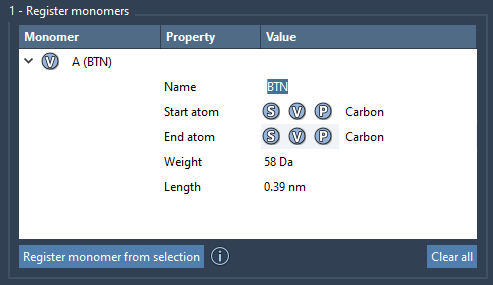
Registered monomers receive unique letter IDs such as A, B, and C. The table displays molecular weight and the distance between each monomer’s start and end atoms. These values give you a quick way to review the building blocks you have registered. You can edit the table, remove an individual monomer, or clear it entirely. Keep in mind that modifying a registered monomer’s structure—for example, adding or removing an atom—deregisters it from the list.
Make repeating patterns reusable
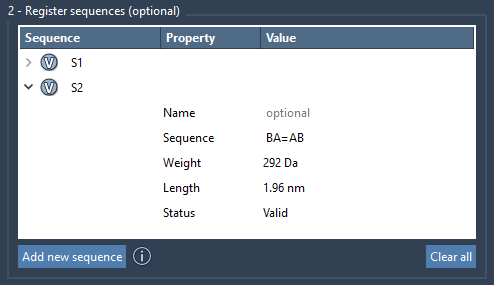
If a polymer contains a recurring motif, register that pattern as a sequence instead of retyping it throughout your final expression. For example, ABBA defines a sequence using monomers A and B. Each saved sequence receives an ID such as S1 or S2, which can then be used when generating the polymer.
Sequence validation is a helpful checkpoint. An invalid expression is reported in the Status property; a valid one is labeled Valid. You can also highlight the monomers used by a sequence, making it easier to check what a pattern refers to before using it in a larger assembly.
Describe the chain clearly
The generation expression can combine monomers, saved sequences, and repeat counts. For instance, 2*AB means two repeats of AB, producing ABAB. Likewise, 2*S1 + 2*S2 combines two repeats of each saved sequence. Thinking in these smaller, named pieces makes a complex design easier to read and revise than a long string of individual monomer IDs.
Bond types can be specified where units connect: use = for a double bond and # for a triple bond. For example, AB=BA connects the AB segment to BA with a double bond. The default connection is a single bond. Enter the expression and review the predicted molecular weight and length before generating the structure; these estimates provide a useful check that the intended composition is represented.

Generate, inspect, and preserve your work
When you generate the polymer, its shape is based on the directions between the start and end atoms of its monomers, and excess hydrogens at connection sites are removed. Optional settings can adjust hydrogens on connection atoms according to valence and try to avoid clashes between connected monomers. Clash adjustment may introduce slight curvature, so inspect the resulting structure rather than assuming the chain will remain perfectly straight.
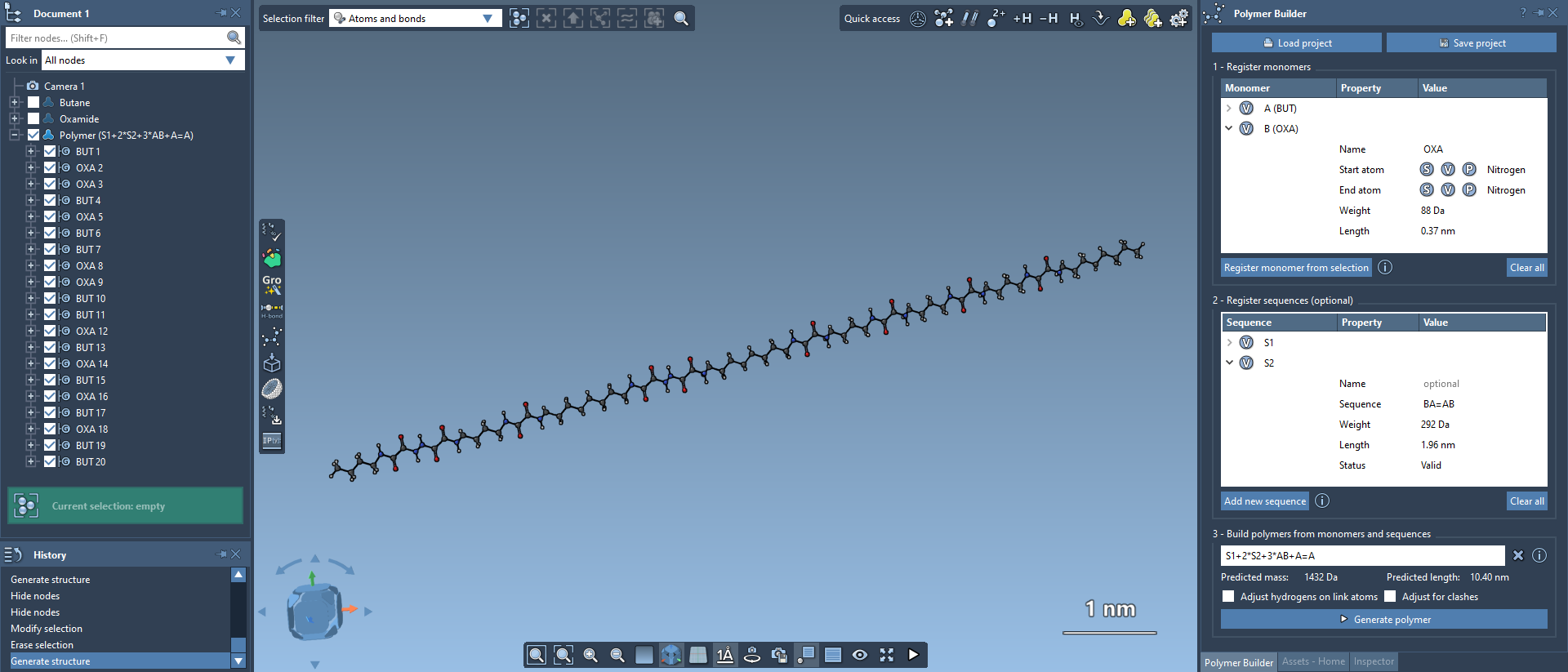
After generation, you can use SAMSON’s built-in minimizer via Edit > Minimize; it uses the Universal Force Field. If you plan to continue later, save the full project to preserve the monomer and sequence tables. To export just the polymer, select it and choose Home > File > Save selection as…. A generated polymer can also be registered as a new monomer for building block copolymers or extending a chain.
This workflow helps turn a custom-polymer design from repetitive manual assembly into a sequence you can inspect, reuse, and revise. For the complete instructions and interface details, see the Polymer Builder tutorial.
Note: SAMSON and all SAMSON Extensions are free for non-commercial use. Get SAMSON.