



Finding a useful region in a molecular structure can be harder than it sounds. A visual selection may be awkward to repeat, and selecting atoms one by one is not practical when the region is defined by a shape: a sphere around a binding site, a slice through a crystal, or a custom outline on a graphene sheet. A coordinate-based rule turns that shape into a repeatable selection criterion.
SAMSON’s Simple Script Extension lets you test atom properties such as a.x, a.y, and a.z, then change properties including selection and visibility. The same mathematical expressions can also be used in the Atoms Selector Extension when you only need to select atoms. The examples below show how to think about the geometry before applying it to your own model.
Start with a shape you can describe
A sphere is a useful first example. For a sphere of radius 10 centered at (0, 0, 2), the squared distance from an atom to the center is a.x^2 + a.y^2 + (a.z - 2)^2. It is inside the sphere when that value is less than the squared radius, 100. In Simple Script, the condition can control visibility:
if ((a.x^2 + a.y^2 + (a.z - 2)^2) < 100) a.visibilityFlag:=1;
else a.visibilityFlag:=0;
Squaring the radius avoids taking a square root for every comparison. The example uses the document’s selected length units, so check that the radius and coordinates are expressed in compatible units.
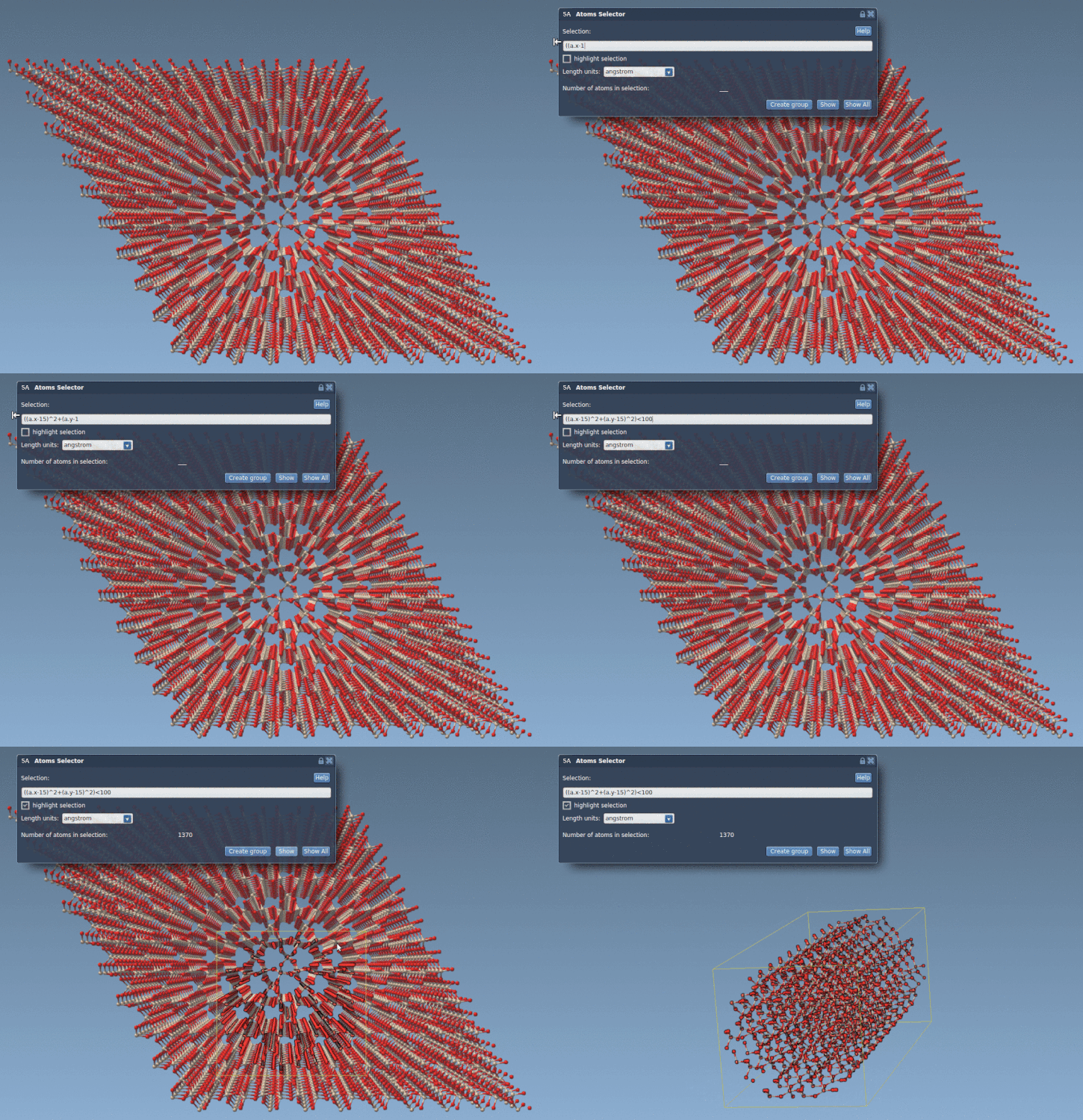
For a cylinder aligned with the z-axis, the distance from the axis depends only on x and y. A radius-10 cylinder centered on the z-axis can therefore be described by a.x^2 + a.y^2 < 100. The Atoms Selector example in the documentation shifts the cylinder’s center to (15, 15) in the xy-plane: (a.x - 15)^2 + (a.y - 15)^2 < 100. This selects atoms within the circular footprint, regardless of their z-coordinate.
Turn a drawn outline into a rule
More elaborate shapes can be assembled from regions defined by inequalities. The nano-batarang example does this by scaling the atom coordinates into working variables, then testing different parts of the outline with conditions. For instance, it uses x:=a.x/2 and y:=a.y/2, checks whether coordinates fall within ranges, and applies equations for the wings, head, and ears. A Boolean variable, iambatman, records whether an atom falls inside the outline.
At the end of the script, the result is applied to two atom properties: atoms inside the shape are selected and made visible; atoms outside it are deselected and hidden. This is useful when the goal is to isolate a patterned region from a larger sheet, but remember that hiding atoms changes what is displayed, not just what is selected.

A few checks before running a selection
- Confirm the coordinate scale. The batarang example notes that positions should be at least in nanometers and divides the coordinates by two before applying its shape equations. Adjust the scale and dimensions for your structure rather than copying the numbers blindly.
- Test a simple boundary first. Begin with an easily understood condition, such as a sphere or a half-space, and inspect which atoms are selected before using a longer piecewise outline.
- Choose the right tool. Use Atoms Selector for a mathematical selection expression. Use Simple Script when you also want to modify supported atom properties, such as coordinates, visibility, or selection flags.
- Keep the scope in mind. These expressions operate on atoms in the active document. Properties such as element name can be tested, but only the listed editable properties can be changed by Simple Script.
Coordinate-based selection is not limited to playful shapes. The same approach can help isolate a crystal region, make a reproducible geometric selection, or expose just the part of a model you need to inspect. The key is to translate the intended boundary into a condition that matches the structure’s coordinate system.
For the complete tutorial and additional scripting examples, read the original SAMSON documentation.
Note: SAMSON and all SAMSON Extensions are free for non-commercial use. Get SAMSON.