



Building a polymer model one unit at a time can become tedious fast. Repeating the same fragment, keeping track of connection points, and expressing different bond types are all small tasks—but together they create plenty of opportunity for mistakes. Polymer Builder in SAMSON offers a way to turn selected molecular fragments into reusable monomers, then assemble them with a compact sequence expression.
The useful shift is to treat polymer construction as two related tasks: first define reliable building blocks, then describe how those blocks are arranged. That makes it easier to revise a design without starting over.
Start with the connection points
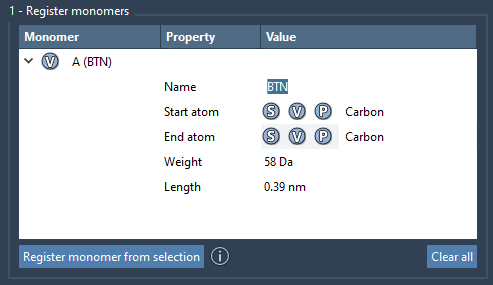
Before registering a fragment, select the intended monomer in the Document view or Viewport. Polymer Builder automatically chooses start and end atoms at opposite ends of the fragment, but those choices matter: they determine how the next unit connects and contribute to the generated chain’s shape.
If the automatic selection does not match your intended connection sites, you can override it. Use S to set an atom from the current selection, or P to pick an atom from a list. The V control highlights a structure or atoms, which can help you check what you are about to use.
Registered monomers receive unique letter IDs such as A and B. The table also displays molecular weight and the distance between each monomer’s start and end atoms—useful details to review before composing a longer chain.
Make repeated patterns reusable
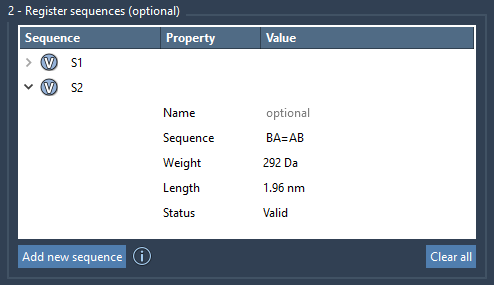
When a design contains a recurring pattern, register it as a sequence instead of typing the same series of monomers repeatedly. For example, if A and B are registered monomers, ABBA can be saved as a sequence and assigned an identifier such as S1. The sequence table shows whether an entry is valid, and its V button can highlight the monomers it uses.
You can also define the bond type between adjacent monomers. A plain connection uses a single bond by default; = indicates a double bond and # a triple bond. For example, A=B describes A connected to B by a double bond. This notation can be used in sequence definitions as well as in the final expression.
Describe the full chain with a compact expression
Once the building blocks are registered, combine monomer IDs and sequence IDs in the polymer expression. The + sign joins parts, while a repeat count lets you reuse a pattern: 2*AB means ABAB. Likewise, 2*S1 + 2*S2 places two repeats of each registered sequence in the expression.
Bond notation can connect larger pieces too. For example, AB=BA means the AB part is connected to BA by a double bond. Before generating, check that every monomer and sequence ID in the expression exists in the tables, and review the predicted molecular weight and length shown by the app.

Generate, inspect, and refine
After you click Generate polymer, the structure is built using the directions between the start and end atoms of the monomers. Excess hydrogens at connection sites are removed. The advanced options can adjust hydrogens at connection atoms based on valence and try to reduce clashes between connected monomers; clash adjustment may introduce slight curvature.
Generation is a starting point, not a substitute for checking the resulting structure. Inspect the connections and overall geometry, then use Edit > Minimize if you want to minimize the polymer. SAMSON’s built-in minimizer uses the Universal Force Field. You can also save the whole project to preserve the monomer and sequence tables, or select and save the generated polymer on its own.
A generated polymer can itself be registered as a monomer, which provides a practical route to building block copolymers or extending a chain. For the complete instructions and interface details, see the Polymer Builder tutorial.
Note: SAMSON and all SAMSON Extensions are free for non-commercial use. Get SAMSON.