



When using ARAP (As-Rigid-As-Possible) Interpolation to generate protein conformational transitions, an essential but sometimes overlooked step is how the structural connectivity—also known as ARAP edges—is defined. For molecular modelers preparing simulations or building transition pathways, getting the connectivity right can dramatically affect the interpolation results. If the model feels off or disjointed, it may stem from assumptions made during ARAP edge setup.
In this post, we take a closer look at edge construction in SAMSON’s ARAP Interpolation App—the choices, their implications, and how to visualize what's going on.
What Are ARAP Edges?
ARAP Interpolation works by treating selected atoms as nodes and defining geometric constraints between them—these constraints are the edges. The more biologically realistic your edge construction is, the more meaningful the interpolated motion will be.
Common Edge Construction Options
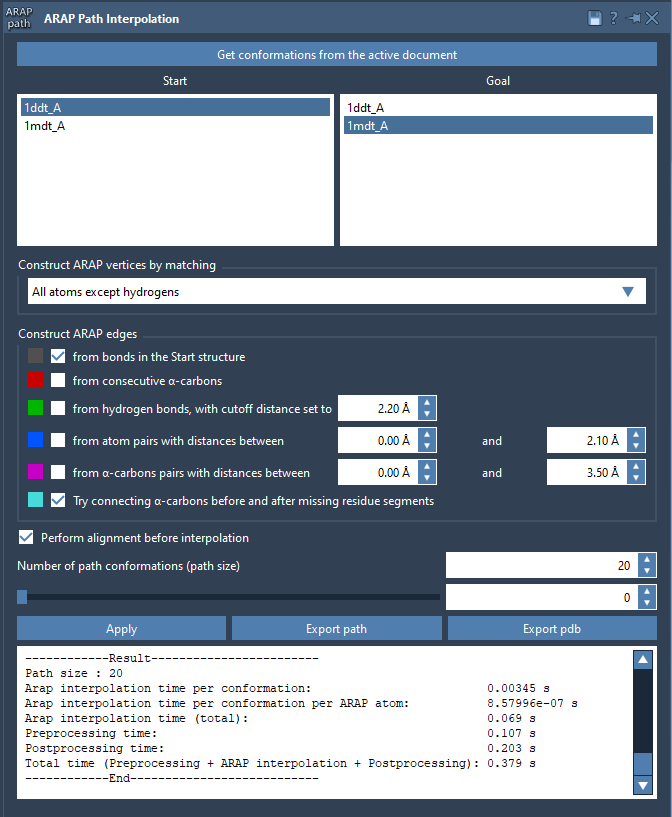
When setting up interpolation in SAMSON, you can choose how to build edges between atoms in the structure. These are the key options:
- From bonds in the Start structure: Uses actual covalent bonds. This is typically recommended as a base option.
- From consecutive α-carbons: Adds edges between backbone CA atoms. Useful for coarse-grain approximations of protein backbones.
- From hydrogen bonds with cutoff distance: Adds noncovalent interactions, mimicking secondary structure stabilization.
- From atom pairs within a distance range: Good for including tertiary contacts or custom interaction ranges.
- From α-carbon pairs within a distance range: For modeling global backbone packing.
- Try connecting α-carbons before and after missing residue segments: Particularly useful for fixing gaps in PDB input structures due to unresolved residues.
You can combine multiple options, and the algorithm applies them in order from top to bottom.
A Visual Aid: Understanding Edge Colors
After running the interpolation with your chosen options, SAMSON displays a visual model showing the constructed ARAP edges. You can toggle visibility and inspect the edge network:
- Document View: Uncheck or check ARAP edges to hide/show them.
- Edge Colors: Each construction method gets a unique color so you can easily tell where each edge came from.
This feedback is helpful to quickly verify if the alignment and structure interpretations match your expectations.
Tips for Choosing Better Edge Construction Strategies
- For detailed atomic transitions, use “from bonds” as a foundation and optionally add hydrogen bonds.
- If working with incomplete structures (e.g., missing loops), enable the “connect α-carbons before/after missing residues” option.
- In large-scale motions or coarse-grained models, use α-carbon or range-based methods to reduce complexity and noise.
Why It Matters
ARAP edge construction directly influences how geometry is preserved along the path. Inaccurate or oversimplified edge networks may lead to unrealistic transitions, distorted intermediates, or fragmented paths. Taking the time to understand and choose meaningful edge parameters makes the difference between an illustrative path and a usable one in simulations or animations.
To learn more about ARAP Interpolation in SAMSON, and to explore detailed tutorials, visit the full documentation page: https://documentation.samson-connect.net/tutorials/arap/arap-interpolation-for-protein-structures/
SAMSON and all SAMSON Extensions are free for non-commercial use. You can get SAMSON at https://www.samson-connect.net.