



Running simulations on large protein assemblies can be computationally expensive. But what if you only had to simulate a fraction of it — without losing critical insights? This is exactly where symmetry detection makes a difference.
Many biological macromolecular assemblies — including protein complexes and viral capsids — exhibit symmetrical patterns. Taking advantage of these patterns allows molecular modelers to work more efficiently, especially when the structure repeats across identical subunits.
Symmetry: More Than Just Aesthetic
Understanding symmetry in biomolecular systems isn’t just visually interesting — it provides practical advantages:
- Reducing simulation cost: By simulating just one asymmetric unit, you could cut down on computational resources and time. The rest of the system can be reconstructed using symmetry operations.
- Guiding molecular design: If you’re engineering symmetric nanomaterials or creating mutations, symmetry helps you replicate the change consistently.
- Validating experimental structures: Structures derived from cryo-EM or X-ray crystallography often imply symmetry. By checking the detected axes, you can verify the expected symmetry elements are present.
Built-In Symmetry Detection in SAMSON
The Symmetry Detection extension in SAMSON offers an approachable way to find and visualize symmetry axes in your assembly. It supports cyclic (Cn), dihedral (Dn), and cubic symmetries (such as tetrahedral, octahedral, and icosahedral).
Quick Example: Icosahedral Capsid (3NQ4)
Icosahedral symmetry commonly appears in viral capsids. The Symmetry Detection app in SAMSON reveals the 2-, 3-, and 5-fold axes, making it easy to identify the minimal asymmetric unit to simulate. Here’s what that visualization looks like:
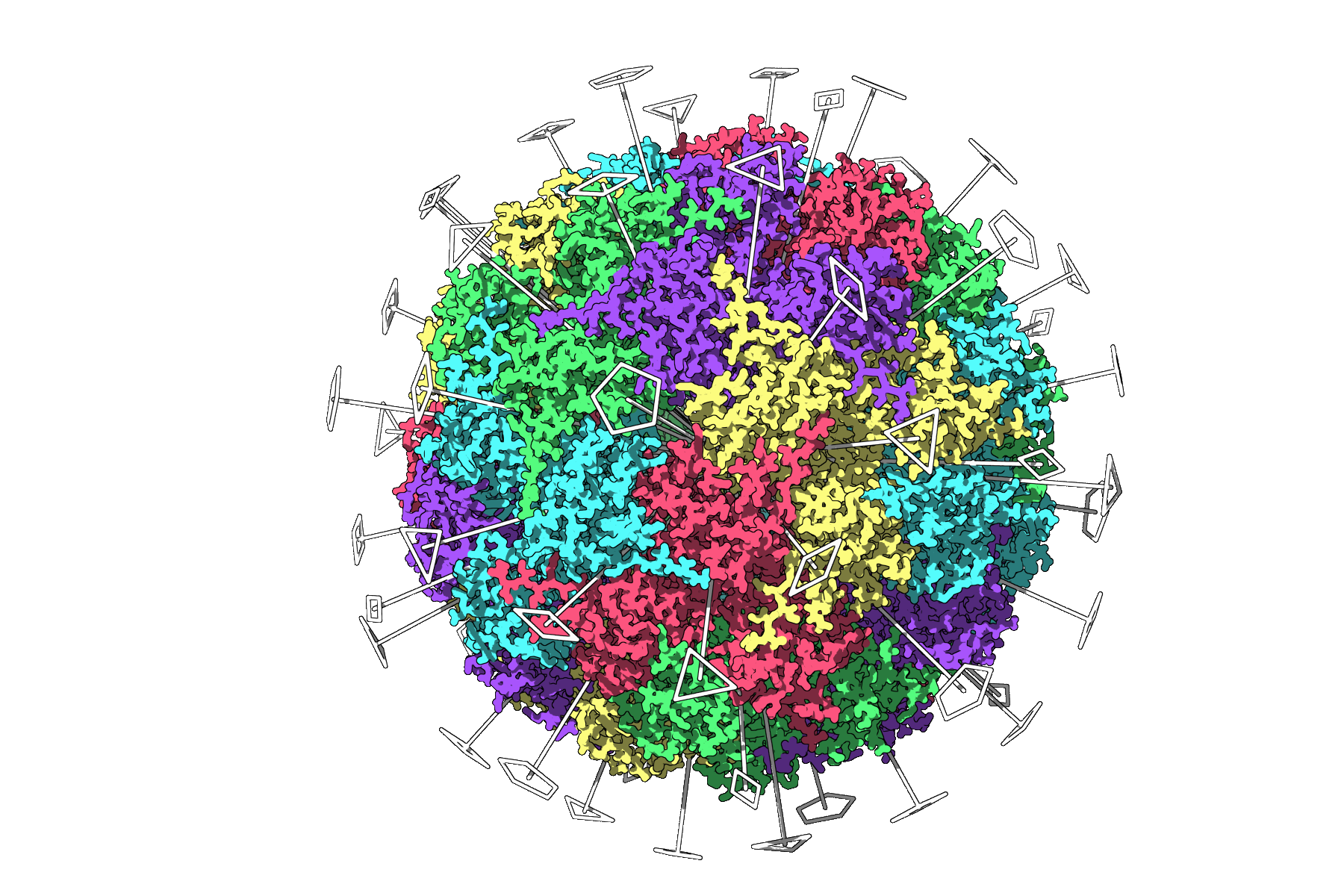
This type of overview keeps heavy simulations focused only on what is necessary — saving time and computing power.
How to Use It
Getting started is quick:
- Open SAMSON.
- Fetch or load your protein (for example, PDB
3NQ4,1CHP, or1B4B). - Go to Home > Apps > Biology > Symmetry Detection.
- Select Compute symmetry.
- Review detected symmetry groups and orientations.
Multiple Symmetries? No Problem
In large assemblies, you might find multiple possible symmetry groups. The app helps you evaluate them based on RMSD (Root Mean Square Deviation):
- Prefer higher-order symmetry groups with low RMSD values.
- You can pick a symmetry manually if you already know the expected group.
With a clear visualization of each axis, you can click to highlight axes or align your view along a chosen axis — all within the SAMSON viewport.
Better Visualizations Lead to Better Decisions
Clarity matters. Use Ribbon or Surface models alongside symmetry axes for context. Color chains to differentiate asymmetric units and create snapshots for publications or presentations.
Final Thoughts
Symmetry detection is often overlooked in early-phase modeling, but identifying and using the right symmetry can simplify your workflow and improve analysis. Whether you’re optimizing simulations or validating experimental models, this tool can help streamline your pipeline.
Learn more about symmetry detection in SAMSON
SAMSON and all SAMSON Extensions are free for non-commercial use. You can download SAMSON at https://www.samson-connect.net.