



Structure refinement is a crucial step in molecular modeling workflows. Whether you’re cleaning up a homology model or preparing a protein for simulation, catching strained backbone conformations early can save you time and lead to better results. One common challenge is pinpointing and correcting outlier residues that adopt energetically unfavorable conformations. The Ramachandran plot has been a staple in this process for decades, but it has often lacked the interactivity modelers need to edit conformations directly. Until now.
The Interactive Ramachandran Plot extension in SAMSON offers a way to not only visualize but also edit protein backbone dihedral angles (φ and ψ) with immediate 3D feedback. Let’s take a closer look at how you can use this tool to refine your models more intuitively.
Drag-and-Fix: Editing φ & ψ in Real Time
After opening the Ramachandran plot in SAMSON (via Home > Apps > Biology > Ramachandran plot), you’ll see a familiar 2D map of dihedral angles. Dots represent residues, color-coded by residue type. Energetically favorable areas are shown in yellow, and unfavorable areas are white.
To refine a particular residue:
- Click on a residue dot in the plot to select it in the viewport.
- Drag the dot to a more favorable region on the plot.
- Watch the 3D structure update immediately in response. No need to calculate anything manually.
This one-to-one linkage between the 2D plot and 3D model makes it much easier to test structural hypotheses, eliminate outliers, and polish backbone geometry.
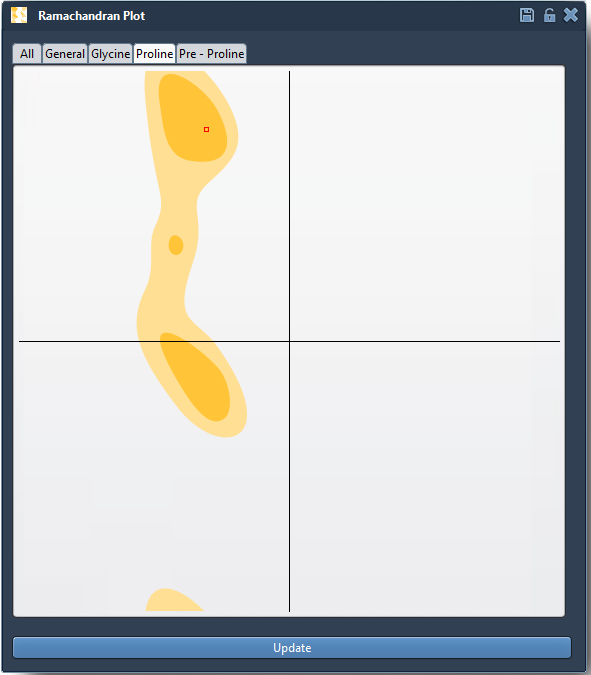
Additionally, if you make a change you don’t like, recovering is fast: just press Ctrl/Cmd + Z to undo the last move.
Edit in 3D Space: Visual Twisting
For users who prefer hands-on 3D editing, the Twister editor provides an alternative method. You can:
- Select the Twister editor from the left menu in the viewport.
- Rotate the backbone in 3D using visual handles.
- See dihedral values update in the Ramachandran plot instantly as you twist.
This offers another intuitive, geometry-focused way to nudge residues into allowed conformations without losing alignment or introducing artifacts.

Why This Matters
Structure quality affects simulations, docking, and energy minimizations. Instead of hunting through tables of numbers or writing code to correct angles, the Interactive Ramachandran Plot lets you work visually and make changes where they matter most. You’ll gain confidence that your protein backbone geometry supports the rest of your modeling pipeline.
To learn more about using the Interactive Ramachandran Plot Extension, including related tools like Twister and normal mode refinement, visit the full documentation page: https://documentation.samson-connect.net/tutorials/ramachandran/ramachandran-plot/
SAMSON and all SAMSON Extensions are free for non-commercial use. You can download SAMSON from https://www.samson-connect.net.