



You know the modeling moment: a ligand is in place, and you want to inspect the nearby atoms. But a broad search can return far more than you need—or include the ligand itself, whole residues, and other nodes from the document hierarchy. In SAMSON, the Node Specification Language (NSL) lets you express the search directly: define the kind of node you want, set a distance, and specify what it should be near.

Start with the node type
A proximity query without a node-type restriction can match unexpected parts of the hierarchy. A document node, for example, may match because some atoms it contains are close to your target. If you want atoms, say so explicitly:
node.type atom within 5A of "GLN 2"
This selects atom nodes within 5 angstroms of the node named GLN 2. The shorter form is n.t a w 5A of "GLN 2". You can use A for angstroms or choose another supported length unit, such as nm.
The restriction matters because proximity describes a relationship between nodes; it does not automatically mean “return only atoms.” Compare the atom-specific query above with * within 5A of "GLN 2": the unrestricted expression can match a higher-level node that contains nearby atoms. When the result should be a particular kind of object, specify that type first.
Exclude the target when you want its neighbors
The atom-specific query can still include atoms belonging to GLN 2 itself. That is often appropriate when you want every atom within the distance, including the target. If you mean nearby atoms outside the target, add an exclusion:
node.type atom within 5A of "GLN 2" out of "GLN 2"
This combines three ideas: return atoms, keep those within 5 angstroms of the named node, and remove nodes that are part of that target. It is a useful pattern for inspecting a local environment without mixing the reference structure into the result.
Use your current selection as the reference
You do not always need to search for a node by name. NSL can refer to the current selection through node.selected (short form n.s). For example:
node.type atom within 5A of node.selected
This asks for atoms within 5 angstroms of the current selection. It can be handy when the target is a ligand or another group you have already selected. If you want only atoms outside that selection, use:
node.type atom within 5A of node.selected out of node.selected
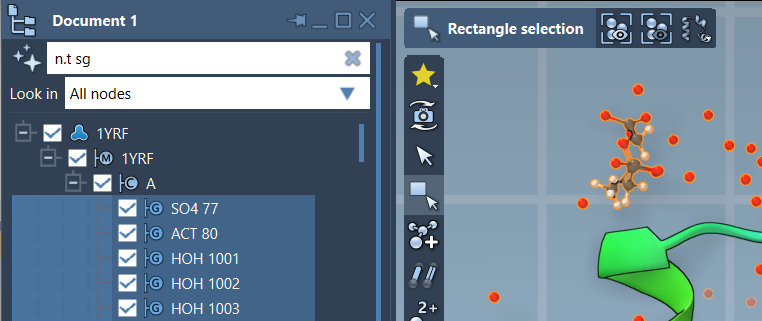
In the Document view, you can also enter an NSL expression in the filter box and press Enter to select the matching nodes. That makes it practical to adjust a query and inspect the filtered hierarchy without repeatedly starting a separate search.
A small workflow for reliable results
- Choose the output. Decide whether you want atoms, residues, or another node type, then include a type condition such as
node.type atom. - Define the reference. Use a quoted node name, such as
"GLN 2", or the current selection,node.selected. - Set the cutoff. Write the distance with a unit, for example
5A. - Check whether the target belongs in the result. Add
out ofwhen you want to exclude it.
For name-based searches, quoted strings can also use simple wildcards: "ALA*" matches names beginning with ALA. In the Find command, pressing Tab after starting a name can show context-sensitive completions, which helps avoid guessing the exact spelling.
These details make proximity searches easier to reason about: first control what kind of node can be returned, then define distance, then decide whether the reference itself should remain. For the full NSL syntax and attribute references, see the SAMSON Node Specification Language documentation.
Note: SAMSON and all SAMSON Extensions are free for non-commercial use. Get SAMSON.