



You have two plausible molecular states and a sequence of structures connecting them. But the in-between poses may be unevenly spaced or physically implausible. That is a common modeling bottleneck: generating a candidate route is not the same as refining it.
The Parallel Nudged Elastic Band method (P-NEB) in SAMSON is designed for this next step. It optimizes the intermediate structures in an existing path, using the interaction model to calculate energies and forces while spring forces help keep neighboring states distributed along the route. It can refine either a path or a set of conformations.
First, check that you have a route to refine
P-NEB improves a candidate path; it does not generate the initial pathway from scratch. If you only have two relaxed states, create intermediate conformations first—for example, using linear interpolation or a path-generating extension such as Ligand Path Finder. The starting and ending structures should represent the states you want to connect, and the intermediate images provide the initial guess that P-NEB will refine.
In SAMSON, a path stores a trajectory for selected atoms, while a conformation stores the positions of a selected atom group. If you already have conformations, you can select them and use Conformation > Create path from conformations to combine them. For the same system and number of steps, the documentation recommends using a path rather than a set of separate conformations, because optimizing the set takes longer.
A practical starting setup
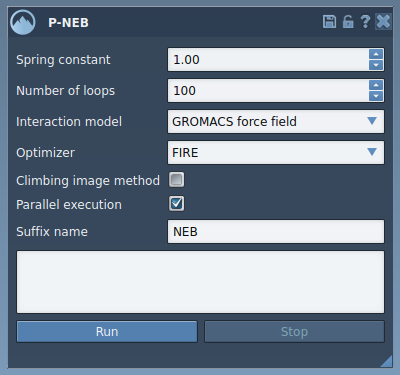
Load a sample path or your own candidate route, then open Home > Apps > All > P-NEB (or find it with the search box). The tutorial’s starting settings are:
- Spring constant: 1.00
- Number of loops: 100
- Interaction model: Universal Force Field (UFF)
- Optimizer: FIRE
- Parallel execution: enabled
- Suffix name: NEB
Parallel execution runs one thread per conformation. The climbing image option, which adds a strategy for locating the saddle point, is left unchecked in the initial tutorial run. That gives you a straightforward first refinement; you can run again with the option enabled to explore that strategy.
Run, then inspect the result
Select the path in the Document view and click Run in P-NEB. When UFF asks whether to use existing bonds, choose to use them and confirm. The app initializes and computes the optimization; progress is shown in the status bar. On completion, SAMSON adds a new path to the Document view and displays a computation summary in the app.

Keep the input and output distinct while reviewing: the new path is the result to examine, and the summary gives you a record of the computation. Select the output path and inspect it in the Inspector; you can also double-click a path to start or stop its animation. If you are starting from conformations instead, the optimized conformations appear in the Document view and can be double-clicked to restore their atom positions.
A useful mental model is that P-NEB is a path-refinement step in a workflow: generate a plausible initial route, relax it with an interaction model, then inspect the resulting structures before deciding what analysis or simulation comes next. Refinement can improve a candidate, but it does not replace evaluating whether the model, endpoints, and chosen interaction model suit your scientific question.
For the full walkthrough and related options, see the P-NEB tutorial.
Note: SAMSON and all SAMSON Extensions are free for non-commercial use. Get SAMSON.