



When working on molecular modeling or simulation, one of the primary challenges is achieving stable molecular geometries that correspond to energy minima. This process, known as geometry optimization, ensures that the molecular structures you work with are as realistic and scientifically on-point as possible.
Enter FIRE (Fast Inertial Relaxation Engine)—a high-performance minimizer designed for large-scale molecular motions. If you’ve ever struggled with slow optimization processes, especially with collective motions or when using large systems, FIRE might be the tool you didn’t know you needed. Let’s explore how FIRE works and why it delivers faster convergence compared to traditional algorithms like the steepest descent method.
Why Could FIRE Make Your Life Easier?
The steepest descent algorithm, while commonly used, often struggles with slow convergence when dealing with complex molecular movements. FIRE tackles this limitation by offering:
- Faster convergence: Particularly for systems where potential energy changes are minimal but the geometry is still evolving significantly.
- Compatibility: It works seamlessly with any SAMSON interaction model, making it highly adaptable.
- Efficiency: It’s ideal for pre-simulation cleanups, where you want to refine and relax structures before running simulations.
How to Use FIRE in SAMSON
Using FIRE in SAMSON isn’t just user-friendly; it’s also designed to save you time. Here’s a quick guide to get started:
Step 1: Load Your Molecular System
First, load your molecular system in SAMSON. It supports formats like PDB, MOL2, and more. If you’re new to the platform, you can check the Loading Molecules Guide for a detailed walkthrough.
Step 2: Add a Simulator
- Go to Edit > Add Simulator within SAMSON.
- Select the interaction model appropriate for your system.
- In the State Updaters list, choose FIRE.
That’s it! Once the simulator is added, you can proceed with the optimization process.
Adjusting and Monitoring Settings
The FIRE minimizer offers a few settings that help you fine-tune the optimization process:
| Setting | Description |
|---|---|
| Step size | Defines the initial integration step for the minimization process. |
| Steps | Number of FIRE steps between visual updates in the viewport. |
| Fixed | Option to keep the step size constant, if desired. |
Comparing FIRE and Steepest Descent
To truly grasp the performance difference, it helps to see it in action. Below are two animations illustrating how FIRE and the steepest descent method handle molecular relaxation:

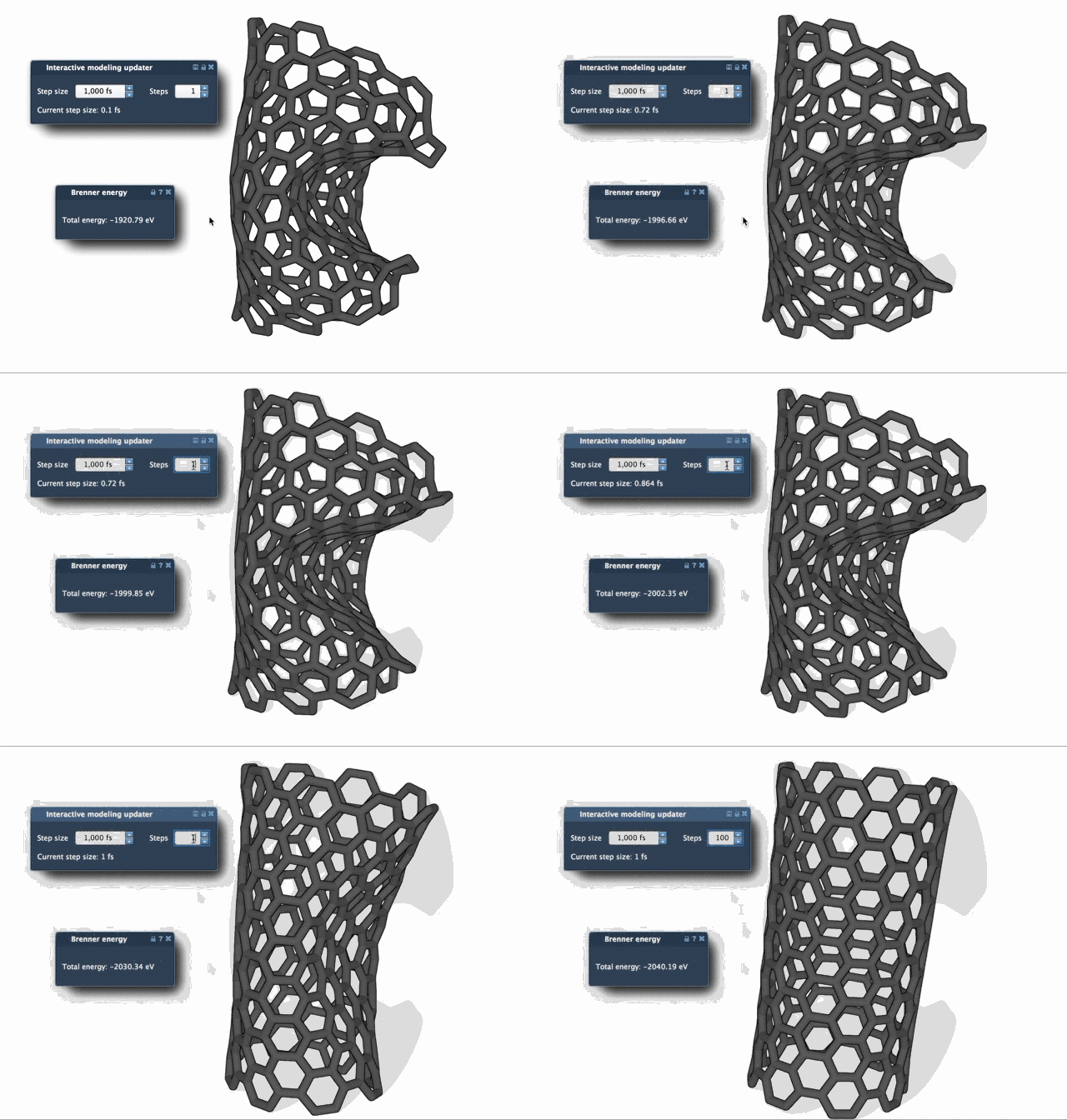
As the animations show, FIRE achieves structural relaxation more swiftly and efficiently, making it a compelling choice for researchers and modelers working on intricate systems.
Seamless Integration in SAMSON
FIRE isn’t just a standalone tool; it’s integrated as a state updater in SAMSON. This allows it to work alongside other apps and extensions that require geometry optimization. For example, you can use FIRE within the Molecular Restrainer Extension for energy minimization of NMR-derived structures.
Learn More
If you’d like to dive deeper, check out the full documentation at this link.
Note: SAMSON and all SAMSON Extensions are free for non-commercial use. You can download SAMSON here.