



Generating realistic transition paths between protein conformations is valuable for structural analysis, molecular dynamics, and free energy calculations. However, a common, often frustrating hurdle in these workflows is preparing protein structures: missing atoms, extra chains, water molecules, and ligands can all interfere with downstream tools.
One example is when using the ARAP Interpolator in SAMSON, the integrative platform for molecular design. If the loaded PDB structures are not cleaned properly, the ARAP app may not run, returning the error:
“Cannot proceed because the structure does not make one connected component”
This message means that your structure has multiple disconnected parts — often residues, water molecules, ions, or ligands unrelated to the chains of interest. Luckily, SAMSON makes it easy to clean your structures before interpolation.
Fetching and Focusing Structures
In this tutorial, we use two PDB IDs: 1DDT and 1MDT, two conformations of the Diphtheria Toxin. Both contain chains A and B, but we will only be working with chain A.
- Open: Home > Fetch
- Enter
1DDT 1MDT - Click the Load button next to each
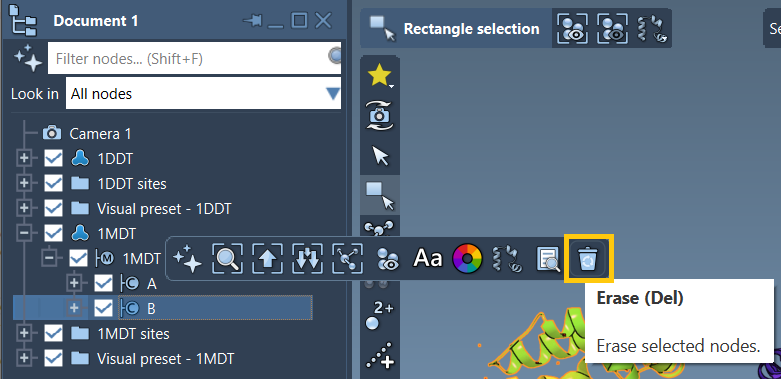
Once loaded, expand 1MDT in the Document view and find chain B. You can safely remove it:
- Select chain
B - Click the Del key or click erase in the popup toolbar

Cleaning Structures with Home > Prepare
To avoid non-connected components:
- Go to Home > Prepare for both structures
- This step removes alternate atom locations, solvent molecules, ligands, and ions
This ensures that each structure contains only the atoms from your chain of interest (A), removing any potential blockers for ARAP computations. It also ensures that the atoms are consistently ordered and named — which matters when interpolating between conformers.
Why Structure Preparation Matters
Protein files from the PDB often include components not needed for animation, simulation, or modeling workflows:
- Waters: unnecessary for most structural transitions
- Heteroatoms: ligands or ions may confuse matching algorithms
- Missing residue segments: can lead to fragmented ARAP edges unless treated carefully
SAMSON’s Prepare tool simplifies this clean-up, helping users avoid common pitfalls and making structures ready for advanced tasks like ARAP interpolation, umbrella sampling setup, or steered MD.
To learn more about structure preparation in SAMSON, including structure validation steps, see the Protein Preparation & Validation tutorial.
Conclusion
Taking a few minutes to clean and focus your protein structures can save hours of troubleshooting later. Whether you’re exploring conformational space, generating transition pathways, or setting up simulations, structure preparation is a required — and often overlooked — first step.
To explore how cleaned structures can be used in ARAP interpolation and visualize conformational transitions, visit the full tutorial page:
ARAP Interpolation for Protein Structures
SAMSON and all SAMSON Extensions are free for non-commercial use. You can download SAMSON at https://www.samson-connect.net.