



Understanding motion is crucial when analyzing molecular dynamics. Whether you are observing structural transitions or simply studying the dynamics of your system, tracking motion patterns can reveal key insights. One valuable tool for such analysis in SAMSON is the Average Velocity feature provided by the Path Analyzer module.
Why is this useful? The Average Velocity feature measures the mean velocity magnitude of a selected group along a path. This quick analysis helps researchers identify bursts of motion or regions of unexpected inactivity in their trajectories, which might otherwise be missed when simply observing the molecular dynamics visually.
Here’s what you need to know to effectively use this feature to enhance your molecular modeling workflow:
Setting Up the Average Velocity Plot
To access this feature, follow these steps:
- Open Path Analyzer from the SAMSON environment.
- Select Average Velocity under the Observable section.
- Choose the Path that contains your trajectory.
- Define the group of atoms or molecules you want to analyze.
- Click on Add Velocity Series or Add Velocity Distribution, depending on the type of analysis you want to perform.
This workflow is intuitive and requires just a few clicks, which means you can start obtaining insights almost immediately.
Interpreting the Outputs
The Average Velocity tool provides two key visualizations:
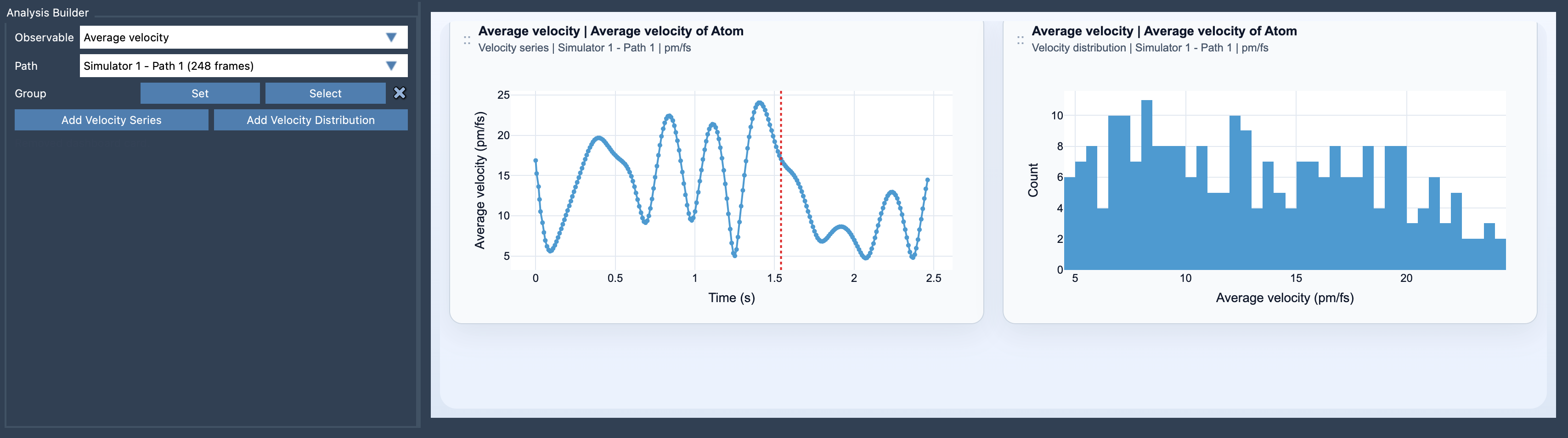
- Velocity Series: This chart shows how the average velocity changes along the path. It provides a temporal view, letting you pinpoint intervals of dynamical activity or stability.
- Velocity Distribution: This insight examines the distribution of velocity values across the selected group, giving you a statistical approach to understanding the dynamics within your path.
The images below demonstrate how the Average Velocity result looks in SAMSON:
Customizing Your Results
Once the data is generated, you can refine your results further:
- Switch between units, such as
pm/fs,A/ps, orm/s, depending on your preferred measurement system. - If you need to compare forces to resultant motion, you can follow up with an Average Force analysis.
The Math Behind It
For those curious about the calculations, Path Analyzer computes the mean velocity magnitude by averaging the velocity of all selected atoms at each frame. You can find the detailed equation in the original documentation. This approach ensures precise measurement and clarity in output, even for complex trajectories.
When Should You Use It?
The Average Velocity analysis is particularly useful for:
- Examining trajectories with dynamic motion, such as conformational changes in proteins or ligand binding/unbinding pathways.
- Identifying unusual regions of activity or inactivity in systems where such aspects could indicate key mechanistic details.
By incorporating Average Velocity into your workflow, you can turn qualitative observations into quantitative insights, saving time and bringing clarity to your molecular design efforts.
To learn more about this feature, visit the original SAMSON documentation page.
SAMSON and all SAMSON Extensions are free for non-commercial use. Start exploring today by downloading SAMSON at https://www.samson-connect.net.