



For molecular modelers, efficiently selecting or filtering specific atoms, residues, or structures from complex molecular systems can be a time-consuming and essential task. SAMSON’s Node Specification Language (NSL) offers a powerful solution to this challenge by allowing users to define precise criteria for searching and filtering. If you’ve ever felt overwhelmed by navigating through dense molecular systems, NSL’s integration within SAMSON provides a way to streamline your workflow.
What is the Node Specification Language (NSL)?
NSL is SAMSON’s declarative syntax designed for selecting and filtering nodes (atoms, residues, structural groups, etc.) based on their attributes. For example, using NSL, you could quickly identify all receptor molecules, locate hydrogens within a certain distance of a sulfur atom, or filter residues by their secondary structure (e.g., helices).
How to Use NSL for Filtering?
In SAMSON, NSL expressions can be entered in two main places to filter nodes:
- Find Command: This command allows users to perform search-driven selections.
- Document View Filter: This interactive tool enables users to dynamically filter nodes in the Document View.
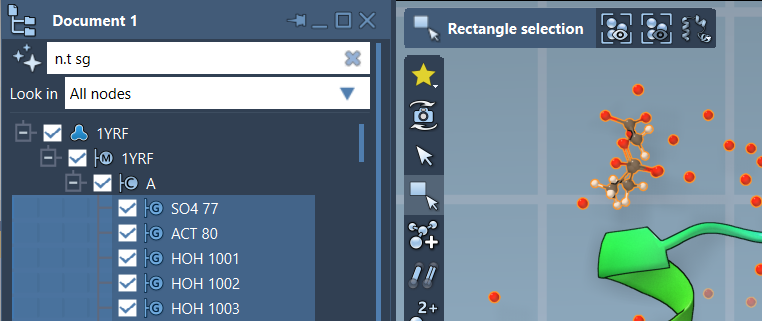
For example, in the Document View, simply type an NSL expression like node.type structuralGroup (or its short version, n.t sg) into the filter box, and press Enter. This will display only structural groups.
Here’s an illustration of filtered nodes matched via NSL in the Document View:
First NSL Expressions to Try
If you’re new to NSL, here are some starting queries that demonstrate its potential:
node.type residue: Select all residues."CA" within 5A of S: Locate alpha carbons within 5 angstrom of any sulfur atom.node.category ligand, receptor: Focus on ligands and receptors only.
To reduce setup time, SAMSON includes context-sensitive completion in the Find Command. Typing partial queries, such as "ALA, followed by pressing the Tab key, will suggest all nodes beginning with “ALA”, such as:
"ALA 22 Backbone""ALA 28 Side chain"
Let AI Simplify Your Selections
For even greater efficiency, SAMSON includes an AI Assistant that can generate NSL expressions tailored to your specific document. By using the Ask AI button (identifiable by the  icon), you can request selections without needing to memorize NSL syntax. This feature is especially helpful when working with large, complex molecular hierarchies.
Benefits of Using NSL
Switching to NSL for node filtering and selection can save time and enhance precision. Its integration into user-friendly commands like the Find Command and Document View Filter ensures that even users new to SAMSON or NSL can take advantage of its capabilities quickly. Whether you’re identifying ligands, analyzing hydrogen bonding, or focusing on specific molecular structures, NSL provides a flexible way to specify your needs at any level of detail.
For a deeper exploration of NSL syntax and examples, visit the official documentation page.
SAMSON and all SAMSON Extensions are free for non-commercial use. Get SAMSON today at www.samson-connect.net.