



For molecular modelers, geometry optimization is a routine task—and yet it often becomes a bottleneck, especially when working with large molecules or flexible systems. If you’ve relied on steepest descent for energy minimization, you’ve likely felt the slow crawl as complex systems relax. But what if there was a faster alternative for large-scale structural relaxation?
That’s where the FIRE minimizer (Fast Inertial Relaxation Engine) comes in. Designed to accelerate convergence during geometry optimization, FIRE offers a different approach that can significantly reduce the time spent waiting for your simulations to start.
When Steepest Descent Isn’t So Steep
The steepest descent method is intuitive and commonly used—it moves atoms downhill in the direction of the negative gradient. While this can be effective, it’s often inefficient in flat or complex energy landscapes. Large systems or those with slow collective motions (common in protein folding, for instance) tend to struggle under steepest descent, requiring a high number of steps to reach convergence.
How FIRE Works Differently
FIRE modifies the way structures move toward a minimum by adding elements of inertia and adaptive stepping, helping it glide along energy valleys more naturally. It’s particularly useful when:
- There’s a need for fast pre-simulation cleanup.
- You’re optimizing structures with flexible loops or extended chains.
- There are small potential energy changes, yet the geometry evolves significantly.
Unlike steepest descent, FIRE adjusts the step size dynamically and integrates previous motion knowledge, often resulting in smoother, more efficient convergence.
Comparison in Motion
Here’s a visual comparison to show how the two methods perform when minimizing the same structure:

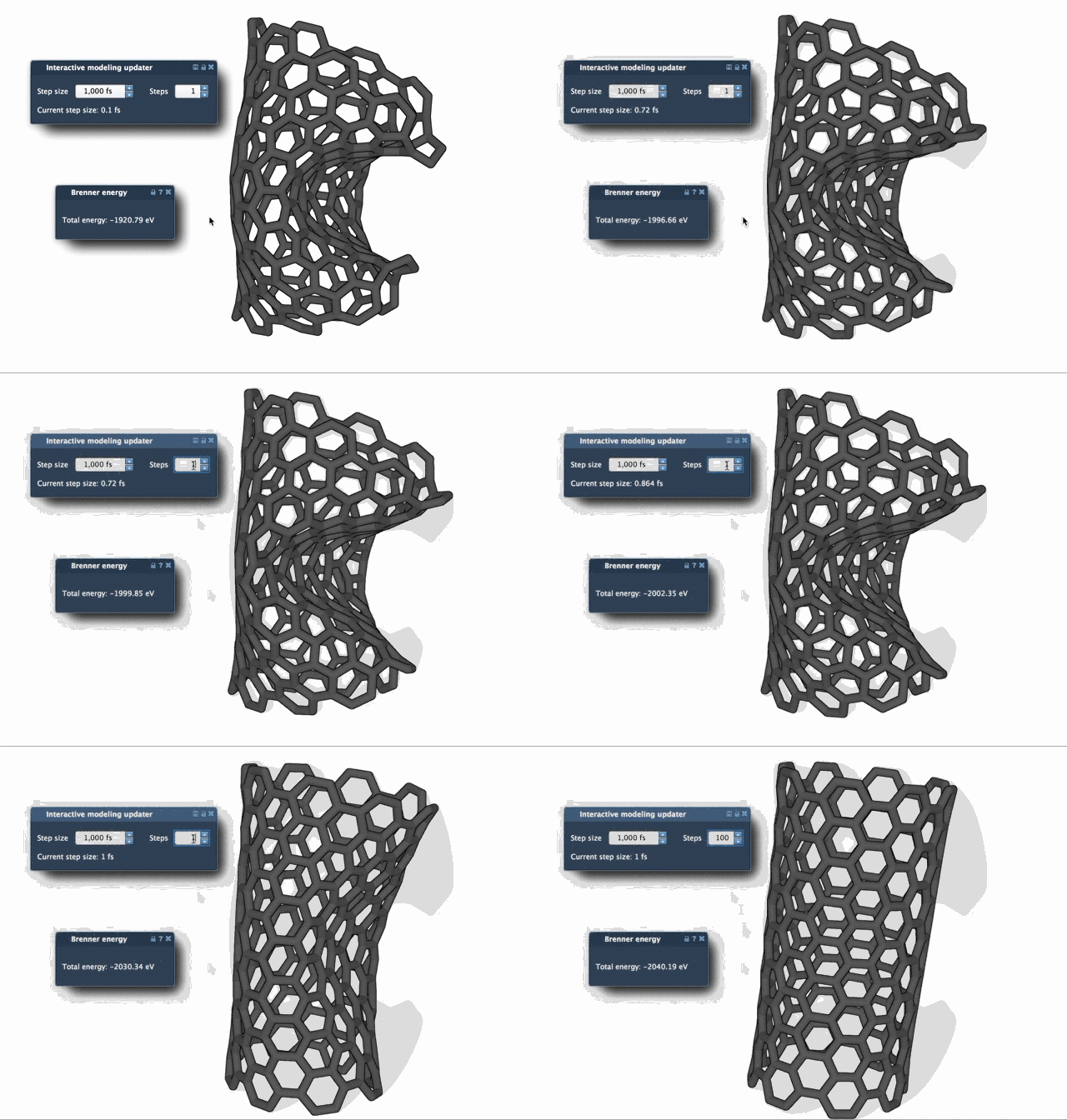
Notice how FIRE converges more rapidly, capturing subtle but important structural relaxations right from the beginning—ideal when prepping molecules for further simulation or visualization.
Making the Switch in SAMSON
To start using FIRE in your SAMSON projects:
- Log in to SAMSON Connect.
- Add the FIRE Minimizer Extension.
- After restarting SAMSON, open or build your structure and add a simulator via
Edit > Add Simulator. - Select your interaction model and choose the FIRE minimizer from the State Updaters.
For best results, you can tune settings such as step size, number of update steps, and choose whether to fix the step size. If you ever reposition atoms manually during minimization, use the Reset button to clear the history and start fresh.
Choosing the Right Tool for the Task
Both steepest descent and FIRE have their place in the modeler’s toolbox. However, for cases with large or loosely structured systems, FIRE often gets you further, faster. Next time you feel steepest descent dragging its feet, try flipping the switch to FIRE and notice the difference.
To learn more or explore step-by-step instructions, visit the full documentation page: https://documentation.samson-connect.net/tutorials/fire/ready-set-fire/
SAMSON and all SAMSON Extensions are free for non-commercial use. Get started at https://www.samson-connect.net.