



Building a polymer model one bond at a time can become tedious—and easy to get wrong when a chain contains several different building blocks or repeated patterns. The challenge is not just connecting fragments: you also need to define where each monomer joins, keep track of the sequence, and check that the resulting structure is usable.
SAMSON’s Polymer Builder offers a practical workflow: register fragments as monomers, optionally save recurring patterns as sequences, then describe the full chain with a compact expression. Here’s how to use that workflow and what to check along the way.
Start with connection points
Open Polymer Builder from Home > Apps > Assembly > Polymer Builder, or find it using Find everything… with Shift+E. Select a monomer fragment in the Document view or Viewport, then choose Register monomer from selection.
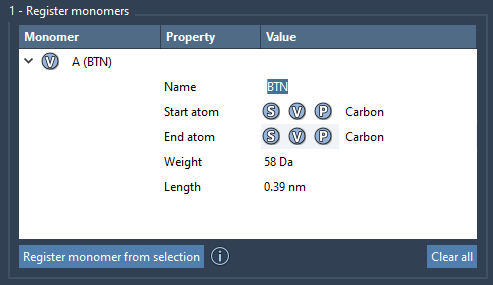
The app assigns each registered monomer a unique letter, such as A or B, and automatically chooses start and end atoms at opposite ends of the fragment. Those atoms define how the fragment connects into a chain, so review them rather than treating registration as a purely administrative step. If the automatic choices are not appropriate, set an atom from the current selection with S, or pick one from the structure with P. The V control can help you highlight the relevant atoms or structure.
The monomer table shows molecular weight and the distance between its start and end atoms. These values are useful for spotting a fragment that may have been selected or oriented differently than intended. You can edit registered monomers in the table. Keep in mind that changing a registered monomer’s structure in SAMSON—for example, adding or removing an atom—causes it to be deregistered.
Turn recurring patterns into reusable sequences
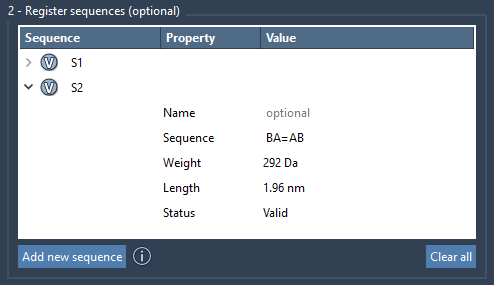
If a chain repeatedly uses the same arrangement of monomers, register that pattern once with Add new sequence. Enter the monomer IDs in order: ABBA, for example, describes a pattern made from A, B, B, and A. Sequences receive identifiers such as S1 and can then be reused in the polymer expression.
Check the sequence’s Status before using it. An invalid sequence displays an error; a valid one is marked Valid. This simple check can save time when a longer expression is assembled from several parts. You can also use the sequence’s V button to highlight its constituent monomers.
Bond types can be specified between adjacent monomers: an ordinary connection is single, = indicates a double bond, and # indicates a triple bond. For example, A=B and A#B express different connections. Use the notation deliberately: it describes the intended bond type at the connection, not a different monomer sequence.
Describe the chain, then inspect the result
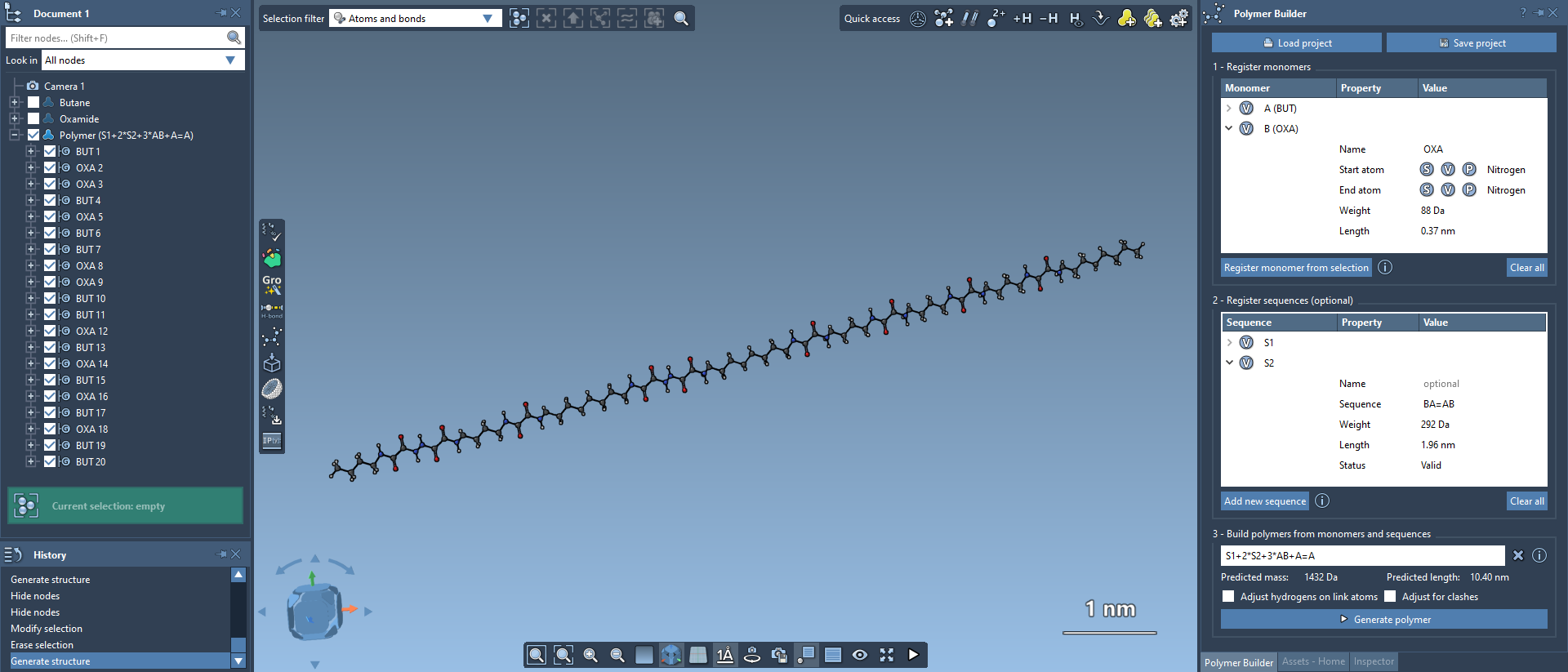
In the polymer expression, combine monomer IDs and saved sequence IDs with +. A multiplier repeats the item that follows it: 3*AB expands to ABABAB, while 2*S1 + 2*S2 requests two repeats of each registered sequence. You can also put bond notation into an expression, as in AB=BA or AB#BA.
Before generating a long chain, it can be helpful to build a shorter expression first. Confirm that the monomer IDs and sequence IDs are valid, that repeat counts produce the order you expect, and that any special bond notation is placed where you intend. Polymer Builder displays predicted molecular weight and length below the expression; use these as estimates to review the design before generation.
Click Generate polymer to create the structure. Its shape is based on the directions between the start and end atoms of the monomers, and excess hydrogens at connection sites are removed. The optional Adjust for clashes setting attempts to avoid steric overlaps and may introduce slight curvature. The hydrogen-adjustment option adjusts hydrogens at connection atoms based on valence and also adjusts their positions.
Finish with a useful model
For a quick energy refinement, use SAMSON’s Edit > Minimize command; the built-in minimizer uses the Universal Force Field. Minimization is a follow-up step, not a substitute for checking your monomer connections and sequence. You can save the selected polymer with Home > File > Save selection as…, or save the full project if you want to preserve the monomer and sequence tables for later work.
This workflow is useful whenever a molecular model depends on a defined repeating architecture: register connection-ready fragments, validate reusable patterns, express the chain compactly, and inspect the generated structure before taking it into further preparation or simulation. For the full instructions and interface details, see the Polymer Builder documentation.
Note: SAMSON and all SAMSON Extensions are free for non-commercial use. Get SAMSON.