



Refining protein structures can be a subtle and time-consuming process. One of the common challenges molecular modelers face is fixing residues with unfavorable conformations before running simulations. A residue that slightly deviates from a stable region in Ramachandran space can cause convergence issues—or worse—in simulation pipelines.
If you’ve ever wished you could just click on a residue and move it to a better spot, you’re not alone. And now, thanks to the Interactive Ramachandran Plot Extension in SAMSON, you actually can.
One Plot, Two Editing Modes
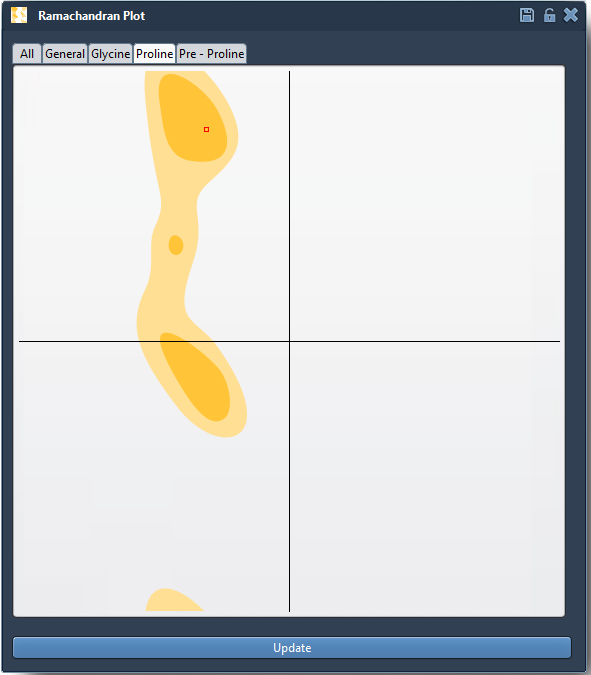
The Interactive Ramachandran Plot gives you a visual map of each residue’s dihedral angles—φ (phi) and ψ (psi)—allowing you to see which residues fall in energetically favorable or unfavorable zones. Once the plot is generated, you can edit individual angles interactively using two complementary modes:
1. Drag-and-Drop Editing
- Click on any point (dot) in the plot to select a residue.
- Drag the point to a new position — the φ and ψ angles update instantly.
- The corresponding 3D structure of your protein updates in real-time, so you immediately see the effect of your changes.
This fast feedback loop helps you move residues from disallowed regions into more stable conformational zones—without guessing angle values manually.
2. Structural Twisting with the Twister Editor
Prefer to work directly in 3D? You can use the Twister Editor from the viewport toolbar.
- Select the residue you want to optimize.
- Twist its backbone directly in 3D space.
- Watch the corresponding point update live on the Ramachandran plot.

This visual feedback makes it easier to understand the relationship between local movements in 3D structure and global positioning in conformational space.
Undo Support Makes It Easy to Experiment
You can freely experiment without fear—just press Ctrl/Cmd + Z to undo any change. This makes it practical to test multiple conformations until your residue is well-positioned.
Try a Mini-Challenge
As a practical exercise, load a model such as 1YRF, and generate its Ramachandran plot. Find a residue in a white (unfavorable) region and try adjusting its φ/ψ angles to move it into a yellow (favored) zone. Between drag-and-drop adjustments and the Twister Editor, you’ll likely find a comfortable workflow.
By directly linking 2D angle control to 3D conformation editing, this tool can help you refine structures faster and reduce outliers before simulation or modeling refinement.
To learn more and explore this feature in detail, visit the original documentation page.
SAMSON and all SAMSON Extensions are free for non-commercial use. You can download SAMSON at https://www.samson-connect.net.